
 Home
Home  Apps
Apps  Games
Games  Windows
  Topics
  Terms of Service
  Cookies & Privacy Policy
  Disclaimer
WOMBO Dream - AI Art Generator


Information
- Category: Art & Design
- Price: free
- Age Rating: Everyone
- Rating: 3.7
- Developer: Wombo Studios Inc
- Version: 6.0.3
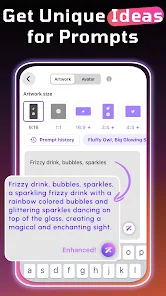
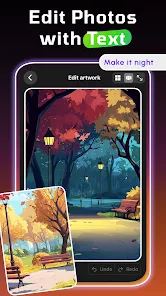
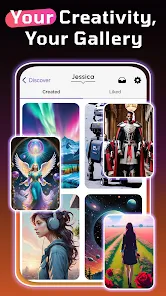
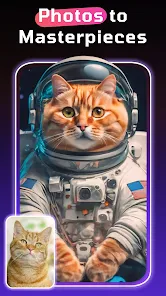
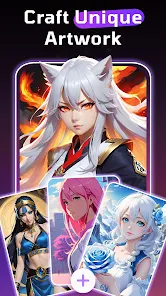
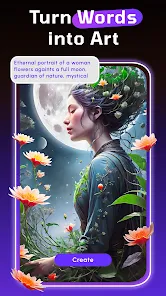
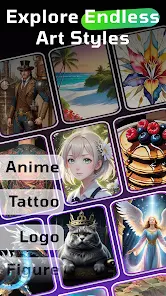
WOMBO Dream is an innovative AI art generator that transforms your ideas into stunning visual art. With just a few prompts, this app harnesses advanced artificial intelligence to create unique and imaginative artworks tailored to your vision. Whether you're an artist seeking inspiration or a casual user wanting to explore creativity, WOMBO Dream offers an intuitive and engaging experience, allowing you to bring your dreams to life through captivating imagery. Unleash your creativity and watch your imagination flourish!
Features of "WOMBO Dream - AI Art Generator"
"WOMBO Dream - AI Art Generator" is a cutting-edge application that harnesses the power of artificial intelligence to create stunning visual art. One of its standout features is the ability to generate artwork from simple text prompts, allowing users to express their creativity without needing advanced artistic skills. The app offers a variety of styles, enabling users to choose from different artistic influences, such as surrealism, impressionism, and more, to tailor the output to their preferences.
Another notable feature is the user-friendly interface, which makes it accessible for individuals of all ages. The app also supports high-resolution outputs, ensuring that the generated images are suitable for printing or sharing on social media. Additionally, "WOMBO Dream" allows users to save their creations and revisit them later, fostering a sense of community as users can share their artwork with others. The app frequently updates its features, keeping the experience fresh and engaging for users who enjoy exploring new artistic possibilities.
How to Use "WOMBO Dream - AI Art Generator"
Using "WOMBO Dream - AI Art Generator" is a straightforward process that invites creativity. To get started, users need to download the app from their respective app store and create an account or log in. Once inside, the user is greeted with a simple interface where they can enter a text prompt that describes the artwork they envision. This could be anything from a specific scene to abstract concepts.
After entering the prompt, users can select from various artistic styles to influence the final output. Once the style is chosen, the app processes the input and generates a unique piece of art in a matter of seconds. Users can then review the artwork, make adjustments if necessary, and save or share their creations. The app also encourages experimentation, allowing users to try different prompts and styles to discover new artistic expressions. Overall, the intuitive design makes it easy for anyone to create beautiful art effortlessly.
Pros & Cons of the App
"WOMBO Dream - AI Art Generator" comes with several advantages that make it appealing to users. One of the primary pros is its ease of use; even those with no artistic background can create impressive artwork in just a few clicks. The variety of styles available allows for a broad range of creative expression, catering to different tastes and preferences. Additionally, the app's ability to generate high-resolution images makes it suitable for both personal and professional use.
However, there are some drawbacks to consider. One con is that the quality of the generated art can vary significantly based on the input prompt, which may lead to inconsistent results. Some users may also find the app's reliance on AI limiting, as it may not always capture the nuances of human creativity. Furthermore, while the app is free to use, certain features may require in-app purchases, which could deter some users. Balancing these pros and cons is essential for anyone considering using the app for their artistic endeavors.
 Google Play
  App Store
 FAQ
Can I create playlists on Spotify?
Yes, users can create, share, and collaborate on playlists with friends.
Can I download music on Spotify?
Yes, premium users can download songs and playlists for offline listening.
Can I listen to Spotify offline?
Yes, premium users can listen to downloaded music offline without an internet connection.
Can I use Spotify on multiple devices?
Yes, you can use Spotify on multiple devices, but only one device can stream at a time.
Does Spotify have podcasts?
Yes, Spotify hosts a wide range of podcasts across various genres.
Similar Apps












You May Like

FlipaClip: Create 2D Animation
Art & Design
4.3

Adobe Express: AI Photo, Video
Art & Design
4.6

Canva: AI Photo & Video Editor
Art & Design
4.8
AR Art Projector: Da Vinci Eye
Art & Design
4.1
GIMP
Art & Design
2.8
Rainbow Brainskull Oracle Deck
Art & Design
4.8

Sketchbook
Art & Design
4.0
Wonder - AI Art Generator
Art & Design
3.3
ibis Paint
Art & Design
4.5

ibis Paint X
Art & Design
4.4

Adobe Capture: Illustrator,Ps
Art & Design
4.6
Clip Studio Paint
Art & Design
4.5