
 Home
Home  Apps
Apps  Games
Games  Windows
  Topics
  Terms of Service
  Cookies & Privacy Policy
  Disclaimer
Bazaart AI Photo Editor Design


Information
- Category: Art & Design
- Price: free
- Age Rating: Everyone
- Rating: 4.7
- Developer: Bazaart Ltd.
- Version: 3.5.1
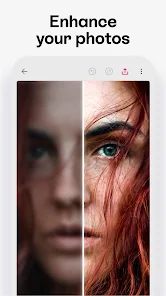
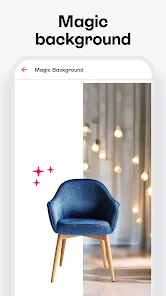
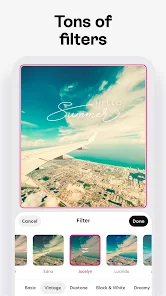
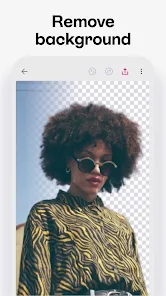
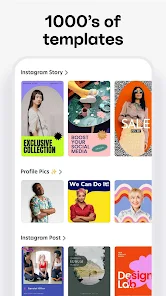
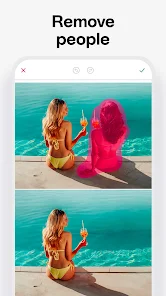
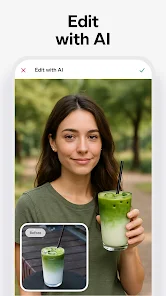
Bazaart AI Photo Editor Design is a powerful app that transforms your photos into stunning works of art. With its intuitive interface and advanced AI tools, you can easily edit, enhance, and create unique designs. Whether you're a professional designer or a casual user, Bazaart offers a wide range of features, including background removal, collage creation, and artistic filters, allowing you to unleash your creativity and bring your vision to life effortlessly.
Features of Bazaart AI Photo Editor Design
Bazaart AI Photo Editor Design is a versatile tool that combines advanced AI technology with user-friendly features, making it ideal for both amateur and professional designers. One of its standout features is the ability to remove backgrounds from images seamlessly, allowing users to create stunning compositions without the hassle of manual editing. The app also offers a wide range of templates and design elements, enabling users to craft unique graphics for social media, marketing materials, and more.
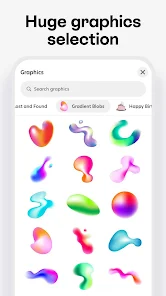
Another notable feature is the extensive library of stock images and graphics, which users can incorporate into their projects. Bazaart also supports layering, giving users the flexibility to manipulate images and text in a way that enhances their designs. Additionally, the app includes various filters and effects that can be applied to images, allowing for creative customization. With its intuitive interface, Bazaart makes it easy to experiment with different design elements, making it a favorite among those looking to elevate their visual content.
How to Use Bazaart AI Photo Editor Design
Using Bazaart AI Photo Editor Design is straightforward, making it accessible for users of all skill levels. To get started, download the app from your device's app store and create an account. Once logged in, you can either start a new project or choose from a variety of templates that suit your needs. The app's interface is designed for ease of use, allowing you to drag and drop images, text, and other elements into your workspace.
To edit an image, simply select it and use the available tools to adjust its size, apply filters, or remove the background. You can also add text by selecting the text tool, choosing a font, and customizing the color and size. Once you’re satisfied with your design, you can save it directly to your device or share it on social media platforms. Bazaart also allows for collaboration, enabling users to share their projects with others for feedback or joint editing, enhancing the creative process.
Pros & Cons of the App
Bazaart AI Photo Editor Design comes with several advantages that make it a popular choice among users. One of the primary pros is its user-friendly interface, which allows even beginners to navigate the app with ease. The powerful AI background removal feature is another highlight, saving users time and effort in creating professional-looking designs. Additionally, the extensive library of templates and stock images provides ample resources for users to draw inspiration from, making the design process more efficient.
However, there are some drawbacks to consider. Some users may find that certain advanced features are limited in the free version, requiring a subscription for full access. Additionally, while the app is generally stable, occasional bugs or performance issues can arise, particularly on older devices. Lastly, while the app offers a wide range of design tools, some users may desire more advanced editing capabilities that are available in other professional software. Balancing these pros and cons can help users determine if Bazaart is the right fit for their design needs.
Get Installation Details  Google Play
  App Store
Google Play App Store FAQ
Can I create playlists on Spotify?
Yes, users can create, share, and collaborate on playlists with friends.
Can I download music on Spotify?
Yes, premium users can download songs and playlists for offline listening.
Can I listen to Spotify offline?
Yes, premium users can listen to downloaded music offline without an internet connection.
Can I use Spotify on multiple devices?
Yes, you can use Spotify on multiple devices, but only one device can stream at a time.
Does Spotify have podcasts?
Yes, Spotify hosts a wide range of podcasts across various genres.
Similar Apps














You May Like

FlipaClip: Create 2D Animation
Art & Design
4.3

Adobe Express: AI Photo, Video
Art & Design
4.6

Canva: AI Photo & Video Editor
Art & Design
4.8
AR Art Projector: Da Vinci Eye
Art & Design
4.1

GIMP
Art & Design
2.8
Rainbow Brainskull Oracle Deck
Art & Design
4.8

Sketchbook
Art & Design
4.0
Wonder - AI Art Generator
Art & Design
3.3
ibis Paint
Art & Design
4.5

ibis Paint X
Art & Design
4.4

Adobe Capture: Illustrator,Ps
Art & Design
4.6

Clip Studio Paint
Art & Design
4.5