

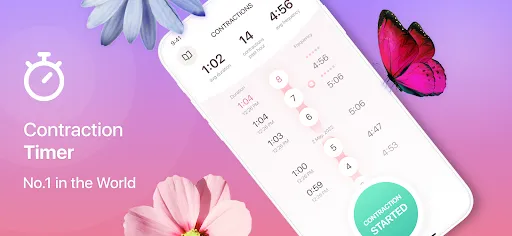
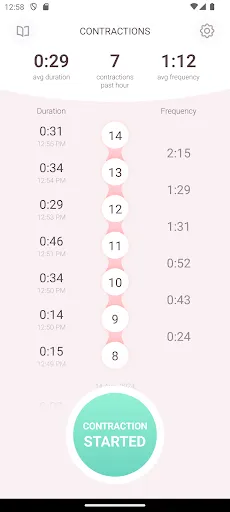
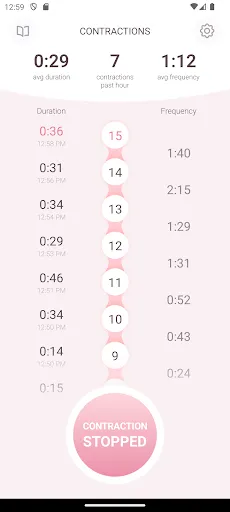
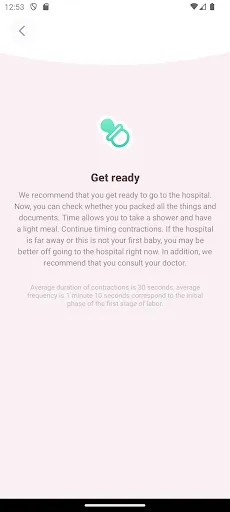
The "Contraction Timer & Counter 9m" app is designed to assist expectant mothers in tracking their contractions during labor. One of its primary features is the ability to time contractions accurately, allowing users to record the duration and frequency of each contraction. This data is crucial for determining when to head to the hospital or birthing center. The app also provides a user-friendly interface, making it easy to start and stop the timer with just a tap.
Another notable feature is the visual graph that displays contraction patterns over time, helping users to identify trends and changes in their labor progression. Additionally, the app offers customizable notifications, reminding users to log their contractions at regular intervals. It also includes a notes section where users can jot down any relevant information, such as pain levels or other symptoms. Overall, the "Contraction Timer & Counter 9m" is a comprehensive tool that empowers women to monitor their labor experience effectively.
Using the "Contraction Timer & Counter 9m" app is straightforward and intuitive. To begin, users should download the app from their preferred app store and create an account if necessary. Once installed, the main screen will present a prominent button to start timing contractions. When a contraction begins, users simply tap the "Start" button, and when it ends, they tap "Stop." The app will automatically calculate the duration and frequency of contractions.
Users can also add notes to each contraction entry, providing context that may be helpful during labor. The app's graph feature allows users to visualize their contraction patterns, making it easier to recognize when labor is progressing. It’s advisable to keep the app open during labor to ensure accurate tracking. Additionally, users can set reminders for regular logging, ensuring they don’t miss any important contractions. Overall, the app is designed to be user-friendly, making it accessible for all expectant mothers.
The "Contraction Timer & Counter 9m" app comes with several advantages that make it a valuable tool for expectant mothers. One of the primary pros is its simplicity and ease of use, allowing users to quickly start and stop timers without any complicated setup. The visual graph feature is also beneficial, as it helps users track their contraction patterns over time, providing insights into labor progression. Additionally, the ability to add notes enhances the app's functionality, allowing for a more comprehensive record of the labor experience.
However, there are some cons to consider. Some users may find that the app lacks advanced features, such as integration with healthcare providers or more detailed analytics. Additionally, while the app is designed to be user-friendly, some users may still experience a learning curve, especially if they are not tech-savvy. Lastly, reliance on a mobile device during labor may not be ideal for everyone, as some may prefer a more traditional approach to tracking contractions. Overall, while the app has its limitations, it remains a useful tool for many expectant mothers.

 Tracks contractions accurately for timely labor updates User-friendly interface ensures easy navigation for all users Customizable alerts keep you informed on contraction patterns Data history helps identify trends and prepare for labor Compact design makes it portable for use anywhere
 Limited functionality may not meet all advanced tracking needs User interface can be confusing for some users Requires a smartphone, limiting accessibility for all users
  Google Play
  App Store
 Yes, users can submit suggestions or feedback through the app's support or feedback feature, enabling developers to improve future versions based on user input.
The app is designed with user privacy in mind and typically does not collect personal data unless explicitly permitted by the user for specific features.
Yes, Contraction Timer & Counter 9m can be used offline, allowing users to track their contractions without needing an internet connection.
Users can cancel their subscription through the app store settings on their device, following the specific instructions provided by the platform (iOS or Android) for managing subscriptions.
The subscription cost for premium features in Contraction Timer & Counter 9m may vary, but it generally offers monthly and yearly subscription options for users.
Yes, you can activate your account by following the activation link sent to your email after registration.
Yes, contact customer service for help retrieving your account details if you lose access to your email.
You can reach our customer service team via the support section in the app or by calling our dedicated hotline.
You can contact customer service through the app's support feature or by calling our help desk for technical support.
To update your customer number, please contact customer service with your current details for verification.