


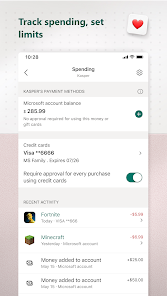
Microsoft Family Safety is designed to help families stay connected and protect each other in the digital world. One of its key features is location sharing, which allows family members to share their real-time locations with one another. This is particularly useful for parents who want to keep track of their children's whereabouts. Additionally, the app includes driving safety features that provide insights into driving habits, helping to promote safer driving practices among family members.
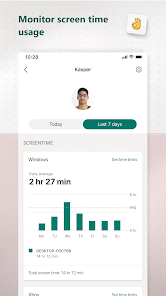
Another significant feature is activity reporting, which gives parents an overview of their children's online activities, including screen time and app usage. This helps parents set appropriate boundaries and encourage healthy digital habits. The app also offers content filtering options, allowing parents to restrict access to inappropriate websites and applications. Furthermore, Microsoft Family Safety integrates with Microsoft 365, enabling families to manage shared calendars and tasks, fostering better organization and communication within the family unit.
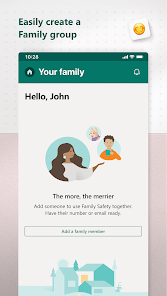
To get started with Microsoft Family Safety, you first need to download the app from the Microsoft Store or your device's app store. Once installed, create a Microsoft account or sign in with an existing one. After logging in, you can set up your family group by inviting family members to join. This can be done by sending invitations via email or through the app itself.
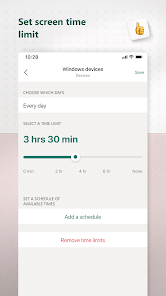
Once your family group is established, you can customize settings for each member, including location sharing, activity reporting, and screen time limits. To enable location sharing, simply toggle the feature on for each family member. For activity reporting, you can view reports directly in the app, which will help you monitor your children's online behavior. Additionally, you can set up driving safety features by linking the app to your family members' devices. Regularly review the settings and reports to ensure that your family is using the app effectively and safely.
Microsoft Family Safety offers several advantages that make it a valuable tool for families. One of the primary benefits is its comprehensive approach to family safety, combining location tracking, activity monitoring, and driving safety features in one app. This integration allows parents to have a holistic view of their children's safety and well-being. The user-friendly interface makes it easy for families to navigate and customize settings according to their needs. Additionally, the app's compatibility with Microsoft 365 enhances its functionality, allowing for better organization and communication among family members.
However, there are some drawbacks to consider. One potential downside is that the app requires a Microsoft account, which may not be appealing to all users. Additionally, while the location sharing feature is beneficial, it may raise privacy concerns among older children and teenagers. Some users may also find the activity reporting feature to be overly intrusive, leading to potential conflicts between parents and children. Lastly, the app's effectiveness can be limited by the availability of internet connectivity, which may hinder its functionality in certain situations. Overall, while Microsoft Family Safety has its pros and cons, it remains a useful tool for promoting family safety in the digital age.

 Easily monitor family location in real-time for added peace of mind. Set screen time limits to promote a healthy digital balance. Receive activity reports to stay informed about your family's online habits. Enable driving safety features to protect young drivers and encourage safe behavior. Share reminders and to-do lists to enhance family organization and communication.
 Limited features compared to other parental control apps may hinder effectiveness. Requires a Microsoft account for full functionality, limiting accessibility. Can be intrusive, potentially causing privacy concerns for family members.
 Yes, users can provide feedback and suggestions through the app or Microsoft's official support channels.
Yes, Microsoft Family Safety may collect personal data to provide its services, but it follows strict privacy policies to protect user information.
Yes, some features, like location sharing, may work offline, but most functionalities require an internet connection for full capability.
You can cancel your subscription through your Microsoft account settings under the "Services & subscriptions" section.
A Microsoft 365 subscription, which includes Microsoft Family Safety, typically starts at around $6.99 per month or $69.99 per year, depending on the plan.
Customer numbers are typically fixed, but you can contact customer service for specific inquiries regarding changes.
To activate your account, follow the instructions in the activation email sent to you after purchase.
Log in to your account, go to your profile settings, and update your contact information there.
To log in, visit the Microsoft Family Safety website and enter your Microsoft account credentials.
Verification details are usually found in your account settings under security options.












 Google Play
  App Store