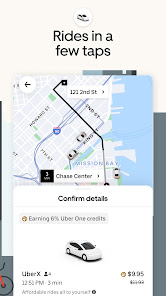
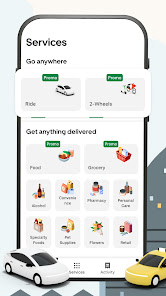
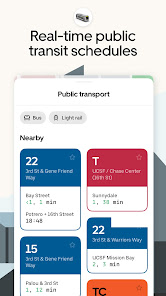

Uber's "Request a Ride" feature offers a seamless and user-friendly experience for passengers seeking transportation. One of the standout features is the ability to request a ride with just a few taps on your smartphone. Users can choose from various ride options, including UberX for everyday rides, UberXL for larger groups, and Uber Comfort for a more premium experience. Additionally, the app provides real-time tracking, allowing passengers to see their driver's location and estimated arrival time.
Another notable feature is the fare estimate, which gives users an idea of the cost before confirming their ride. The app also includes a rating system, enabling passengers to rate their drivers and provide feedback, which helps maintain service quality. Furthermore, Uber offers in-app payment options, making transactions quick and secure. Riders can also share their trip details with friends or family for added safety. Overall, these features combine to create a convenient and efficient ride-hailing experience.
Using the "Request a Ride" feature on the Uber app is straightforward and user-friendly. First, download the Uber app from your device's app store and create an account if you haven't already. Once logged in, open the app and enter your destination in the "Where to?" box. The app will automatically detect your current location, but you can adjust the pickup point if necessary.
After entering your destination, the app will display various ride options available in your area, along with estimated fares and arrival times. Select the ride type that best suits your needs and tap the "Confirm" button to request your ride. You will then be matched with a nearby driver, and you can track their arrival in real-time. Once your ride is complete, you can pay through the app and rate your driver, ensuring a smooth and efficient experience from start to finish.
Like any service, the Uber app has its advantages and disadvantages. One of the primary pros is the convenience it offers. Users can request a ride from virtually anywhere at any time, making it an excellent option for those who need quick transportation. The app's real-time tracking feature enhances safety and allows passengers to know exactly when their driver will arrive. Additionally, the variety of ride options caters to different needs and budgets, making it accessible to a wide range of users.
However, there are also some cons to consider. Surge pricing can significantly increase fares during peak times, which may deter some users. Additionally, the quality of service can vary depending on the driver, leading to inconsistent experiences. There are also concerns regarding safety, as incidents involving drivers and passengers have been reported. Lastly, in some areas, the availability of rides may be limited, leading to longer wait times. Weighing these pros and cons can help users make informed decisions about using the Uber app.

 Convenient rides available at any time, day or night. Quick and easy booking through a user-friendly app. Affordable pricing with transparent fare estimates before rides. Safe and reliable transportation with professional drivers. Flexible ride options to suit your needs and preferences.
 Surge pricing can make rides unexpectedly expensive during peak hours. Limited availability in less populated areas may lead to longer wait times. Driver quality and safety can vary significantly between rides.
 Yes, users can submit suggestions or feedback through the app's help or support section, which is designed for user inquiries and improvements.
Yes, 优步 - 在您的城市随时叫车出行 collects personal data such as your name, phone number, and location to facilitate ride bookings and improve user experience.
优步 - 在您的城市随时叫车出行 requires an internet connection to function, so it does not support offline use for booking rides.
Since there is no subscription model, users do not need to worry about cancellation; simply stop using the app when desired.
优步 - 在您的城市随时叫车出行 does not typically offer a subscription model; charges are based on per-ride fares.
A phone number is required for account activation, as it helps with verification and communication.
To activate your account, follow the sign-up process in the app and confirm your email and phone number.
If your email isn't recognized, ensure it's the same one used during sign-up, or try using your phone number to log in.
You can reach customer service through the app by selecting the canceled ride and choosing "Help" for assistance.
Tap on "Forgot password?" on the login screen to receive a password reset link via email.












 Google Play
  App Store