



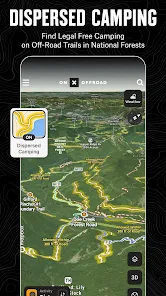
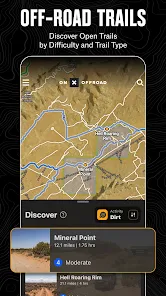
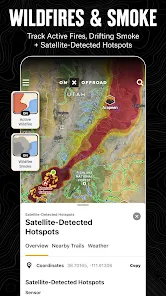
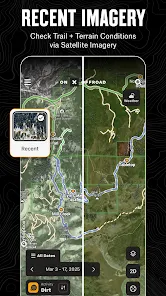
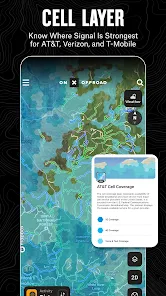
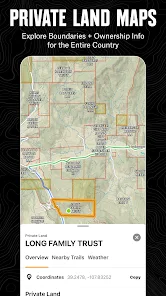
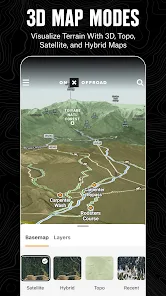
"onX Offroad: Trail Maps & GPS" is a comprehensive app designed for outdoor enthusiasts who enjoy off-roading, hiking, and exploring trails. One of its standout features is the extensive database of trail maps, which includes detailed information on thousands of off-road trails across the United States. Users can access topographic maps, satellite imagery, and 3D terrain views, allowing for better navigation and planning of their adventures.
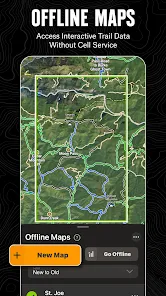
Another key feature is the ability to download maps for offline use, ensuring that users can access vital information even in remote areas without cell service. The app also includes waypoints and route planning tools, enabling users to mark favorite spots, plan trips, and share routes with friends. Additionally, the app provides real-time GPS tracking, which helps users stay oriented while exploring unfamiliar terrain. With user-generated content, the app allows for community engagement, where users can share trail conditions and experiences, enhancing the overall off-roading experience.
Using "onX Offroad: Trail Maps & GPS" is straightforward and user-friendly. First, download the app from your device's app store and create an account. Once logged in, you can explore the vast library of trails by searching for specific locations or browsing through categories based on your interests, such as off-roading, hiking, or biking. The interactive map allows you to zoom in and out, providing a detailed view of the terrain and available trails.
To plan a trip, simply select a trail and view its details, including difficulty level, length, and user reviews. You can save your favorite trails and create custom routes by adding waypoints. Before heading out, ensure you download the necessary maps for offline access, especially if you plan to venture into areas with limited cell service. During your adventure, use the GPS tracking feature to monitor your location and stay on course. Remember to share your experiences and trail conditions with the community to contribute to the app's growing database.
Like any app, "onX Offroad: Trail Maps & GPS" has its advantages and disadvantages. One of the primary pros is its extensive database of trails, which provides users with a wealth of information for planning outdoor activities. The offline map feature is particularly beneficial for those venturing into remote areas, ensuring that users can navigate without relying on cellular service. Additionally, the app's user-friendly interface and real-time GPS tracking enhance the overall experience, making it easier for users to explore new trails confidently.
However, there are some cons to consider. The app requires a subscription for full access to its features, which may deter some users. Additionally, while the community-generated content is valuable, the accuracy of trail conditions can vary, leading to potential discrepancies. Some users have also reported occasional glitches or slow loading times, which can be frustrating during critical moments of navigation. Overall, while "onX Offroad" offers a robust set of features for outdoor enthusiasts, potential users should weigh these pros and cons before committing to the app.

 Access thousands of detailed trail maps for off-road adventures. Enjoy real-time GPS navigation for precise location tracking. Discover user-generated content for the latest trail information. Plan and save custom routes tailored to your preferences. Stay connected with offline maps for areas with no signal.
 Limited offline functionality can hinder navigation in remote areas Subscription costs may add up over time User-generated content can sometimes be inaccurate or outdated
 Yes, users can submit suggestions or feedback through the app's support section or by reaching out directly to their customer service team, as they value user input for future updates.
onX Offroad: Trail Maps & GPS may collect certain personal data, such as location information and usage statistics, to enhance user experience and improve the app. Users can review the privacy policy for more details.
Yes, onX Offroad: Trail Maps & GPS allows users to download maps for offline access, making it convenient for use in areas without cellular service.
Users can cancel their onX Offroad: Trail Maps & GPS subscription through their account settings within the app or by contacting customer support for assistance.
The subscription cost varies, typically offering monthly and annual plans, with discounts for longer commitments. Users should check the app or website for the most current pricing.
Yes, you can change your log in email address in the account settings after logging in to your onX Offroad account.
Yes, your customer number can be found in the account settings section of the onX Offroad app under "Account Info."
To activate your account, simply check your email for the activation link sent after sign-up and follow the instructions provided.
You can reach customer service by visiting our website and using the support chat feature or by emailing support
To log in on a different device, simply download the onX Offroad app, and enter your existing log in credentials.












 Google Play
  App Store














