
 Home
Home  Apps
Apps  Games
Games  Windows
  Topics
  Terms of Service
  Cookies & Privacy Policy
  Disclaimer
Windguru Lite


Information
- Category: Weather
- Price: Free
- Age Rating: /
- Rating: 4
- Developer: Windguru
- Version: 2.0.8
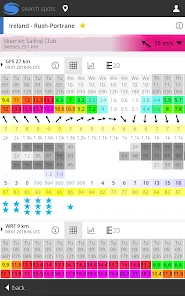
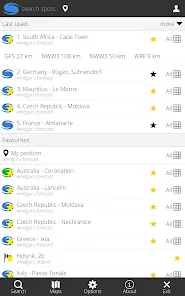
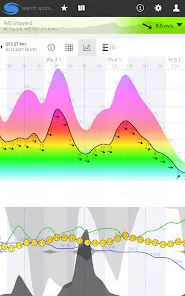
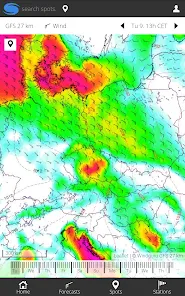
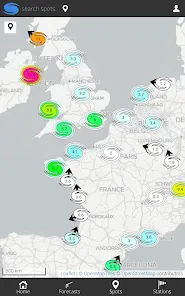
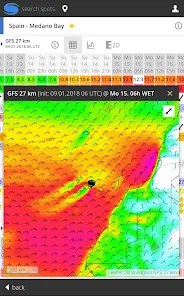
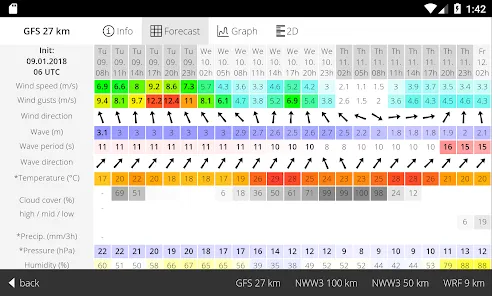
Windguru Lite is a powerful weather app designed for outdoor enthusiasts, providing accurate wind and weather forecasts tailored for various activities like surfing, sailing, and kitesurfing. With its user-friendly interface, Windguru Lite offers real-time data, detailed maps, and customizable settings to help users plan their adventures effectively. Stay informed about changing weather conditions and make the most of your time outdoors with Windguru Lite, your go-to companion for reliable weather insights.
Features of "Windguru Lite"
"Windguru Lite" is a specialized weather application designed for outdoor enthusiasts, particularly those involved in water sports like surfing, sailing, and kitesurfing. One of its standout features is the detailed weather forecasts that include wind speed, direction, and wave height, which are crucial for planning activities. The app provides access to a wide range of locations worldwide, allowing users to check conditions at their favorite spots or discover new ones.
Another notable feature is the customizable interface, which enables users to select the specific data they want to see, making it easier to focus on the most relevant information. The app also includes radar and satellite imagery, giving users a visual representation of weather patterns. Additionally, "Windguru Lite" offers a user-friendly experience with intuitive navigation, ensuring that even those new to weather apps can easily find the information they need. Overall, the combination of detailed forecasts, global coverage, and user-friendly design makes "Windguru Lite" a valuable tool for anyone who relies on accurate weather data for their outdoor activities.
How to Use "Windguru Lite"?
Using "Windguru Lite" is straightforward and user-friendly, making it accessible for both seasoned users and newcomers. To get started, download the app from your device's app store and install it. Once opened, you will be greeted with a clean interface that allows you to search for specific locations. You can either enter the name of a place or browse through a list of popular spots.
After selecting a location, the app will display a detailed weather forecast, including wind speed, direction, and wave height. You can customize the view to focus on the data that matters most to you. Additionally, the app allows you to save your favorite locations for quick access in the future. To stay updated, check the app regularly, especially before planning any outdoor activities. With its intuitive design and comprehensive data, "Windguru Lite" makes it easy to stay informed about weather conditions that impact your adventures.
Pros & Cons of the App
"Windguru Lite" comes with several advantages that make it a popular choice among outdoor enthusiasts. One of the primary pros is its accuracy in providing detailed weather forecasts, which are essential for activities like surfing and sailing. The app's global coverage allows users to access weather data from various locations, making it versatile for travelers. Additionally, the customizable interface enhances user experience, enabling individuals to focus on the information that is most relevant to them.
However, there are some drawbacks to consider. One con is that while the app is free, certain advanced features may require a premium subscription, which could deter some users. Additionally, the app's reliance on internet connectivity means that users may not have access to real-time data in remote areas. Lastly, some users have reported that the interface could be overwhelming due to the abundance of information available. Balancing these pros and cons can help users determine if "Windguru Lite" is the right fit for their weather forecasting needs.
Get Installation Details  Google Play
  App Store
Google Play App Store FAQ
Can I create playlists on Spotify?
Yes, users can create, share, and collaborate on playlists with friends.
Can I download music on Spotify?
Yes, premium users can download songs and playlists for offline listening.
Can I listen to Spotify offline?
Yes, premium users can listen to downloaded music offline without an internet connection.
Can I use Spotify on multiple devices?
Yes, you can use Spotify on multiple devices, but only one device can stream at a time.
Does Spotify have podcasts?
Yes, Spotify hosts a wide range of podcasts across various genres.
Similar Apps














You May Like

The Weather Channel - Radar
Weather
4.7

AccuWeather
Weather
4.4

Weather Radar by WeatherBug
Weather
4.7

Dark Sky Tech & Radar Forecast
Weather
4.2

Clime: NOAA Weather Radar Live
Weather
4.2

My Lightning Tracker Pro
Weather
4.7

MyRadar Weather Radar Pro
Weather
4.7

NOAA Weather Unofficial (Pro)
Weather
4.8

RadarOmega
Weather
3.4
RadarScope
Weather
3.9
Weather Home - Live Radar
Weather
4.5

FOX Weather: Daily Forecasts
Weather
3.8