
 Home
Home  Apps
Apps  Games
Games  Windows
  Topics
  Terms of Service
  Cookies & Privacy Policy
  Disclaimer
Windfinder: Wind & Weather map


Information
- Category: Weather
- Price: free
- Age Rating: Everyone
- Rating: 4.7
- Developer: Windfinder
- Version: 3.38.5
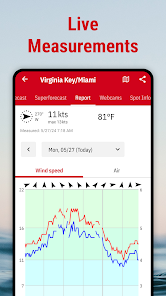
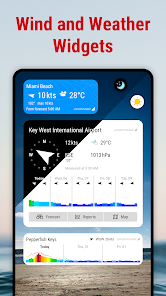
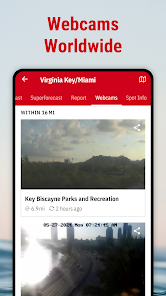
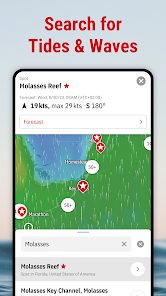
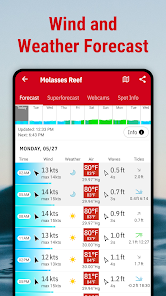
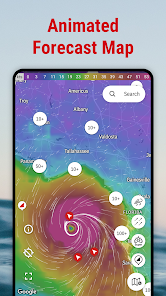
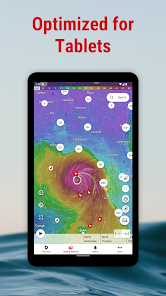
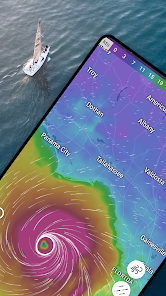
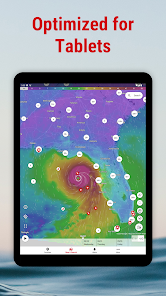
"Windfinder: Wind & Weather map" is your ultimate tool for tracking wind and weather conditions in real-time. Whether you're a sailor, surfer, or outdoor enthusiast, this app provides accurate forecasts, detailed wind maps, and weather data to help you plan your activities. With features like customizable alerts and a user-friendly interface, Windfinder ensures you stay informed about changing weather patterns, making it easier to enjoy your favorite outdoor pursuits safely and effectively.
Features & Highlights
- Real-Time Wind Data: Windfinder provides accurate wind speed and direction information that updates in real-time. Imagine planning a day of sailing; having precise wind data ensures you can choose the best time to set sail, optimizing your experience on the water.
- Interactive Weather Maps: The app features interactive maps that show not only wind conditions but also temperature, precipitation, and cloud cover. This feature is invaluable when I’m preparing for a weekend hike—by checking the map, I can identify the best trails based on current weather conditions.
- Forecasts Up to 14 Days: With forecasts extending up to two weeks, Windfinder helps users plan ahead. When I recently organized a beach outing, I relied on the 14-day forecast to choose the perfect day, ensuring we had sunshine instead of rain.
- Personalized Notifications: Users can set alerts for specific weather conditions. I enjoy kite surfing, and I’ve set notifications for when wind speeds exceed a certain threshold, allowing me to grab my gear and head out at just the right time.
- User-Friendly Interface: The app is designed to be intuitive, making navigation easy even for first-time users. On my first use, I appreciated how quickly I could find the information I needed, allowing me to focus on my outdoor activities without the hassle of figuring out how to use the app.
Real Experience Using Windfinder: Wind & Weather map
Application Scenarios
My adventures with Windfinder began when I took up sailing. As an amateur sailor, I quickly learned that understanding the wind is crucial for a successful outing. One Saturday morning, I decided to take my boat out on the local lake. Before heading out, I opened the Windfinder app to check the wind conditions. The real-time data indicated that the wind was picking up, making it a perfect time to go. The app not only confirmed that it was safe to sail but also provided essential information about the expected wind patterns over the next few hours, giving me confidence in my decision.
Aside from sailing, I often use Windfinder for my hiking trips. There have been occasions when I ventured into the mountains, only to be caught in unexpected rain. However, with Windfinder's interactive weather maps, I can assess the likelihood of precipitation before I set out. One memorable trip involved planning a hike to a beautiful waterfall. The app showed clear skies in the morning, but as I checked the interactive map, I noticed clouds building up in the afternoon. This allowed me to start my hike early and enjoy the scenery without getting drenched.
User Experience
The user interface of Windfinder is one of its standout features. Upon opening the app, I was greeted with a clean and straightforward layout. Navigating through the various sections felt seamless, and I found it easy to access the real-time wind data and forecasts. The workflow was efficient; I could switch between different locations with just a couple of taps, which is crucial when I’m out and about.
The performance of the app has been impressive as well. I’ve noticed that it loads quickly, even when switching between different weather maps. The graphics are visually appealing, and the color-coded indicators for wind speed and weather conditions make it easy to interpret data at a glance. Overall, my experience with Windfinder has been overwhelmingly positive; it has become my go-to app for all things weather-related.
Pricing
Windfinder offers a free version that provides a wealth of information, but for those who want an ad-free experience alongside additional features, there is a premium version available for a reasonable subscription fee. I opted for the premium version, and I must say, the absence of ads and the added benefits make it worth every penny, especially considering how often I use the app.
Updates & Support
The developers of Windfinder are committed to keeping the app updated with the latest weather data and features. I appreciate the regular updates that improve functionality and user experience. Should any issues arise, the support team is responsive and helpful, which gives me confidence that I can rely on them if I encounter any problems.
Security & Privacy Review
As a user concerned about security and privacy, I was pleased to find that Windfinder is available on both the App Store and Google Play, ensuring that I downloaded it from a reputable source. The app does not require extensive personal data upon registration; a simple email is sufficient for setting up an account, which is a relief compared to many other apps that ask for too much personal information.
Regarding ads and tracking, Windfinder’s premium version eliminates ads, making the user experience much more enjoyable. In the free version, I noticed minimal tracking, and the app does a good job of maintaining user privacy. Overall, I feel secure using Windfinder, knowing that my personal information is protected while I enjoy all that the app has to offer.
Pros 
-
 Stay updated with real-time data
 - Access detailed wind forecasts
- View interactive weather maps
- Get alerts for changing conditions
- Plan your outdoor activities better
Cons 
-
 Limited data coverage
 - Inaccurate forecasts sometimes
- Ads can be intrusive
- User interface may confuse
 Google Play
  App Store
 FAQ
Can I submit suggestions or feedback to Windfinder?
Yes, users can submit feedback and suggestions through the app's support feature.
Does Windfinder collect my personal data?
Windfinder may collect data for app functionality, but it prioritizes user privacy.
Does Windfinder support offline use?
Yes, Windfinder allows users to download weather data for offline access.
How do I cancel my Windfinder subscription?
You can cancel your subscription through the app store settings or directly in the app.
How much does a subscription to Windfinder cost?
The subscription cost varies based on the plan, typically around $10 per year.
How to use Windfinder: Wind & Weather map
How can I contact Windfinder customer service?
You can reach Windfinder customer service via their website's contact form or by emailing support
How do I find my customer number for Windfinder?
Your customer number is typically found in your account settings or purchase confirmation email. If you can't locate it, contact support.
How do I log in to my Windfinder account?
To log in, open the app or website, click on "Log In," and enter your registered email and password.
Is there a way to activate my Windfinder subscription?
If you purchased a subscription, it activates automatically upon payment. You can check your subscription status in your account settings.
Similar Apps















You May Like

The Weather Channel - Radar
Weather
4.7

AccuWeather
Weather
4.4

Weather Radar by WeatherBug
Weather
4.7

Dark Sky Tech & Radar Forecast
Weather
4.2
Clime: NOAA Weather Radar Live
Weather
4.2

My Lightning Tracker Pro
Weather
4.7

MyRadar Weather Radar Pro
Weather
4.7

NOAA Weather Unofficial (Pro)
Weather
4.8

RadarOmega
Weather
3.4
RadarScope
Weather
3.9
Weather Home - Live Radar
Weather
4.5

FOX Weather: Daily Forecasts
Weather
3.8