
 Home
Home  Apps
Apps  Games
Games  Windows
  Topics
  Terms of Service
  Cookies & Privacy Policy
  Disclaimer
Stash: Investing made easy


Information
- Category: Finance
- Price: free
- Age Rating: Everyone
- Rating: 3.7
- Developer: Stash Financial
- Version: 4.96.0.0
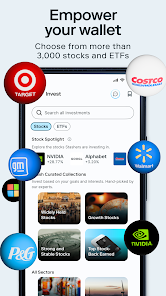
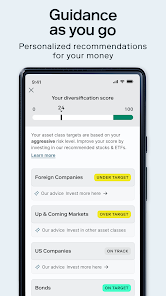
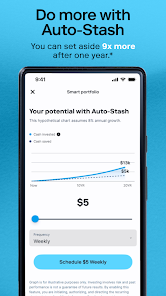
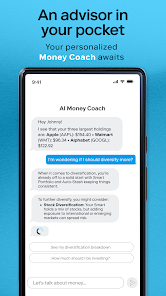
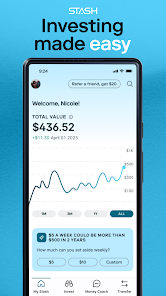
Stash: Investing Made Easy is your personal finance companion, designed to simplify investing for everyone. Whether you're a beginner or looking to enhance your portfolio, Stash empowers you to take control of your financial future. With user-friendly tools, personalized guidance, and a wide range of investment options, you can start building wealth at your own pace. Join a community of savvy investors and discover how easy it is to make your money work for you.
Features of "Stash: Investing Made Easy"
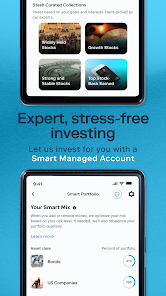
"Stash: Investing Made Easy" is designed to simplify the investment process for users of all experience levels. One of its standout features is the ability to start investing with as little as $5, making it accessible for beginners. The app offers a user-friendly interface that guides users through the investment process, allowing them to easily buy fractional shares of stocks and ETFs. Additionally, Stash provides personalized investment recommendations based on users' financial goals and risk tolerance, helping them make informed decisions.
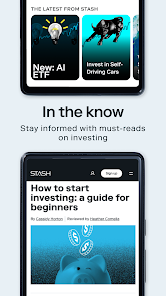
Another notable feature is the educational content available within the app. Stash offers articles, videos, and tutorials that cover various investment topics, empowering users to enhance their financial literacy. The app also includes a budgeting tool that helps users manage their finances effectively, ensuring they can allocate funds for investing. Furthermore, Stash allows users to set up automatic recurring investments, making it easier to build their portfolios over time. Overall, Stash combines simplicity, education, and automation to create a comprehensive investing platform.
How to Use "Stash: Investing Made Easy"
Using "Stash: Investing Made Easy" is straightforward and user-friendly. To get started, users need to download the app and create an account by providing some basic personal information. Once registered, users can link their bank accounts to fund their investment activities. After funding their account, users can explore various investment options, including stocks, ETFs, and bonds, tailored to their financial goals and risk preferences.
To make the most of the app, users can take advantage of the educational resources available. Stash offers insights and articles that help users understand different investment strategies and market trends. Users can also set up automatic investments, allowing them to contribute regularly without having to think about it. Additionally, the app provides a feature for tracking investment performance, enabling users to monitor their progress over time. By following these steps, users can effectively utilize Stash to grow their investments and enhance their financial knowledge.
Pros & Cons of the App
Like any investment platform, "Stash: Investing Made Easy" has its advantages and disadvantages. One of the primary pros is its accessibility; users can start investing with a minimal amount, making it ideal for beginners. The app's educational resources are also a significant benefit, as they help users understand the investment landscape and make informed decisions. Additionally, the user-friendly interface and automated investment options simplify the investing process, allowing users to focus on their financial goals.
On the downside, Stash charges a monthly subscription fee, which may not be cost-effective for users with smaller investment amounts. Furthermore, while the app offers a variety of investment options, the selection may be limited compared to other platforms that provide access to a broader range of assets. Some users may also find the fees associated with certain investments to be higher than average. Overall, while Stash is a great tool for novice investors, those with more experience may want to explore other platforms that offer more advanced features and lower costs.
Get Installation Details  Google Play
  App Store
Google Play App Store FAQ
Can I create playlists on Spotify?
Yes, users can create, share, and collaborate on playlists with friends.
Can I download music on Spotify?
Yes, premium users can download songs and playlists for offline listening.
Can I listen to Spotify offline?
Yes, premium users can listen to downloaded music offline without an internet connection.
Can I use Spotify on multiple devices?
Yes, you can use Spotify on multiple devices, but only one device can stream at a time.
Does Spotify have podcasts?
Yes, Spotify hosts a wide range of podcasts across various genres.
Similar Apps
















You May Like

Green Dot - Mobile Banking
Finance
3.6

Intuit Credit Karma
Finance
4.7

TurboTax
Finance
4.8

10bii Financial Calculator
Finance
4.4

ATLAS:EARTH - Fun Cashback
Finance
4.6

Bank of America Mobile Banking
Finance
4.6

Brigit: Cash Advance & Credit
Finance
4.8

Capital One Mobile
Finance
4.5

Chime
Finance
4.8

Dave: Credit, Cash & Money App
Finance
4.5

Experian®
Finance
4.7

Google Pay: Save and Pay
Finance
3.9