
 Home
Home  Apps
Apps  Games
Games  Windows
  Topics
  Terms of Service
  Cookies & Privacy Policy
  Disclaimer
Asana: Work Management


Information
- Category: Business
- Price: free
- Age Rating: Everyone
- Rating: 4.0
- Developer: Asana, Inc.
- Version: 8.80.5




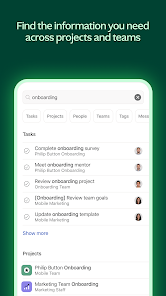
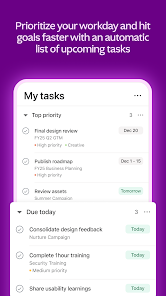

Asana: Work Management is a powerful tool designed to help teams organize, track, and manage their work efficiently. With its intuitive interface, users can create tasks, set deadlines, and collaborate seamlessly, ensuring everyone stays aligned and productive. Whether you're managing projects, tracking progress, or streamlining workflows, Asana provides the flexibility and features needed to enhance team collaboration and drive results. Transform the way you work and achieve your goals with Asana.
Features of "Asana: Work Management"
Asana: Work Management is a robust tool designed to enhance team collaboration and streamline project management. One of its standout features is the ability to create tasks and subtasks, allowing users to break down larger projects into manageable components. This hierarchical structure helps teams stay organized and focused on specific deliverables.
Another key feature is the customizable project views, which include list, board, calendar, and timeline formats. This flexibility enables teams to visualize their work in a way that best suits their workflow. Additionally, Asana offers integration with various third-party applications, such as Slack, Google Drive, and Microsoft Teams, facilitating seamless communication and file sharing.
Asana also includes advanced reporting tools that provide insights into project progress and team performance. Users can set deadlines, assign tasks to team members, and track completion rates, ensuring accountability and transparency. Furthermore, the platform supports automation through rules and templates, which can help reduce repetitive tasks and improve efficiency.
Overall, Asana: Work Management is designed to enhance productivity, foster collaboration, and provide teams with the tools they need to succeed in their projects.
How to Use "Asana: Work Management"
Using Asana: Work Management is straightforward and user-friendly. To get started, create an account and set up your workspace. Once your workspace is established, you can create projects by clicking on the “New Project” button. You can choose from various templates or start from scratch, depending on your needs.
After creating a project, you can add tasks by clicking the “Add Task” button. Each task can be assigned to team members, given a due date, and categorized with tags for better organization. You can also create subtasks to break down larger tasks into smaller, actionable steps, making it easier to track progress.
To enhance collaboration, invite team members to join your project. They can comment on tasks, attach files, and provide updates, ensuring everyone stays informed. Utilize the different project views—list, board, calendar, or timeline—to visualize your workflow and adjust as necessary. Regularly check the dashboard for updates and use the reporting features to monitor project performance and team productivity.
By following these steps, you can effectively leverage Asana: Work Management to enhance your team's productivity and streamline project execution.
Pros & Cons of the App
Asana: Work Management offers several advantages that make it a popular choice among teams. One of the primary benefits is its user-friendly interface, which allows users to navigate the platform with ease. The ability to customize project views and workflows caters to diverse team preferences, enhancing overall productivity. Additionally, Asana's robust integration capabilities with other tools streamline communication and file sharing, making it easier for teams to collaborate effectively.
However, Asana is not without its drawbacks. Some users may find the extensive features overwhelming, especially if they are new to project management tools. The free version has limitations on the number of users and features, which may not suffice for larger teams or complex projects. Furthermore, while Asana provides excellent task management capabilities, it may lack some advanced features found in other project management software, such as time tracking or resource management.
In summary, Asana: Work Management is a powerful tool that can significantly enhance team collaboration and project management. However, potential users should weigh its pros and cons to determine if it aligns with their specific needs and workflow requirements.
Get Installation Details  Google Play
  App Store
Google Play App Store FAQ
Can I create playlists on Spotify?
Yes, users can create, share, and collaborate on playlists with friends.
Can I download music on Spotify?
Yes, premium users can download songs and playlists for offline listening.
Can I listen to Spotify offline?
Yes, premium users can listen to downloaded music offline without an internet connection.
Can I use Spotify on multiple devices?
Yes, you can use Spotify on multiple devices, but only one device can stream at a time.
Does Spotify have podcasts?
Yes, Spotify hosts a wide range of podcasts across various genres.
Similar Apps
















You May Like

ADP Mobile Solutions
Business
4.5

Joist Invoices for Contractors
Business
4.7

DoorDash - Dasher
Business
4.2

Duo Mobile
Business
4.5

Google Chat
Business
4.4

Indeed Job Search
Business
4.7
Invoice Maker - InvoiceBase
Business
4.9

LinkedIn: Jobs & Business News
Business
4.1

Microsoft Authenticator
Business
4.7

Microsoft Teams
Business
4.7

Intuit QuickBooks for Business
Business
4.7

Uber - Driver: Drive & Deliver
Business
4.6