
 Home
Home  Apps
Apps  Games
Games  Windows
  Topics
  Terms of Service
  Cookies & Privacy Policy
  Disclaimer
Amazon Chime


Information
- Category: Business
- Price: free
- Age Rating: Everyone
- Rating: 2.9
- Developer: Amazon Mobile LLC
- Version: 5.23.7311
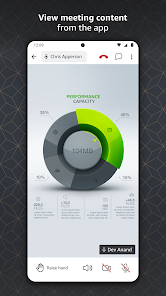
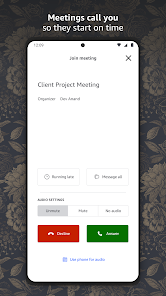
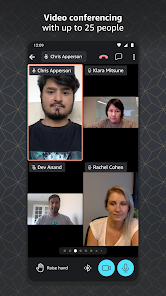
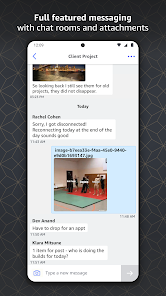
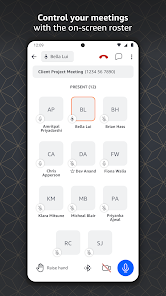
Amazon Chime is a communication service that enables users to conduct online meetings, video conferencing, and chat. Designed for businesses of all sizes, it offers a seamless experience across devices, allowing users to connect easily and collaborate effectively. With features like screen sharing, file sharing, and integration with other Amazon Web Services, Chime enhances productivity and streamlines communication, making it an ideal solution for remote teams and organizations looking to improve their virtual collaboration.
Features & Highlights
Amazon Chime is a versatile communication platform that has quickly become a favorite for businesses and individuals alike. Its core features cater to a variety of communication needs, making it a powerful tool for anyone looking to enhance their workflow. Here are some of the standout features:
- Video Conferencing: With high-quality video calls, Amazon Chime allows you to connect with colleagues and clients as if you were in the same room. For instance, during a recent team meeting, I was able to share my screen seamlessly while discussing project updates, which enhanced collaboration significantly.
- Chat Functionality: The integrated chat feature lets you send messages, share files, and even create channels for specific projects. I found this particularly useful when coordinating a marketing campaign, as we could easily exchange ideas and resources without cluttering our email inboxes.
- Call Scheduling: Amazon Chime makes it easy to schedule and manage meetings through its intuitive calendar integration. This feature was a lifesaver when I had to coordinate a last-minute meeting with several team members across different time zones.
- Mobile Accessibility: The mobile app allows you to stay connected on the go, ensuring that you never miss an important meeting or chat. I often use it during my commute to review messages and prepare for upcoming discussions.
- Meeting Recording: With the ability to record meetings, you can ensure that no detail is missed. After a lengthy brainstorming session, I was able to refer back to the recording to capture all our ideas accurately.
Real Experience Using Amazon Chime
Application Scenarios
My journey with Amazon Chime began when my team adopted it for our remote work setup. Being part of a marketing team, we often need to brainstorm ideas, hold client meetings, and coordinate projects. I remember the first time I used Chime for a client presentation. I was able to set up the meeting in advance, share my screen to showcase our latest marketing strategies, and even record the session for later reference. This convenience transformed how we interacted with clients and made our communications much more effective.
User Experience
The user interface of Amazon Chime is clean and intuitive, making it easy for both tech-savvy individuals and those less familiar with digital tools to navigate. The dashboard presents all necessary functions clearly, from initiating calls to accessing chat features. I particularly enjoyed how smoothly the platform transitions between video calls and chat, allowing for seamless communication. Performance-wise, I found the app to be reliable with minimal lag during video calls, even when sharing screens or transferring files. Overall, my experience has been overwhelmingly positive, and I appreciate how Amazon Chime has streamlined our team's communication process.
Pricing
Amazon Chime offers a flexible pricing model that caters to both small teams and larger enterprises. The basic tier is free and includes essential features, while the Pro version provides advanced functionalities at a competitive price. I opted for the Pro version to take advantage of features like meeting recordings and larger participant limits, which have proven invaluable for my team. The cost is reasonable considering the robust capabilities of the app, and I believe it offers great value for businesses looking to enhance their communication.
Updates & Support
Amazon Chime is regularly updated to improve functionality and security, which is reassuring as a user. The support resources available are also commendable. I’ve utilized the help center for troubleshooting and found their guides to be comprehensive and easy to follow. Additionally, the support team is responsive, providing prompt assistance when needed. Overall, I feel confident that any issues I encounter will be addressed quickly.
Security & Privacy Review
When it comes to security and privacy, Amazon Chime takes significant measures to protect user data, which is essential for American users concerned about online safety. The app is available on both the App Store and Google Play, ensuring easy access for users on various devices. Registration requires minimal personal data, which is a definite plus in today’s privacy-conscious environment. I appreciate that Amazon Chime does not engage in intrusive ads or tracking behavior, allowing for a more focused and secure communication experience. Knowing that my conversations and data are safeguarded gives me peace of mind as I use the app for both work and personal communications.
Pros 
-
 Amazon Chime enhances meetings
 - Seamless video conferencing tool
- High-quality audio experience
- User-friendly interface design
- Integrates with other AWS services
Cons 
-
 Limited third-party integrations
 - Higher cost for larger teams
- Occasional audio quality issues
- User interface can be complex
 Google Play
  App Store
 FAQ
Can I submit suggestions or feedback to Amazon Chime?
Yes, users can submit suggestions or feedback through the Amazon Chime support page or directly within the app.
Does Amazon Chime collect my personal data?
Yes, Amazon Chime collects personal data to provide and improve its services, as outlined in its privacy policy.
Does Amazon Chime support offline use?
No, Amazon Chime requires an internet connection for full functionality.
How do I cancel my Amazon Chime subscription?
You can cancel your subscription through the Amazon Chime console under your account settings.
How much does a subscription to Amazon Chime cost?
Subscription costs vary based on the plan, starting from a basic tier to more comprehensive options.
How to use Amazon Chime
How can I contact Amazon Chime customer service?
You can reach Amazon Chime customer service through the AWS Support Center or by calling the AWS customer service number available on the AWS website.
How do I activate my Amazon Chime account?
You can activate your Amazon Chime account by following the instructions in the confirmation email you receive after signing up. Click the activation link provided.
How do I find my Amazon Chime customer number?
Your Amazon Chime customer number can be located in the AWS Management Console under the Billing and Cost Management section.
How do I log in to my Amazon Chime account?
To log in, visit the Amazon Chime website or app, enter your email address and password, and click 'Sign In.'
Similar Apps
















You May Like

ADP Mobile Solutions
Business
4.5

Joist Invoices for Contractors
Business
4.7

DoorDash - Dasher
Business
4.2

Duo Mobile
Business
4.5

Google Chat
Business
4.4

Indeed Job Search
Business
4.7

Invoice Maker - InvoiceBase
Business
4.9

LinkedIn: Jobs & Business News
Business
4.1

Microsoft Authenticator
Business
4.7

Microsoft Teams
Business
4.7
Intuit QuickBooks for Business
Business
4.7

Uber - Driver: Drive & Deliver
Business
4.6