


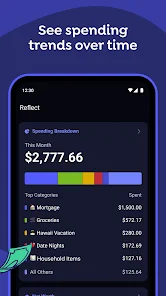


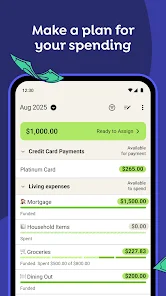


YNAB, or You Need A Budget, is a powerful budgeting tool designed to help users take control of their finances. One of its standout features is the "Four Rules" methodology, which encourages users to give every dollar a job, embrace their true expenses, roll with the punches, and age their money. This approach promotes proactive budgeting rather than reactive spending.
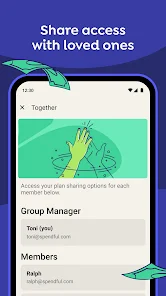
Another key feature is real-time tracking, allowing users to monitor their spending and adjust their budgets on the fly. YNAB also offers goal-setting capabilities, enabling users to set financial goals and track their progress towards achieving them. The app supports multiple devices, ensuring that users can access their budgets from anywhere, whether on a computer or mobile device.
Additionally, YNAB provides detailed reporting tools that help users analyze their spending habits and identify areas for improvement. The app also includes educational resources, such as workshops and tutorials, to help users enhance their budgeting skills. Overall, YNAB combines a user-friendly interface with robust features to empower individuals to manage their finances effectively.
Using YNAB is straightforward and intuitive, making it accessible for users of all financial backgrounds. To get started, first, sign up for an account on the YNAB website or download the mobile app. Once registered, you can link your bank accounts for automatic transaction imports, or you can manually enter your transactions if you prefer a hands-on approach.
Next, set up your budget by allocating your income to various categories based on your spending habits and financial goals. YNAB encourages users to assign every dollar a specific purpose, which helps in managing expenses effectively. As you spend, regularly update your budget to reflect your actual spending, ensuring that you stay on track.
Utilize the reporting features to analyze your financial trends and adjust your budget as needed. YNAB also offers educational resources, including workshops and tutorials, to help you maximize the app's potential. By consistently engaging with the app and following its principles, you can develop better financial habits and achieve your budgeting goals.
YNAB has several advantages that make it a popular choice among budgeting apps. One of the primary benefits is its unique approach to budgeting, which emphasizes proactive financial management. This method helps users develop a deeper understanding of their spending habits and encourages them to prioritize their financial goals. Additionally, YNAB's user-friendly interface and mobile accessibility make it easy to track expenses and manage budgets on the go.
However, there are some drawbacks to consider. YNAB operates on a subscription model, which may not be appealing to everyone, especially those who prefer free budgeting tools. Some users may also find the learning curve steep, as the app's methodology requires a shift in mindset regarding budgeting. Furthermore, while YNAB offers excellent features, it may not integrate with all financial institutions, which could limit its functionality for some users.
In summary, YNAB is a powerful budgeting tool with a unique approach that can help users take control of their finances. While it has its pros and cons, many find that the benefits outweigh the drawbacks, making it a worthwhile investment for those serious about budgeting.

 YNAB promotes proactive budgeting, helping you plan for future expenses effectively. It enhances financial awareness, allowing you to track spending easily. The app encourages saving, ensuring you have funds for unexpected costs. YNAB fosters better financial habits, leading to long-term money management success. Accessible across devices, it allows seamless budgeting anytime, anywhere.
 YNAB can be complex for new users to grasp quickly. Monthly subscription fees may deter budget-conscious users. Limited automation features require more manual input and tracking.
  Google Play
  App Store
 Yes, YNAB encourages users to submit suggestions and feedback through their website or community forums to improve the app and user experience.
YNAB prioritizes user privacy and does not sell personal data. They collect only necessary information to provide their services, complying with privacy regulations.
YNAB requires an internet connection for full functionality, but users can access some features offline through the mobile app and sync their data once they are back online.
Users can cancel their YNAB subscription through their account settings on the YNAB website or mobile app, following the provided instructions.
A subscription to YNAB typically costs $14.99 per month or $98.99 per year, with occasional discounts or promotions available.
Unfortunately, Customer Numbers cannot be changed. If you have concerns, please contact Customer Service for assistance.
Yes, you can change your email in your account settings after logging in. If you need help, contact Customer Service.
You can reach our Customer Service via the help section on our website or by emailing support
If you're having trouble activating your account, please reach out to Customer Service for help via email or the YNAB help center.
You can find your Customer Number in the YNAB app under account settings or your email confirmation when you signed up.