


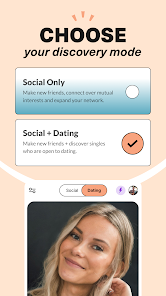
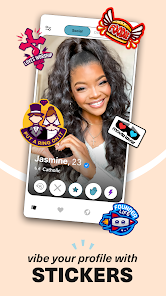




"Upward: Christian Dating App" is designed specifically for Christian singles seeking meaningful relationships. One of its standout features is the ability to create a detailed profile that highlights your faith, interests, and relationship goals. Users can upload photos and answer prompts that reflect their personality and beliefs, making it easier to find like-minded individuals.
The app also includes a unique matching algorithm that connects users based on shared values and interests, enhancing the chances of finding a compatible partner. Additionally, Upward offers a chat feature that allows users to communicate safely and privately, fostering deeper connections. The app emphasizes community, providing users with access to events and groups that align with their faith, further enriching the dating experience.
Moreover, Upward prioritizes user safety with features like profile verification and reporting options, ensuring a secure environment for all members. The app is user-friendly, with a clean interface that makes navigation simple, even for those who may not be tech-savvy. Overall, Upward combines faith and dating in a thoughtful way, making it a popular choice among Christian singles.
Using "Upward: Christian Dating App" is straightforward and user-friendly. To get started, download the app from your device's app store and create an account. You'll need to provide some basic information, such as your name, age, and location, as well as details about your faith and what you're looking for in a partner. This initial setup is crucial as it helps the app tailor matches to your preferences.
Once your profile is complete, you can begin browsing potential matches. The app will present you with profiles of other users based on shared interests and values. You can swipe right to express interest or left to pass. If both users swipe right, a match is created, allowing you to start a conversation through the app's chat feature.
To enhance your experience, consider participating in community events or groups offered within the app. This not only helps you meet new people but also allows you to engage in activities that align with your faith. Remember to be respectful and genuine in your interactions, as building a meaningful connection is the ultimate goal of using Upward.
Like any dating app, "Upward: Christian Dating App" has its advantages and disadvantages. One of the primary pros is its focus on faith-based connections, making it easier for users to find partners who share similar beliefs and values. The app's user-friendly interface and detailed profiles also enhance the overall experience, allowing for more meaningful interactions.
Another significant advantage is the community aspect, where users can participate in events and groups that foster connections beyond just dating. Additionally, the safety features, such as profile verification, help create a secure environment for users, which is crucial in online dating.
On the downside, some users may find the pool of potential matches limited, especially in less populated areas. Additionally, while the app is free to use, certain features may require a subscription, which could deter some users. Lastly, as with any dating platform, there is always the risk of encountering individuals who may not be genuine. Overall, weighing these pros and cons can help users determine if Upward is the right fit for their dating journey.

 Upward connects like-minded Christians seeking meaningful relationships. The app prioritizes faith-based compatibility for deeper connections. Users can share their beliefs and values openly. Intuitive design makes it easy to navigate and engage. Upward fosters a supportive community for spiritual growth and connection.
 Limited user base may restrict potential matches in some areas Subscription costs can be high for premium features Profile verification process can be slow and cumbersome for users
 Yes, Upward encourages users to submit suggestions or feedback through the app's support or contact features to help improve the user experience.
Yes, Upward collects personal data to enhance user experience and improve services; however, it adheres to privacy policies to protect user information.
Upward requires an internet connection to function, so offline use is not supported.
Users can cancel their subscription through the app settings or their app store account settings, following the provided instructions for cancellation.
Subscription costs can vary, but users typically have options for monthly or yearly plans, with pricing details available within the app.
Yes, you can update your contact information in the account settings section of the app.
You can check your account activation status by logging into the app and looking for a confirmation message on your profile.
You can contact our customer service team via the support section in the app or email us directly at support
To activate your account, simply click the activation link sent to your email after registration.
Account activation usually happens immediately after you click the link in your email, but it may take a few minutes.












 Google Play
  App Store