


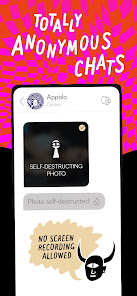





"PURE: Anonymous Dating & Chat" offers a unique platform for users seeking casual connections without the pressure of traditional dating apps. One of its standout features is the emphasis on anonymity; users can engage in conversations without revealing their identities, which fosters a more relaxed environment for interaction. The app allows users to create temporary profiles that disappear after a set period, ensuring privacy and discretion.
Another notable feature is the location-based matching system, which connects users with potential partners nearby. This facilitates spontaneous meetups and encourages real-life interactions. The app also includes a chat function that allows users to communicate freely, with the option to share photos and videos securely. Additionally, "PURE" promotes a no-strings-attached approach, making it ideal for those looking for short-term relationships or casual encounters. Overall, the app's design prioritizes user safety and comfort, making it a popular choice for individuals seeking anonymous dating experiences.
Using "PURE: Anonymous Dating & Chat" is straightforward and user-friendly. To get started, download the app from your device's app store and create a temporary profile. You will need to provide basic information, but the app allows you to remain anonymous, so you can choose how much to share. Once your profile is set up, you can browse through potential matches based on your location.
After finding someone you’re interested in, you can initiate a chat. The app encourages open communication, so feel free to express your intentions clearly. If both parties are interested, you can arrange to meet in person. Remember, profiles and chats are temporary, so be sure to make the most of your time on the app. Always prioritize safety by meeting in public places and informing a friend about your plans. With these steps, you can enjoy a seamless and enjoyable experience on "PURE."
Like any dating app, "PURE: Anonymous Dating & Chat" has its advantages and disadvantages. One of the primary pros is the focus on anonymity, which allows users to engage without the fear of judgment or unwanted attention. The temporary nature of profiles also means that users can explore connections without long-term commitments, making it ideal for those seeking casual encounters. Additionally, the location-based matching feature enhances the likelihood of finding nearby partners, facilitating spontaneous meetups.
On the downside, the app's emphasis on anonymity may lead to concerns about safety and trust, as users may not always be who they claim to be. The temporary profiles can also result in a lack of depth in connections, as users may not invest time in building a meaningful relationship. Furthermore, the app may not be suitable for individuals seeking serious or long-term relationships, as its primary focus is on casual dating. Overall, while "PURE" offers a unique approach to dating, users should weigh these pros and cons before diving in.

 Experience complete anonymity while connecting with like-minded individuals Enjoy a simple and intuitive interface for easy navigation Connect with people nearby for spontaneous meet-ups and fun Engage in secure messaging without revealing personal information Explore diverse interests and desires without judgment or pressure
 Limited user verification can lead to safety concerns. Lack of detailed profiles may hinder meaningful connections. Temporary anonymity might encourage dishonest behavior among users.
  Google Play
  App Store
 Yes, users can submit suggestions or feedback through the app's support section or by contacting customer service directly, helping to improve future versions of the app.
PURE prioritizes user privacy and does not collect personal data that can identify individuals. Instead, it operates with temporary profiles and anonymous interactions.
No, PURE requires an active internet connection to function, as it relies on real-time interactions and location-based features.
To cancel your subscription, you can go to your account settings within the app or through the app store from which you downloaded PURE, following the instructions for subscription management.
Subscription costs for PURE can vary based on the duration chosen, typically ranging from monthly to yearly plans. Users can check the app for the most current pricing details.
Unfortunately, customer numbers cannot be changed after activation. For further inquiries, please reach out to customer service.
You can contact customer service through the app's support section or via our website for assistance with login issues.
To activate your account, follow the link sent to your email after registration. If you need help, contact customer service.
Your customer number can usually be found in your account settings. If you need help, feel free to ask customer service.
You can recover your login details by selecting the "Forgot Password?" option on the login page and following the instructions.