







"Tilt: Cash Advance & Credit" offers a range of features designed to provide users with quick access to funds and flexible credit options. One of the primary features is the ability to receive cash advances directly to your bank account, allowing for immediate financial relief in times of need. The app also provides a user-friendly interface that simplifies the process of applying for credit and managing your finances.
Another notable feature is the integration of budgeting tools, which help users track their spending and manage their cash flow effectively. This can be particularly beneficial for those looking to improve their financial habits. Additionally, "Tilt" offers personalized credit limits based on individual financial profiles, ensuring that users have access to the funds they need without overextending themselves. The app also emphasizes security, employing advanced encryption methods to protect user data and transactions.
Furthermore, "Tilt" provides educational resources to help users understand credit management better, making it a comprehensive tool for both immediate cash needs and long-term financial health.
Using "Tilt: Cash Advance & Credit" is a straightforward process designed for user convenience. To get started, download the app from your device's app store and create an account by providing the necessary personal information, including your name, email address, and financial details. Once your account is set up, you can link your bank account to facilitate cash advances and credit transactions.
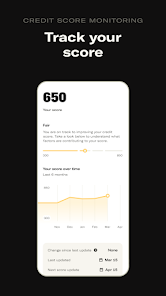
After linking your bank account, you can apply for a cash advance by selecting the amount you need and submitting your request through the app. The approval process is typically quick, allowing you to receive funds almost instantly. Additionally, you can monitor your credit limit and spending through the app's dashboard, which provides insights into your financial habits.
To make the most of "Tilt," take advantage of the budgeting tools and educational resources available within the app. Regularly reviewing your financial status and adjusting your spending habits can help you maintain a healthy credit profile and avoid potential pitfalls associated with cash advances.
"Tilt: Cash Advance & Credit" comes with several advantages that make it appealing to users. One of the main pros is the quick access to cash advances, which can be a lifesaver during emergencies. The app's user-friendly interface simplifies the process of applying for credit, making it accessible even for those who may not be financially savvy. Additionally, the budgeting tools and educational resources provided can help users develop better financial habits, promoting long-term financial health.
However, there are also some cons to consider. Cash advances can come with high fees and interest rates, which may lead to a cycle of debt if not managed carefully. Furthermore, the app's reliance on linking a bank account may raise security concerns for some users, despite the app's emphasis on data protection. Lastly, while the app offers personalized credit limits, these may not always align with users' expectations or needs, potentially limiting access to funds in certain situations.
In summary, while "Tilt: Cash Advance & Credit" provides valuable features and tools for managing finances, users should weigh the pros and cons carefully to ensure it aligns with their financial goals and needs.

 Tilt offers easy and intuitive expense tracking for users. Enjoy seamless group payments and splitting options. Gain insights with real-time financial analytics and reports. Benefit from customizable budgeting tools tailored to your needs. Access dedicated customer support for any financial queries.
 Limited customer support options can lead to frustration for users. High fees for certain transactions may reduce overall savings. The app's interface can be confusing for new users to navigate.
 Yes, users can submit suggestions or feedback through the app or the official website, where they can find options for contacting the support team.
Yes, Tilt does collect personal data to provide tailored financial services, but it is committed to protecting user privacy and data security.
Yes, Tilt allows users to access certain features offline, although some functionalities may require an internet connection for full operation.
Users can cancel their subscription directly through the app settings or by contacting customer support for assistance.
The subscription cost varies based on the plan selected, with options for monthly or annual billing available.
Yes, you can activate your account by following the instructions in the app after downloading it.
Customer numbers are unique and cannot be changed. If you have concerns, please reach out to customer service.
If you didn’t receive a confirmation email, check your spam folder or contact customer service for further help.
You can reach customer service by using the in-app chat feature or by emailing support
To log in, open the app and enter your registered email and password. If you encounter issues, try resetting your password.












 Google Play
  App Store