

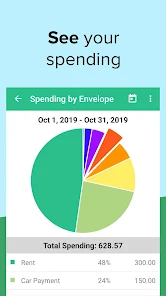
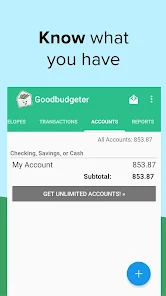
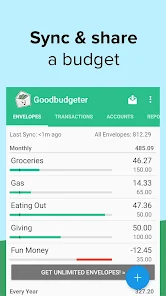
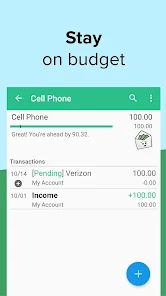
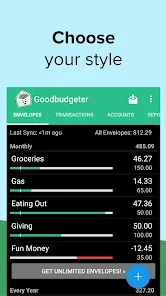
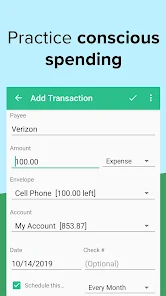
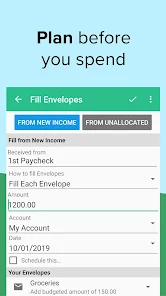
"Goodbudget: Budget & Finance" is a user-friendly budgeting app designed to help individuals manage their finances effectively. One of its standout features is the envelope budgeting system, which allows users to allocate funds to different categories or "envelopes" for various expenses. This visual approach makes it easier to track spending and stay within budget limits. Additionally, the app supports syncing across multiple devices, enabling users to access their budget from anywhere, whether on a smartphone or a computer.
Another notable feature is the ability to set savings goals, which encourages users to save for specific purposes, such as vacations or emergency funds. Goodbudget also provides detailed reports and insights into spending habits, helping users identify areas where they can cut back. Furthermore, the app allows for manual entry of transactions, making it suitable for those who prefer a hands-on approach to budgeting. Overall, Goodbudget combines simplicity with powerful tools to help users take control of their financial lives.
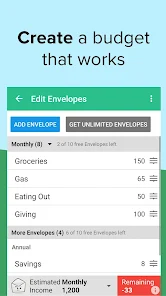
Using "Goodbudget: Budget & Finance" is straightforward and intuitive. To get started, users need to download the app from their device's app store and create an account. Once registered, users can set up their budget by creating envelopes for different spending categories, such as groceries, entertainment, and bills. Each envelope can be allocated a specific amount of money, which helps in visualizing how much is available for each category.
After setting up envelopes, users can begin tracking their expenses by entering transactions manually or syncing with their bank accounts. The app allows users to monitor their spending in real-time, ensuring they stay within their budget. Additionally, users can set savings goals and track their progress over time. Regularly reviewing reports and insights provided by the app can help users make informed financial decisions and adjust their budgets as needed. Overall, Goodbudget offers a comprehensive yet easy-to-use platform for effective financial management.
Like any budgeting app, "Goodbudget: Budget & Finance" has its advantages and disadvantages. One of the primary pros is its envelope budgeting system, which provides a clear visual representation of spending limits. This method can be particularly effective for users who prefer a tangible way to manage their finances. Additionally, the app's ability to sync across devices ensures that users can access their budgets anytime, anywhere, which adds to its convenience.
On the downside, some users may find the manual entry of transactions tedious, especially if they have a high volume of expenses. While the app does offer a free version, some features are limited, and users may need to subscribe to a paid plan for full access. Furthermore, Goodbudget does not connect directly to bank accounts, which may deter users who prefer automated tracking. Overall, while Goodbudget is a powerful tool for budgeting, it may not suit everyone's preferences or needs.

 Goodbudget helps you track spending easily with a user-friendly interface. It enables digital envelope budgeting for better financial organization. Access your budget anywhere with its mobile and web applications. Set savings goals to boost your financial planning and discipline. Sync across devices for real-time updates and collaboration with family.
 Limited features in the free version restrict budgeting flexibility. Syncing across devices can be inconsistent and frustrating. Lack of direct bank integration complicates tracking and managing expenses.
  Google Play
  App Store
 Yes, Goodbudget encourages users to submit suggestions and feedback through their support channels or within the app itself.
Goodbudget does not sell personal data and collects only the information necessary to provide its services while prioritizing user privacy.
Goodbudget allows limited offline access, but certain features, like syncing, require an internet connection.
You can cancel your Goodbudget subscription through your account settings in the app or by contacting customer support for assistance.
A Goodbudget subscription typically costs around $7 per month or $60 per year, providing enhanced features and allowances.
Yes, you can activate your account using just your email and password. The Customer Number is not required for activation.
Yes, you can change your email in the account settings after logging in. Make sure to verify the new email if prompted.
You can reach Goodbudget Customer Service through the in-app support feature or by emailing support
After logging in, go to account settings where you can update your payment information securely. If you need help, contact Customer Service.
To activate your account, follow the activation link sent to your email after sign-up. If you didn't receive it, check your spam folder or contact support.