

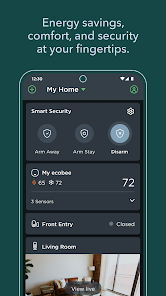
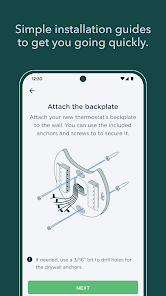
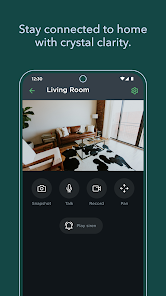
When it comes to smart home technology, ecobee stands out with an impressive array of features designed to enhance comfort, efficiency, and convenience. Below are some of the core highlights of the ecobee app that elevate it above the competition:
My journey with the ecobee app began during a particularly scorching summer. As someone who spends most of their day working from home, I found myself constantly fiddling with the thermostat. Once I installed the ecobee system and downloaded the app, everything changed. Now, I can effortlessly manage the temperature from my phone while I’m in my home office. One day, I had an unexpected meeting and realized the house was uncomfortably warm. With a quick tap on the app, I adjusted the air conditioning without missing a beat, making the environment more pleasant for my guests.
Another instance where the app truly shined was during a family vacation. I set the Home/Away Assist feature before we left, ensuring that the house wouldn’t be unnecessarily cooled while we were away. One evening, I received an alert about a sudden temperature spike. With just a few clicks, I could verify that everything was running smoothly, and I felt a wave of relief knowing I had control over my home’s climate while enjoying my time away.
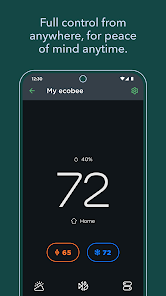
The user interface of the ecobee app is clean and intuitive, making it easy for anyone to navigate. Upon opening the app, I’m greeted with a straightforward dashboard that displays the current temperature and weather forecast. Accessing settings and features is seamless, with clearly labeled icons and options. Adjusting the thermostat is as simple as sliding a bar left or right, and I appreciate the quick response time; there’s no lag when making changes.
The app also offers a variety of customization options, allowing me to set schedules that align with my daily routines. I love how I can adjust settings on the go, which lends me peace of mind. Overall, using the ecobee app has not only made my home more comfortable but has also transformed how I think about energy consumption. I feel empowered to make smarter choices about my heating and cooling habits.
Ecobee’s pricing is competitive, especially considering the range of features it offers. The ecobee SmartThermostat starts around $249, and additional sensors can be purchased separately for about $79 each. Given the savings on my energy bills that I’ve experienced, I genuinely believe the initial investment pays for itself over time. Plus, the app is free to use, enhancing the overall value of the product.
Ecobee offers consistent updates to improve the app's functionality and performance. I appreciate that the company actively listens to user feedback and integrates valuable suggestions into their updates. Their customer support is also commendable. I had a minor issue with my thermostat connection once, and I received prompt assistance via their online chat feature. The representatives were knowledgeable and friendly, making the entire experience smooth and hassle-free.
As a tech-savvy user, security and privacy are always top of mind when using smart home devices. Ecobee has taken steps to ensure that user data is protected, which is reassuring. The app is available on both the App Store and Google Play, providing a reliable source for downloads. Upon registration, the app requires basic personal information, such as an email address, which is standard for most smart home applications.
One aspect I truly appreciate is that ecobee does not bombard users with ads, nor does it engage in invasive tracking behaviors. The app respects user privacy, only collecting data necessary for optimizing performance and improving user experience. I feel comfortable using the app knowing that my information is handled with care, allowing me to focus on enjoying the comfort and convenience that ecobee brings to my home.

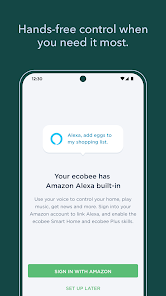
 Smart scheduling adapts to your lifestyle Energy savings reduce utility bills significantly Remote access via app enhances convenience Voice control integration offers hands-free operation Room sensors optimize comfort in every space
 Limited compatibility with certain HVAC systems User interface can be confusing for some Higher initial cost compared to competitors Requires Wi-Fi for full functionality
 Yes, ecobee collects data related to your thermostat use and preferences to provide personalized services, but it is committed to protecting your privacy and data security.
Ecobee does not offer a free trial, but users can access basic features without a subscription after purchasing an ecobee device.
Yes, ecobee devices require an internet connection to access features such as remote control, scheduling, and integration with smart home ecosystems.
You can contact ecobee support through their website, by email, or through the app, and feedback can also be submitted via their support channels.
You can manage or cancel your ecobee subscription through the ecobee app or website by accessing your account settings and following the prompts for subscription management.
Log in to the app, and your account status will be displayed on the home screen or under account settings.
You can reach ecobee customer service at 1-877-932-6233 for assistance.
On the app's login screen, tap "Forgot Password?" and follow the instructions to reset your password via email.
To activate, connect your ecobee to Wi-Fi, follow the prompts on the app, and register your device using the provided code.
Open the ecobee app, tap "Log In," enter your email and password, then tap "Sign In."












 Google Play
  App Store