

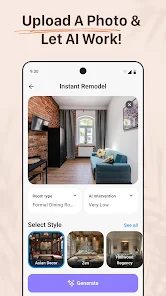
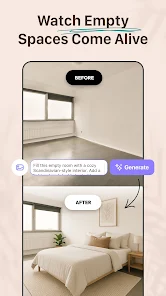

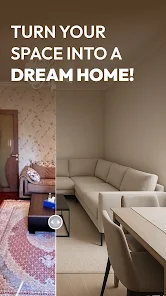

As someone who loves interior design but isn't a professional, I often find myself overwhelmed with choices. Recently, I decided to revamp my small apartment’s layout and decor. I started using AI Remodel during a weekend project where I aimed to convert my spare room into a cozy reading nook. I used the app to input the room dimensions, and it quickly generated several layout options. The ability to visualize different arrangements in 3D helped me decide on the best furniture placement without the hassle of moving bulky items around.
The user interface of AI Remodel is incredibly intuitive. When I first opened the app, I was greeted with a clean design that made navigation a breeze. The feature workflow is straightforward: you start by entering your room’s dimensions, select your style preferences, and the app does the rest. I found the performance to be swift, with minimal loading times, which is a huge plus when you're eager to see your ideas come to life. After spending a few hours experimenting with different designs, I felt a sense of empowerment, having transformed a bland space into something that truly reflected my personality.
AI Remodel offers a free version with basic features, which is great for casual users. However, to unlock the premium features such as advanced 3D visualization and unlimited design options, there is a subscription fee. I opted for the monthly plan, which felt reasonable considering the extensive tools and resources available. It’s worth it for anyone serious about interior design.
The app is regularly updated, and I’ve noticed new features being added every few months, which keeps the experience fresh. Customer support is also commendable. I had a minor issue with a design not saving properly, and I reached out via their support chat. The response was prompt, and they walked me through a quick fix, leaving me satisfied with their service.
When it comes to security and privacy, AI Remodel takes several measures to reassure American users. The app is available on both the App Store and Google Play, ensuring that it meets the necessary security standards for mobile applications. During the registration process, I was required to provide basic personal information like my email address, which is standard for most apps. However, I appreciate that the app is transparent about how my data is used, especially regarding design preferences and saved layouts.
While using the app, I noticed no intrusive ads, which is a relief. Instead, they focus on providing a smooth user experience. Additionally, the app does not engage in excessive tracking behavior; it only collects data essential to improving features and user experience. This approach has made me feel secure while using the app, knowing my information is handled responsibly.

 Transform your space effortlessly Personalized design suggestions Real-time 3D visualization Access to expert designers Seamless furniture integration Easy sharing with friends
 Limited design options available User interface can be confusing Requires high-quality images Occasional inaccuracies in layouts
  Google Play
  App Store
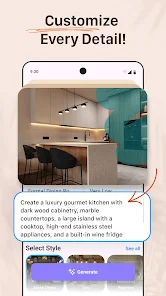
 Yes! AI Remodel allows users to customize designs extensively. You can adjust colors, furniture selections, layouts, and other elements to ensure the final design reflects your personal taste and lifestyle.
Yes, the app includes sharing options that allow users to easily share their designs with friends, family, or professional designers. This feature facilitates collaboration and feedback on design ideas.
Yes, AI Remodel is versatile and can be used for various types of rooms, including living rooms, bedrooms, kitchens, and bathrooms. Users can input specific dimensions and styles to get tailored design suggestions for any space in their home.
While AI Remodel is primarily focused on residential design, it can also be adapted for some commercial spaces, depending on the specific features offered. Users should check the app for relevant tools suitable for commercial interior design.
Some features of AI Remodel may require an internet connection for full functionality, such as accessing design suggestions or shopping links. However, certain offline capabilities may be available for users working on their designs without connectivity.
You can reach our customer service via the app's help section or by emailing support
If activation is necessary, simply enter the activation code sent to your email during the setup process. Follow the prompts to complete activation.
To log in, open the app and enter your registered email and password. If you forgot your password, use the "Forgot Password" link.
Our customer support number is 1-800-555-REMODEL. We're available Monday through Friday from 9 AM to 6 PM EST.