




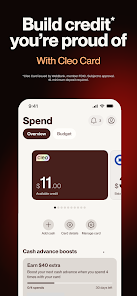



"Cleo AI: Cash Advance & Money" is a financial management app designed to help users take control of their finances with ease. One of its standout features is the AI-driven chatbot that provides personalized financial advice and insights. This interactive assistant can answer questions about spending habits, budgeting, and saving strategies, making financial literacy more accessible.
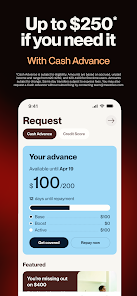
Another key feature is the cash advance option, which allows users to access funds quickly in times of need. This service is designed to be user-friendly, with minimal fees and a straightforward application process. Additionally, Cleo offers budgeting tools that help users track their expenses and set financial goals, ensuring they stay on top of their financial health.
The app also includes a social aspect, allowing users to share their financial journeys with friends and family, fostering a supportive community. Furthermore, Cleo provides insights into spending patterns, helping users identify areas where they can cut back and save more effectively. Overall, Cleo AI combines technology and finance to create a comprehensive tool for managing money.
Using "Cleo AI: Cash Advance & Money" is a straightforward process that begins with downloading the app from your device's app store. Once installed, users need to create an account by providing basic information and linking their bank accounts for seamless integration. This connection allows Cleo to analyze spending habits and provide tailored financial advice.
After setting up the account, users can interact with the AI chatbot to ask questions about their finances, receive budgeting tips, and explore cash advance options. The app's user-friendly interface makes it easy to navigate through various features, including expense tracking and goal setting. Users can also set up notifications to stay informed about their spending and savings progress.
To access cash advances, users simply need to request the amount they need, and Cleo will process the request quickly. The app also offers insights into spending patterns, helping users make informed decisions about their finances. Overall, Cleo AI is designed to empower users to take charge of their financial well-being with minimal effort.
Like any financial app, "Cleo AI: Cash Advance & Money" has its advantages and disadvantages. One of the primary pros is its user-friendly interface, which makes financial management accessible to users of all experience levels. The AI chatbot provides personalized advice, helping users understand their spending habits and make informed decisions. Additionally, the cash advance feature is a significant benefit for those who need quick access to funds without the hassle of traditional loans.
However, there are some cons to consider. The cash advance feature may come with fees that could add up if not managed carefully. Some users may also find the app's reliance on AI for financial advice less reliable than consulting a human financial advisor. Furthermore, while the app is designed to be secure, linking bank accounts can raise privacy concerns for some users.
In summary, "Cleo AI: Cash Advance & Money" offers a blend of innovative features and practical tools for managing finances, but potential users should weigh the pros and cons to determine if it aligns with their financial needs and preferences.

 Cleo AI offers personalized budgeting tailored to your spending habits. Track your expenses effortlessly with real-time insights and notifications. Build your credit score with guided tips and resources. Enjoy engaging features that make financial management fun and interactive. Access financial guidance any time, enhancing your money management skills.
 Limited investment options may hinder long-term financial growth User experience can be confusing for beginners Reliance on data may compromise privacy and security concerns
  Google Play
  App Store
 Yes, users can submit suggestions or feedback through the app's feedback feature or by contacting Cleo's customer support directly.
Yes, Cleo AI: Budget & Build Credit collects personal data to provide tailored financial advice and services, but it prioritizes user privacy and security.
Cleo AI: Budget & Build Credit primarily requires an internet connection to access real-time data and insights, so offline use is limited.
Users can cancel their subscription through the app settings or by managing their subscription in the respective app store (iOS or Android) where they initially subscribed.
The subscription cost for Cleo AI: Budget & Build Credit varies based on the plan chosen, with options for monthly or annual payments, typically starting around $5 per month.
Yes, you can activate your account by following the prompts in the app after signing up.
You can reach customer service through the app's help section or by emailing support
To keep your login information secure, use a strong password and enable two-factor authentication in the app settings.
Open the app and enter your email and password on the login screen to access your account.
If your customer number is incorrect, please contact customer service to have it updated.