



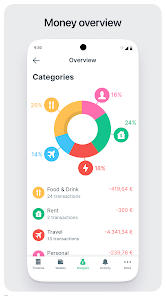
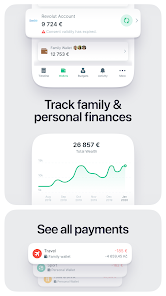
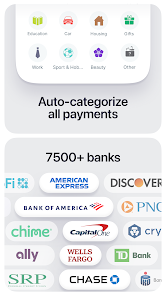

Spendee is a versatile budgeting app designed to help users manage their finances effectively. One of its standout features is the ability to create shared wallets, allowing multiple users to track expenses together, which is particularly useful for families or roommates. The app also supports multiple currencies, making it ideal for travelers or those dealing with international transactions. Users can categorize their expenses and income, providing a clear overview of their financial situation.
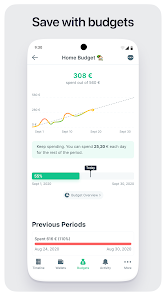
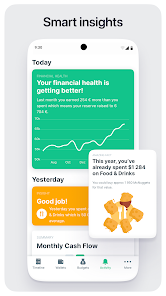
Another notable feature is the visual representation of financial data through graphs and charts, which helps users understand their spending habits at a glance. Spendee also offers customizable budgets, enabling users to set limits on various categories, ensuring they stay within their financial goals. Additionally, the app provides insights and reports, helping users identify trends and make informed decisions about their spending. With its user-friendly interface and robust features, Spendee is a comprehensive tool for anyone looking to take control of their finances.
Using Spendee is straightforward and user-friendly. To get started, download the app from your device's app store and create an account. Once registered, you can set up your profile by entering your income sources and linking your bank accounts for automatic transaction tracking. This feature simplifies the process of monitoring your finances, as it automatically categorizes your expenses.
After setting up your account, you can create budgets for different categories such as groceries, entertainment, and bills. Simply navigate to the budgeting section, select a category, and set your desired spending limit. As you make purchases, you can manually enter expenses or let the app track them automatically. Regularly reviewing your financial reports and insights will help you adjust your spending habits and stay on track with your financial goals. Overall, Spendee offers a seamless experience for managing your budget effectively.
Spendee comes with several advantages that make it a popular choice among budgeting apps. One of its primary benefits is the intuitive interface, which makes navigation easy for users of all experience levels. The ability to create shared wallets is another significant advantage, fostering collaboration in managing finances among family members or friends. Additionally, the app's visual data representation helps users quickly grasp their financial status, making it easier to identify areas for improvement.
However, Spendee does have some drawbacks. One notable con is that while the app offers a free version, many of its advanced features are locked behind a subscription paywall. This may deter users who are looking for a completely free budgeting solution. Furthermore, some users have reported occasional syncing issues with bank accounts, which can lead to discrepancies in tracking expenses. Despite these limitations, Spendee remains a powerful tool for those seeking to enhance their financial management skills.

 Easily track your spending habits for better financial awareness. Create custom budgets to manage your finances effectively. Sync bank accounts for real-time updates on your transactions. Visualize your expenses with intuitive charts and reports. Collaborate with family or friends for shared budget management.
 Limited features in the free version restrict comprehensive budgeting capabilities. User interface can be overwhelming for new users unfamiliar with budgeting apps. Lack of direct bank integration may complicate expense tracking for some users.
  Google Play
  App Store
 Yes, Spendee encourages users to submit suggestions or feedback through the app or their official website to help improve the service.
Spendee does collect some personal data to enhance user experience and provide personalized insights, but it adheres to strict privacy policies to protect user information.
Yes, Spendee allows users to track expenses and manage budgets offline, with data syncing available when an internet connection is restored.
Users can cancel their subscription through the app's settings or their account settings in the app store from which they purchased the subscription.
Subscription costs may vary based on the plan selected, but typically range from a monthly fee to a discounted annual fee.
Yes, you can log in to Spendee using your social media accounts such as Facebook or Google. Just select the appropriate option on the login page.
Absolutely! Our customer service team can assist you in recovering your login details. Just reach out for help.
You can reach our customer service via the support section in the app or through our website's contact form. We’re here to help!
To activate your account, click the activation link sent to your email after registration. If you didn't receive it, check your spam folder or contact customer service.
If you change your email, please contact customer service to update your customer number in our system. They will guide you through the process.