


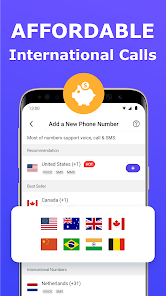
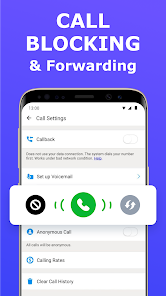

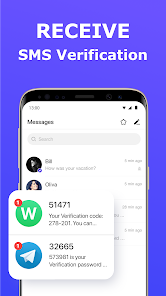
The "2nd Phone Number - Call & Text" app offers a variety of features designed to enhance communication while maintaining privacy. One of its primary features is the ability to create a second phone number that can be used for calls and text messages. This is particularly useful for individuals who want to separate personal and professional communications without needing an additional SIM card.
Another notable feature is the option to customize voicemail greetings, allowing users to personalize their messaging experience. The app also supports call forwarding, enabling users to redirect calls to their primary number if needed. Additionally, users can send and receive multimedia messages, making it versatile for various communication needs. The app's user-friendly interface ensures that even those who are not tech-savvy can navigate it easily. Furthermore, it provides options for temporary numbers, which can be useful for short-term projects or online transactions, enhancing security and privacy.
Using the "2nd Phone Number - Call & Text" app is straightforward and user-friendly. First, download the app from your device's app store and install it. Once installed, open the app and create an account by providing the necessary information, such as your email address and a password. After setting up your account, you will be prompted to choose a second phone number from a list of available options.
Once you have selected your new number, you can start making calls and sending texts immediately. The app allows you to manage your contacts and customize settings, such as voicemail greetings and notification preferences. To make a call, simply select the number from your contacts or enter it manually. For texting, navigate to the messaging section, compose your message, and send it just like you would with a regular phone number. The app also provides options for managing your call history and message threads, making it easy to keep track of your communications.
The "2nd Phone Number - Call & Text" app comes with several advantages. One of the main pros is the enhanced privacy it offers, allowing users to keep their personal and professional lives separate. This is particularly beneficial for freelancers, small business owners, or anyone who frequently interacts with clients. The app's user-friendly interface and customizable features, such as voicemail greetings, add to its appeal. Additionally, the option for temporary numbers provides an extra layer of security for online transactions or dating.
However, there are some drawbacks to consider. One potential con is that the app may require a subscription for full access to its features, which could be a deterrent for some users. Additionally, call quality and connectivity can vary based on network conditions, leading to occasional disruptions. Some users may also find that the app's functionality is limited compared to traditional phone services. Overall, while the app offers valuable features for privacy-conscious individuals, it is essential to weigh these pros and cons before committing to its use.

 Enjoy free voice calls to other TalkU users worldwide Access affordable international calling rates to any number Send unlimited text messages to friends and family User-friendly interface makes communication effortless for everyone No hidden fees, ensuring transparent and reliable service
 Limited call quality can lead to dropped connections and misunderstandings. Ads can interrupt the user experience, causing frustration during calls. International calling may incur unexpected fees, reducing cost-effectiveness for users.
  Google Play
  App Store
 Yes, users can submit suggestions or feedback through the app or by reaching out to TalkU's customer support team via their official website.
Yes, TalkU may collect personal data as part of its user registration and service provision, which is detailed in its privacy policy.
TalkU requires an internet connection to function, so it does not support offline use for making calls or sending messages.
To cancel your TalkU subscription, you can go to your account settings within the app and follow the cancellation process outlined there.
The cost of a subscription to TalkU varies based on the plan chosen, with options for monthly or annual payments; users can check the app for the latest pricing details.
Yes, you can change your second phone number by logging into your account and navigating to the settings. For further assistance, contact customer service.
Yes, providing your customer number will help expedite your request when contacting customer service. Have it ready for quicker assistance.
You can reach customer service by calling our support hotline or using the live chat feature on our website. We’re here to help!
To activate your second phone number, log in to your account and follow the activation prompts. If you need help, our customer service team is available.
Log in to your account and go to the billing section to update your payment information. For any issues, reach out to customer service for help.