


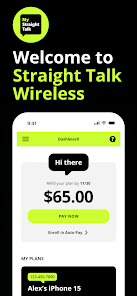



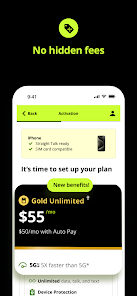
The "My Straight Talk" mobile app offers a variety of features designed to enhance the user experience for Straight Talk customers. One of the primary features is the ability to manage your account directly from your smartphone. Users can easily check their data usage, view their plan details, and monitor their account balance in real-time. This convenience allows customers to stay informed about their mobile usage without needing to log into a website.
Another notable feature is the option to refill your plan or add additional data with just a few taps. The app supports various payment methods, making it easy to keep your service active. Additionally, users can access customer support through the app, which includes FAQs and live chat options for immediate assistance. Notifications about plan renewals and promotional offers are also available, ensuring that users never miss out on important updates. Overall, the "My Straight Talk" app is a comprehensive tool for managing mobile services efficiently.
Using the "My Straight Talk" mobile app is straightforward and user-friendly. To get started, download the app from the Apple App Store or Google Play Store, depending on your device. Once installed, open the app and sign in using your Straight Talk account credentials. If you don’t have an account, you can easily create one within the app by providing your phone number and other required information.
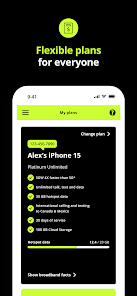
After logging in, you will be greeted with a dashboard that displays your account information, including your current plan, data usage, and balance. To refill your plan, navigate to the payment section, where you can choose your preferred payment method. The app also allows you to set up notifications for plan renewals and data usage alerts, helping you stay on top of your mobile service. For any questions or issues, the customer support feature provides quick access to assistance, making it a convenient tool for all Straight Talk users.
The "My Straight Talk" mobile app comes with several advantages that enhance the user experience. One of the main pros is its convenience; users can manage their accounts, check data usage, and make payments all in one place. The app's user-friendly interface makes navigation easy, even for those who may not be tech-savvy. Additionally, the ability to access customer support directly through the app is a significant benefit, as it provides quick solutions to any issues that may arise.
However, there are some cons to consider. Some users have reported occasional glitches or slow loading times, which can be frustrating. Additionally, while the app is generally reliable, there may be instances where certain features are temporarily unavailable due to maintenance or updates. Lastly, not all users may find the app necessary, especially if they prefer managing their accounts through a web browser. Overall, while the app has its drawbacks, its benefits often outweigh the negatives for many Straight Talk customers.

 Manage your account easily from anywhere with the mobile app. Track your data usage in real-time to avoid overages. Purchase or refill plans quickly and securely with just a few taps. Access customer support directly for immediate assistance and troubleshooting. Receive notifications for plan renewals and special offers to save money.
 Limited features compared to the full website experience Frequent app glitches can disrupt usage Customer support options are limited within the app
  Google Play
  App Store
 Yes, users can submit suggestions or feedback through the app or directly via the Straight Talk customer service channels to improve their experience.
Yes, My Straight Talk: Mobile App may collect personal data as part of its functionality, including account information and usage data, in accordance with its privacy policy.
While some features may be accessible offline, the app primarily requires an internet connection to access most functionalities and real-time account information.
To cancel your subscription, you need to contact Straight Talk customer service or manage your account through the app, following the provided instructions for plan cancellation.
The app itself does not have a subscription fee, but users need to maintain an active Straight Talk service plan to utilize its features fully.
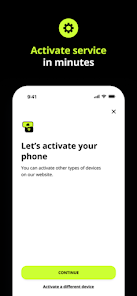
Yes, you can activate your account directly in the app by following the prompts on the activation screen.
Unfortunately, you cannot change your customer number through the app. Please contact customer service for assistance.
You can reach customer service by tapping on the "Contact Us" option within the app for quick assistance.
For support, tap on "Help" or "Contact Us" within the app to reach customer service.
Your customer number is located in the account settings section of the My Straight Talk app.