



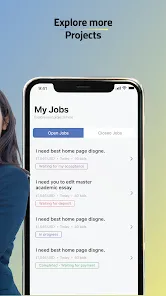

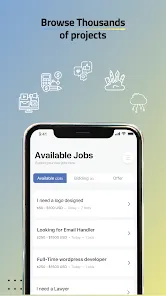
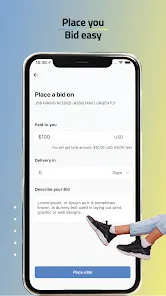


"24Task For Freelancers" is a comprehensive platform designed to connect freelancers with clients seeking various services. One of its standout features is the user-friendly interface, which allows both freelancers and clients to navigate the platform with ease. The platform supports a wide range of categories, including writing, graphic design, programming, and digital marketing, making it a versatile choice for professionals in different fields.
Another notable feature is the robust project management tools that help freelancers track their tasks and deadlines efficiently. The platform also offers secure payment options, ensuring that freelancers receive their payments promptly upon project completion. Additionally, "24Task" includes a rating and review system, allowing clients to provide feedback on freelancers' work, which helps maintain quality and accountability. Furthermore, the platform provides resources and support for freelancers to enhance their skills and grow their businesses, making it an all-in-one solution for freelance professionals.
Using "24Task For Freelancers" is a straightforward process that begins with creating an account. Freelancers can sign up by providing their basic information and setting up a profile that highlights their skills, experience, and portfolio. Once registered, users can browse available projects or post their services to attract potential clients. The platform's search functionality allows freelancers to filter projects based on their expertise and preferences, making it easier to find suitable opportunities.
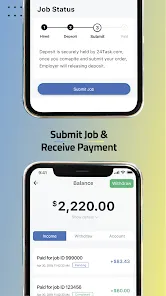
After identifying a project of interest, freelancers can submit proposals outlining their approach, timeline, and pricing. Communication with clients is facilitated through the platform, allowing for discussions and clarifications before starting the work. Once a project is completed, freelancers can submit their work for review and receive payment through the secure payment system. Regularly updating their profiles and gathering positive reviews can help freelancers build a strong reputation on the platform, leading to more opportunities in the future.
Like any platform, "24Task For Freelancers" has its advantages and disadvantages. One of the primary pros is the wide range of job categories available, which caters to various skill sets and industries. This diversity allows freelancers to find work that aligns with their expertise. Additionally, the platform's user-friendly interface and project management tools enhance the overall user experience, making it easier for freelancers to manage their workload effectively.
On the downside, some users may find the competition on the platform to be quite intense, as many freelancers vie for the same projects. This can sometimes lead to lower rates, as freelancers may feel pressured to underbid to secure work. Furthermore, while the platform offers secure payment options, there may be fees associated with transactions that could impact freelancers' earnings. Overall, while "24Task For Freelancers" provides valuable opportunities, freelancers should weigh these pros and cons before fully committing to the platform.

 Access a diverse range of projects across various industries. Flexible working hours allow you to manage your own schedule. Secure payment systems ensure timely and reliable compensation. User-friendly interface simplifies project management and communication. Build a strong portfolio by showcasing your completed work.
 Limited job variety may restrict freelancers from exploring diverse opportunities. Low client engagement often leads to communication challenges and misunderstandings. High competition can make it difficult for newcomers to secure projects.
  Google Play
  App Store
 Yes, users can submit suggestions or feedback through the app’s support feature or via email to the support team.
Yes, 24Task For Freelancers collects personal data as part of account creation and usage, but it is committed to protecting user privacy according to its privacy policy.
24Task For Freelancers primarily requires an internet connection to access its features, so offline use is limited.
You can cancel your subscription through your account settings in the app or by contacting customer support for assistance.
Subscription costs may vary, so it’s best to check the app for the most current pricing information and any available plans.
Yes, you can update your customer number by contacting customer service for assistance with the process.
To activate your account, check your email for the activation link and click it. If you didn’t receive it, contact customer service for assistance.
You can reach our customer service via the support section on our website or by emailing us directly for assistance with your login issues.
To log in, visit the website, enter your email and password, and click the login button. If you have trouble, check your email for your customer number.
You can contact customer service as often as needed; we’re here to assist you with any questions or issues you may have.



























