
 Home
Home  Apps
Apps  Games
Games  Windows
  Topics
  Terms of Service
  Cookies & Privacy Policy
  Disclaimer
TalkingParents: Co-Parent App


Information
- Category: Parenting
- Price: free
- Age Rating: Everyone
- Rating: 2.7
- Developer: Monitored Communications, LLC
- Version: 8.2.0
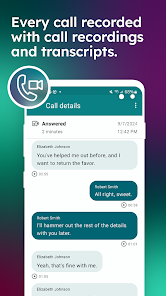
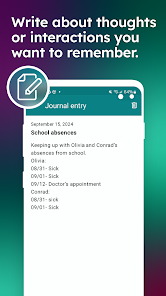

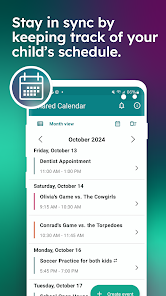
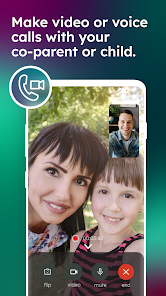
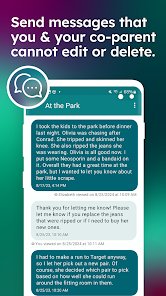
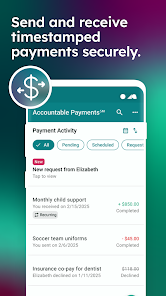
TalkingParents is a co-parenting app designed to simplify communication and organization for separated or divorced parents. It provides a secure platform for messaging, sharing schedules, and managing important documents, ensuring that both parents stay informed and engaged in their child's life. With features like a shared calendar and expense tracking, TalkingParents promotes transparency and accountability, helping to reduce conflict and foster a cooperative parenting relationship.
Features of "TalkingParents: Co-Parent App"
"TalkingParents: Co-Parent App" is designed to facilitate communication between co-parents, ensuring that all interactions are documented and organized. One of its standout features is the secure messaging system, which allows parents to communicate in real-time while keeping a record of all conversations. This is particularly useful in case of disputes, as it provides a clear history of interactions.
Another key feature is the shared calendar, which helps parents coordinate schedules for their children, including visitation times, school events, and extracurricular activities. This feature minimizes misunderstandings and ensures that both parents are on the same page regarding their child's commitments.
The app also includes a document storage feature, allowing users to upload and share important files such as medical records, school reports, and legal documents. Additionally, the app offers a journal feature, enabling parents to log important events or concerns regarding their child's well-being. Overall, "TalkingParents" aims to streamline communication and foster a cooperative parenting environment.
How to Use "TalkingParents: Co-Parent App"
Using the "TalkingParents: Co-Parent App" is straightforward and user-friendly. First, download the app from your device's app store and create an account. You will need to provide basic information, including your name, email address, and a secure password. Once registered, you can invite your co-parent to join by sending them an invitation through the app.
After both parents have created accounts, you can start using the messaging feature to communicate. All messages sent through the app are automatically logged, ensuring that you have a complete record of your conversations. To utilize the shared calendar, simply add events and appointments, which both parents can view and edit as needed.
For document sharing, navigate to the document storage section to upload files that you want to share with your co-parent. You can also use the journal feature to note any significant events or concerns regarding your child. By regularly using these features, you can maintain clear communication and effectively manage co-parenting responsibilities.
Pros & Cons of the App
The "TalkingParents: Co-Parent App" offers several advantages that make it a valuable tool for co-parents. One of the primary benefits is its focus on documentation, which can be crucial in legal situations. The secure messaging feature ensures that all communications are recorded, providing a reliable reference in case of disputes. Additionally, the shared calendar helps parents coordinate schedules effectively, reducing the likelihood of misunderstandings.
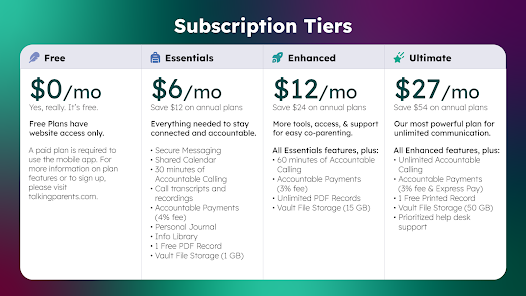
However, there are some drawbacks to consider. Some users may find the app's interface less intuitive than desired, which could lead to a learning curve for new users. Additionally, while the app is free to use, certain premium features may require a subscription, which could be a barrier for some families. Furthermore, reliance on technology for communication may not suit every co-parenting dynamic, especially if one parent is less tech-savvy.
In summary, while "TalkingParents: Co-Parent App" provides essential tools for effective co-parenting, it is important to weigh its pros and cons to determine if it fits your family's needs.
 Google Play
  App Store
 FAQ
Can I create playlists on Spotify?
Yes, users can create, share, and collaborate on playlists with friends.
Can I download music on Spotify?
Yes, premium users can download songs and playlists for offline listening.
Can I listen to Spotify offline?
Yes, premium users can listen to downloaded music offline without an internet connection.
Can I use Spotify on multiple devices?
Yes, you can use Spotify on multiple devices, but only one device can stream at a time.
Does Spotify have podcasts?
Yes, Spotify hosts a wide range of podcasts across various genres.
Similar Apps















You May Like

Findmykids: Kids GPS Tracker
Parenting
4.6

Amazon Kids+: Books, Videos…
Parenting
4

Microsoft Family Safety
Parenting
3.9

Speech Blubs: Language Therapy
Parenting
4.5

OurFamilyWizard Co-Parent App
Parenting
4.5

AirDroid Parental Control
Parenting
4.5

Eyezy: GPS phone tracker
Parenting
3.4

KidsGuard-Parental Control App
Parenting

Bark - Parental Controls
Parenting
4.2
Parental Control App- FamiSafe
Parenting
3.3

Solid Starts: Baby Food App
Parenting
4.9

Babysits - Find Babysitters
Parenting
4.1