
 Home
Home  Apps
Apps  Games
Games  Windows
  Topics
  Terms of Service
  Cookies & Privacy Policy
  Disclaimer
Sitly - The babysitter app


Information
- Category: Parenting
- Price: Share
- Age Rating: Everyone
- Rating: 1.5
- Developer: Sitly babysitting app development
- Version: 2.3.0
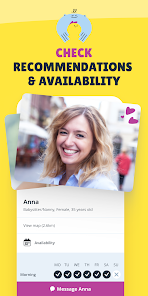
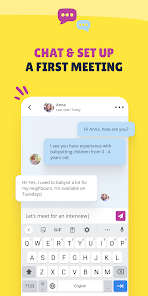
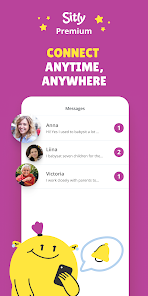
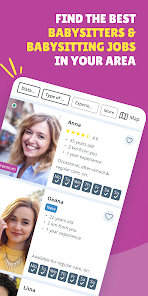


Sitly is the ultimate babysitter app designed to connect families with trusted caregivers effortlessly. With a user-friendly interface, parents can easily find, review, and hire local babysitters who match their specific needs. Sitly prioritizes safety and reliability, offering profiles with ratings and reviews to ensure peace of mind. Whether you need occasional help or regular childcare, Sitly makes it simple to find the perfect babysitter for your family. Enjoy more freedom while knowing your children are in good hands!
Features of "Sitly - The Babysitter App"
"Sitly - The Babysitter App" offers a variety of features designed to connect parents with reliable babysitters. One of the standout features is the user-friendly interface that allows parents to easily create profiles, detailing their childcare needs and preferences. This includes specifying the age of their children, required hours, and any special requirements. Additionally, the app provides a robust search function, enabling parents to filter potential babysitters based on location, availability, and experience.
Another key feature is the in-app messaging system, which facilitates direct communication between parents and babysitters. This allows for easy scheduling and discussions about specific needs. The app also includes a review and rating system, helping parents make informed decisions based on the experiences of others. Furthermore, Sitly offers a secure payment system, ensuring that transactions are safe and straightforward. Overall, these features work together to create a seamless experience for both parents and caregivers.
How to Use "Sitly - The Babysitter App"
Using "Sitly - The Babysitter App" is a straightforward process that begins with downloading the app from your device's app store. Once installed, users can create an account by providing basic information such as their name, email address, and location. After setting up the account, parents can create a detailed profile outlining their childcare needs, including the number of children, their ages, and preferred babysitting hours.
Next, parents can browse through a list of available babysitters in their area. The app allows users to filter results based on various criteria, such as experience, ratings, and availability. Once a suitable babysitter is found, parents can initiate contact through the in-app messaging feature to discuss details and arrange a meeting. After confirming the babysitter, parents can manage bookings and payments directly through the app, ensuring a smooth and efficient process for both parties.
Pros & Cons of the App
Like any service, "Sitly - The Babysitter App" has its advantages and disadvantages. One of the primary pros is the extensive database of babysitters, which provides parents with a wide range of options to choose from. The app's user-friendly interface and filtering options make it easy to find a suitable caregiver based on specific needs. Additionally, the in-app messaging feature allows for seamless communication, and the review system helps parents make informed choices based on feedback from other users.
On the downside, some users may find that the quality of babysitters can vary significantly, as the app relies on user-generated profiles and reviews. Additionally, while the app is designed to facilitate secure payments, some parents may still have concerns about the safety and reliability of the caregivers they hire. Lastly, the availability of babysitters may fluctuate, especially during peak times, which could limit options for parents in urgent need of childcare. Overall, weighing these pros and cons can help users make the best decision for their family's needs.
 Google Play
  App Store
 FAQ
Can I create playlists on Spotify?
Yes, users can create, share, and collaborate on playlists with friends.
Can I download music on Spotify?
Yes, premium users can download songs and playlists for offline listening.
Can I listen to Spotify offline?
Yes, premium users can listen to downloaded music offline without an internet connection.
Can I use Spotify on multiple devices?
Yes, you can use Spotify on multiple devices, but only one device can stream at a time.
Does Spotify have podcasts?
Yes, Spotify hosts a wide range of podcasts across various genres.
Similar Apps














You May Like
Findmykids: Kids GPS Tracker
Parenting
4.6

Amazon Kids+: Books, Videos…
Parenting
4

Microsoft Family Safety
Parenting
3.9

Speech Blubs: Language Therapy
Parenting
4.5

OurFamilyWizard Co-Parent App
Parenting
4.5
AirDroid Parental Control
Parenting
4.5

Eyezy: GPS phone tracker
Parenting
3.4

KidsGuard-Parental Control App
Parenting

Bark - Parental Controls
Parenting
4.2
Parental Control App- FamiSafe
Parenting
3.3

Solid Starts: Baby Food App
Parenting
4.9

Babysits - Find Babysitters
Parenting
4.1