



Solocator - GPS Field Camera is a powerful tool designed for professionals who require precise geolocation data in their photography. One of its standout features is the ability to embed GPS coordinates directly into images, ensuring that every photo is tagged with accurate location information. This is particularly useful for fields such as surveying, construction, and environmental monitoring.
Another notable feature is the integration of time-stamping, which allows users to track when each photo was taken. This is essential for documentation purposes, especially in projects that require chronological records. The app also supports various image formats, providing flexibility in how users can capture and store their photos.
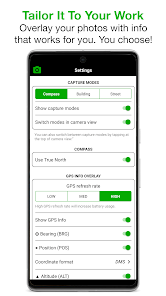
Additionally, Solocator offers customizable settings, enabling users to adjust parameters such as image resolution and GPS accuracy. The user-friendly interface makes it easy to navigate through the app, while the option to add notes or descriptions enhances the context of each image. Overall, Solocator combines functionality with ease of use, making it an invaluable asset for fieldwork.
Using Solocator - GPS Field Camera is straightforward, making it accessible for both seasoned professionals and newcomers. First, download and install the app on your smartphone or tablet. Once installed, open the app and grant it permission to access your device's GPS and camera features. This is crucial for the app to function correctly and capture location data.
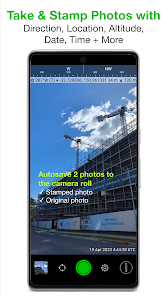
After setting up, you can customize your preferences, such as image quality and GPS accuracy. To take a photo, simply tap the camera icon within the app. The app will automatically capture the GPS coordinates and time stamp, embedding this information into the image file. You can also add notes or descriptions to provide additional context.
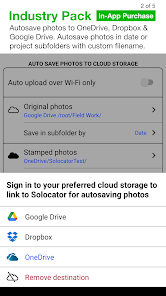
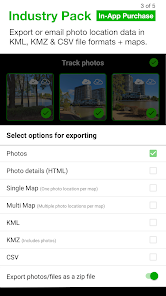
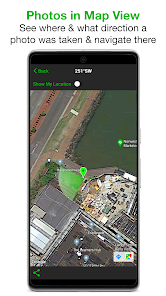
Once you've taken your photos, you can easily share them via email or social media, or export them to your preferred storage solution. The app also allows you to view your images on a map, providing a visual representation of where each photo was taken. This feature is particularly useful for project management and reporting.
Like any application, Solocator - GPS Field Camera has its advantages and disadvantages. One of the primary pros is its ability to seamlessly integrate GPS data into images, which is invaluable for professionals in fields like surveying and environmental science. The user-friendly interface and customizable settings also enhance the overall experience, making it easy to tailor the app to individual needs.
However, there are some cons to consider. The app's reliance on GPS can sometimes lead to inaccuracies in areas with poor signal reception, which may affect the quality of the geolocation data. Additionally, while the app is generally intuitive, some users may find the initial setup process a bit cumbersome, especially if they are not tech-savvy.
Furthermore, while the app is feature-rich, it may not offer all the advanced functionalities that some professional photographers or surveyors might require. Overall, Solocator - GPS Field Camera is a robust tool for those needing GPS-enabled photography, but potential users should weigh its pros and cons based on their specific needs.

 Solocator enables precise geotagging for accurate location data capture. The camera enhances project documentation with time-stamped images. Its user-friendly interface simplifies operation for all skill levels. High-resolution images ensure clarity in every captured detail. The app supports multiple formats for versatile sharing and reporting.
 Limited battery life may hinder extended field use. The camera's bulkiness can affect portability and ease of use. High price point may not justify its features for all users.
 Yes, users can submit suggestions or feedback directly through the app or via the official website, where the development team welcomes input to improve the application.
Solocator - GPS Field Camera may collect certain data for functionality and service improvement, but it is designed to prioritize user privacy and does not share personal data with third parties without consent.
Yes, Solocator - GPS Field Camera supports offline use, allowing users to capture photos and videos even without an internet connection. The geotagging functionality will still work using GPS data.
Users can cancel their subscription through the app store they used to purchase it, following the specific cancellation process outlined by either the Apple App Store or Google Play Store.
The subscription cost for Solocator - GPS Field Camera varies based on the plan selected, with options typically including monthly and yearly subscriptions that provide full access to all features.
Yes, you can reset your password by clicking on the "Forgot Password" link on the login page.
You can activate your account by clicking the activation link sent to your email after registration.
You can reach our customer service by emailing support
To log in, visit our website and enter your email and password in the login section.
You can update your information by logging in to your account and navigating to the account settings section.












 Google Play
  App Store














