
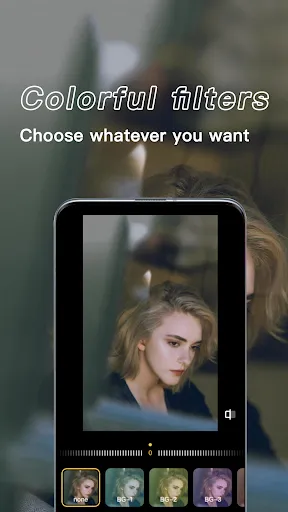


"X PhotoKit" is a comprehensive photo editing application designed to cater to both amateur and professional photographers. One of its standout features is the intuitive user interface, which allows users to navigate through various editing tools effortlessly. The app offers a wide range of filters and presets that can enhance images with just a single click, making it easy to achieve stunning results without extensive editing knowledge.
Additionally, "X PhotoKit" includes advanced editing tools such as layer management, masking, and blending options, enabling users to perform intricate edits. The app supports high-resolution images, ensuring that the quality of photos is maintained throughout the editing process. Users can also take advantage of batch processing, which allows for the simultaneous editing of multiple images, saving time and effort. Furthermore, the app provides cloud storage integration, making it easy to access and share edited photos across devices.
Lastly, "X PhotoKit" features a community platform where users can share their work, gain inspiration, and receive feedback from fellow photographers, fostering a collaborative environment for creativity.
Using "X PhotoKit" is a straightforward process that begins with downloading and installing the app on your device. Once installed, launch the application and create an account or log in if you already have one. The main interface will present you with options to import photos from your device or cloud storage. Select the images you wish to edit and click on the 'Edit' button to access the editing workspace.
In the editing workspace, you will find a variety of tools on the sidebar, including filters, adjustments, and effects. Start by applying filters to enhance the overall look of your photos. You can then fine-tune your images using the adjustment tools for brightness, contrast, saturation, and more. For more advanced edits, utilize the layer management feature to create complex compositions. Once you are satisfied with your edits, save your work and choose the export option to share your photos directly to social media or save them to your device.
Regularly explore the community section for tips, tutorials, and inspiration from other users to enhance your editing skills further.
"X PhotoKit" comes with several advantages that make it a popular choice among photo editing enthusiasts. One of the primary pros is its user-friendly interface, which simplifies the editing process for beginners while still offering advanced features for experienced users. The extensive library of filters and presets allows for quick enhancements, and the batch processing feature is a significant time-saver for those working with multiple images. Additionally, the cloud storage integration ensures that users can access their work from anywhere, making it convenient for on-the-go editing.
However, there are some drawbacks to consider. Some users may find that the app requires a subscription for access to premium features, which could be a deterrent for those on a budget. Additionally, while the app is feature-rich, it may have a learning curve for users unfamiliar with advanced editing techniques. Lastly, occasional performance issues, such as lagging during heavy edits, can be frustrating. Overall, while "X PhotoKit" offers a robust set of tools for photo editing, potential users should weigh these pros and cons before committing.

 X PhotoKit offers intuitive editing tools for all skill levels Enjoy seamless integration with popular photo platforms Enhance images with advanced filters and presets for stunning results Organize and manage photos effortlessly with smart tagging features Share creations instantly on social media with one-click options
 X PhotoKit has a steep learning curve for new users. Limited integration with other software can hinder workflow efficiency. Occasional performance issues may disrupt editing tasks and frustrate users.
  Google Play
  App Store
 Yes, X PhotoKit encourages users to submit suggestions or feedback through the app's support section or via their official website.
X PhotoKit has a privacy policy that outlines the data collected, which typically includes usage data and user preferences, but does not collect sensitive personal information without consent.
Yes, X PhotoKit allows users to access certain features and edit photos offline, although some functionalities may require an internet connection.
You can cancel your X PhotoKit subscription through your account settings in the app or via the app store where you purchased the subscription.
A subscription to X PhotoKit generally costs $9.99 per month or $99.99 per year, with occasional discounts or promotions available.
Unfortunately, customer numbers cannot be changed. If you have any concerns, please contact customer service for assistance.
To activate your account, follow the link sent to your email after registration. If you didn’t receive the email, check your spam folder or contact customer service.
You can reach our customer service by emailing support
For help with your subscription, log into your account and check the subscription section. You can also contact customer service for any specific questions.
Simply visit the login page, enter your registered email and password, then click "Log In." If you encounter issues, please contact customer service.