






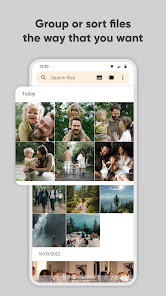
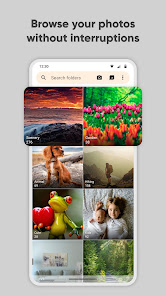
Simple Gallery Pro is a versatile photo management app designed to enhance your photo viewing experience. One of its standout features is the ability to organize images into customizable albums, allowing users to categorize their photos according to personal preferences. The app supports a wide range of file formats, including JPEG, PNG, and GIF, ensuring compatibility with various image types.
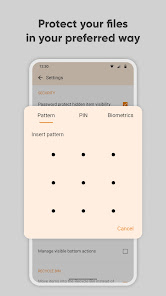
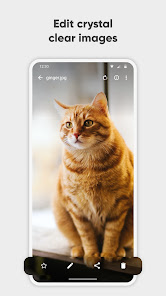
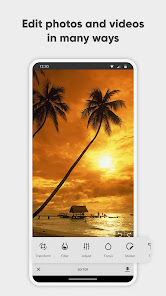
Another notable feature is the built-in editing tools, which enable users to make quick adjustments to their photos, such as cropping, rotating, and applying filters. The app also offers a slideshow mode, allowing users to enjoy their images in a dynamic presentation format. Additionally, Simple Gallery Pro prioritizes user privacy, providing options to hide albums and protect them with passwords. The intuitive interface makes navigation seamless, ensuring that users can easily access their favorite images without hassle.
Furthermore, the app includes a powerful search function, enabling users to find specific photos quickly. With its lightweight design, Simple Gallery Pro is optimized for performance, ensuring smooth operation even on devices with limited resources. Overall, these features make it a comprehensive solution for anyone looking to manage and enjoy their photo collection efficiently.
Using Simple Gallery Pro is straightforward and user-friendly, making it accessible for individuals of all tech levels. To get started, download and install the app from your device's app store. Once installed, open the app, and you will be greeted with a clean interface that displays your photo library. You can easily navigate through your images by swiping or tapping on thumbnails.
To create a new album, simply tap the "Create Album" button, name your album, and select the photos you wish to include. You can also rearrange photos within albums by dragging and dropping them into your desired order. For editing, select a photo and tap the edit icon to access various tools, such as cropping, rotating, and applying filters. If you want to keep certain albums private, you can enable password protection in the settings menu.
Additionally, the app allows you to share your photos directly to social media or via messaging apps. To do this, select the photo or album you want to share, tap the share icon, and choose your preferred sharing method. With these simple steps, you can effectively manage and enjoy your photo collection using Simple Gallery Pro.
Simple Gallery Pro comes with several advantages that make it a popular choice among users. One of the primary pros is its user-friendly interface, which allows for easy navigation and quick access to features. The app's robust editing tools enable users to enhance their photos without needing additional software. Furthermore, the ability to create customizable albums and hide them for privacy adds a layer of organization and security that many users appreciate.
However, there are some drawbacks to consider. While the app supports various file formats, it may not handle certain high-resolution images as efficiently as some users would like. Additionally, some advanced editing features may be limited compared to dedicated photo editing apps. Users have also reported occasional bugs, which can disrupt the overall experience. Lastly, while the app is generally lightweight, it may consume more resources on older devices, leading to slower performance.
In summary, Simple Gallery Pro offers a solid balance of features and usability, making it a great option for photo management. However, potential users should weigh the pros and cons to determine if it meets their specific needs and expectations.

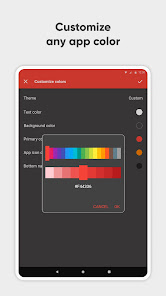
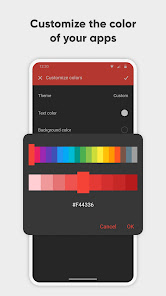
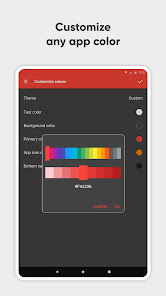
 User-friendly interface makes photo management effortless and enjoyable. Supports various file formats for versatile gallery options. Advanced customization options allow personalized gallery designs and layouts. Fast loading times ensure a seamless viewing experience for users. Built-in sharing features facilitate easy social media integration.
 Limited customization options restrict unique gallery designs. Performance issues may arise with large image collections. Lack of direct support can hinder troubleshooting for users.
  Google Play
  App Store
 Yes, users can submit suggestions or feedback through the app's support or contact section, which is regularly monitored by the development team.
Simple Gallery Pro is designed with user privacy in mind and does not collect personal data without user consent.
Yes, Simple Gallery Pro can be used offline, allowing users to access and manage their media files without an internet connection.
You can cancel your subscription to Simple Gallery Pro through your app store account settings or the subscription management section of the app.
The subscription cost for Simple Gallery Pro varies depending on the plan chosen, with options for monthly or yearly subscriptions.
Yes, you can activate your account by following the activation link sent to your email after registration.
Customer Numbers are unique and cannot be changed. If you need assistance, contact Customer Service.
To change your login credentials, log in to your account, go to settings, and select 'Change Password' or 'Update Email.'
You can reach our Customer Service through the support section in the app or by emailing support
Your Customer Number can be found in your account settings or in the confirmation email you received upon registration.



























