


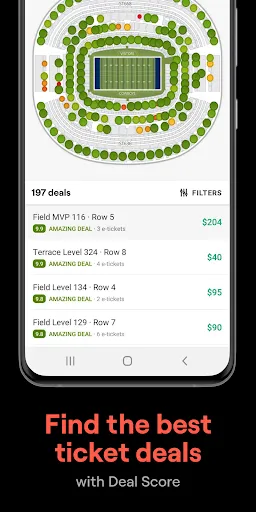
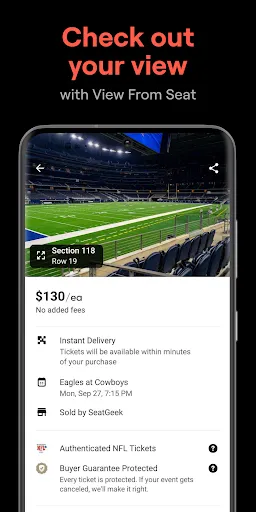
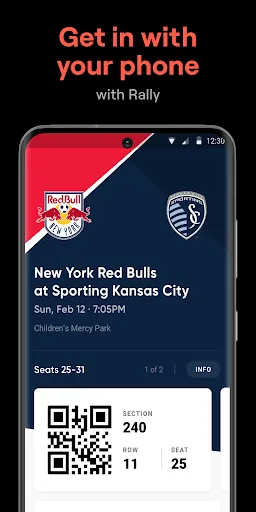
SeatGeek is a comprehensive ticketing platform that offers a variety of features designed to enhance the user experience when purchasing tickets for events. One of its standout features is the interactive seating chart, which allows users to visualize the venue layout and select their preferred seats. This feature is particularly useful for concert-goers and sports fans who want to ensure they are seated in the best possible location.
Another notable feature is the price comparison tool, which aggregates ticket prices from various sellers, enabling users to find the best deals available. Additionally, SeatGeek provides a user-friendly mobile app that allows for easy browsing and purchasing of tickets on the go. The app also includes personalized recommendations based on user preferences and past purchases, making it easier to discover new events.
Furthermore, SeatGeek offers a "Deal Score" feature that rates tickets based on their value, helping users make informed decisions. The platform also supports a wide range of events, from concerts and sports to theater and comedy shows, ensuring that there is something for everyone. Overall, SeatGeek combines convenience, transparency, and a user-friendly interface to create a seamless ticket-buying experience.
Using the SeatGeek app is a straightforward process that allows users to easily find and purchase tickets for their favorite events. To get started, users need to download the SeatGeek app from their device's app store and create an account. Once logged in, users can browse events by category, such as concerts, sports, or theater, or search for specific events using the search bar.
After selecting an event, users can view the interactive seating chart to choose their desired seats. The app displays various ticket options along with their prices, allowing users to compare deals. Once a selection is made, users can proceed to checkout, where they will enter their payment information and confirm their purchase. SeatGeek also provides an option to save tickets to a digital wallet for easy access on the day of the event.
Additionally, users can take advantage of the app's personalized recommendations and alerts for upcoming events based on their interests. This feature ensures that users never miss out on their favorite artists or teams. Overall, the SeatGeek app is designed to make the ticket-buying process as simple and efficient as possible, catering to both casual attendees and avid fans alike.
Like any app, SeatGeek has its advantages and disadvantages. One of the primary pros is its user-friendly interface, which makes it easy for users to navigate through various events and find tickets quickly. The interactive seating chart is another significant advantage, as it allows users to visualize their seating options before making a purchase. Additionally, the price comparison feature helps users secure the best deals, making it a cost-effective choice for ticket buyers.
However, there are some cons to consider. One downside is that, while SeatGeek aggregates ticket prices from multiple sellers, this can sometimes lead to inconsistencies in availability and pricing. Users may find that certain tickets are sold out on one platform but available on another, which can be frustrating. Furthermore, some users have reported issues with customer service responsiveness, particularly when it comes to resolving ticket-related problems.
In summary, while SeatGeek offers a range of features that enhance the ticket-buying experience, potential users should weigh these pros and cons carefully. Overall, it remains a popular choice for those looking to attend live events, thanks to its convenience and comprehensive offerings.

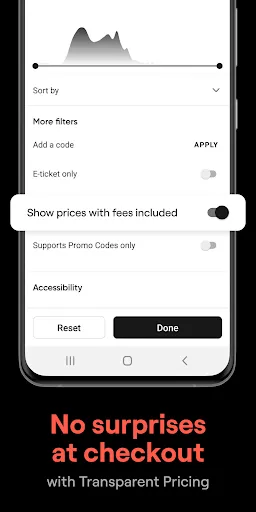
 Find tickets for a wide variety of events easily and quickly. Enjoy competitive pricing with transparent fee structures for better budgeting. Access interactive seating charts to select your ideal view and location. Receive personalized recommendations tailored to your interests and preferences. Benefit from a user-friendly mobile app for convenient ticket management on-the-go.
 Limited availability for popular events can lead to higher prices. User interface may feel cluttered and confusing at times. Customer service response times can be slow during peak periods.
  Google Play
  App Store
 Yes, users can submit suggestions or feedback through the app's help or support section, or by contacting customer service directly.
Yes, SeatGeek – Tickets to Events collects personal data, such as your name, email address, and payment information, to process transactions and enhance your user experience.
The app primarily requires an internet connection for ticket purchases and updates, but users can access their purchased tickets offline once they are downloaded to the app.
Since there is no subscription for SeatGeek – Tickets to Events, there is no cancellation process. Users can simply stop using the app at any time.
SeatGeek – Tickets to Events does not have a subscription model; it allows users to purchase tickets on a pay-per-event basis.
Yes, you can activate your account through the SeatGeek mobile app by following the prompts after downloading.
You can reach our customer service team through the help section on our website or by emailing support
For account activation help, visit the activation page or contact customer service for detailed guidance.
Once logged in, go to your account settings, and you can update your email address from there.
To log in, visit our website or app and enter your email and password in the login section.