




















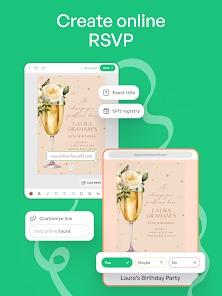

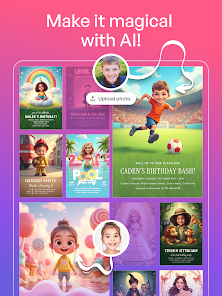



"Invitation Maker: Cards & RSVP" is a versatile application designed to simplify the process of creating and sending invitations for various events. One of its standout features is the extensive library of customizable templates, which cater to a wide range of occasions, including weddings, birthdays, and corporate events. Users can easily personalize these templates by adding their own text, images, and colors, ensuring that each invitation reflects their unique style.
Another notable feature is the RSVP management system, which allows hosts to track responses efficiently. This feature helps in planning and organizing events by providing real-time updates on guest attendance. Additionally, the app supports sharing invitations via multiple platforms, including social media and email, making it easy to reach a wider audience. Users can also save their designs for future use, streamlining the invitation process for recurring events. Overall, "Invitation Maker: Cards & RSVP" combines creativity with practicality, making it an essential tool for anyone looking to host a memorable event.
Using "Invitation Maker: Cards & RSVP" is a straightforward process that allows users to create stunning invitations in just a few steps. First, download the app from your device's app store and open it. Upon launching the app, you will be greeted with a variety of templates categorized by event type. Browse through the options and select a template that resonates with your event theme.
Once you've chosen a template, you can customize it by tapping on the text fields to enter your event details, such as the date, time, and location. The app also allows you to upload images or choose from its library to enhance your invitation's visual appeal. After finalizing your design, you can preview it to ensure everything looks perfect. Finally, share your invitation via email, social media, or through a direct link, and manage RSVPs directly within the app. This user-friendly approach makes it easy for anyone to create beautiful invitations without any design experience.
"Invitation Maker: Cards & RSVP" comes with several advantages that make it a popular choice among users. One of the primary pros is its user-friendly interface, which allows even those with minimal design skills to create professional-looking invitations. The extensive library of templates caters to various events, providing users with plenty of options to choose from. Additionally, the RSVP management feature is a significant benefit, as it helps hosts keep track of guest responses efficiently.
However, the app is not without its drawbacks. Some users may find that certain advanced features require a premium subscription, which could be a deterrent for those looking for a completely free solution. Additionally, while the app offers a wide range of templates, some users may desire more customization options to create truly unique designs. Overall, while "Invitation Maker: Cards & RSVP" is a powerful tool for event planning, potential users should weigh these pros and cons before diving in.

 Easily customize designs to match your event's theme and style. Access a wide variety of templates for any occasion. User-friendly interface makes creating invitations quick and effortless. Share digital invitations instantly via social media or email. Save time and money with DIY options for stunning invitations.
 Limited customization options can restrict creative expression. The app may contain ads that disrupt the user experience. Exporting designs can sometimes lead to resolution issues.
  Google Play
  App Store
 Yes, users are encouraged to submit suggestions or feedback through the app's support section or by contacting customer service directly, as the developers value user input for future updates.
The app may collect certain personal data for functionality and improvement purposes, but it adheres to privacy guidelines and offers options for users to manage their data preferences.
Yes, Invitation Maker: Card Creator allows users to create and edit invitations offline, enabling access to its features without needing an internet connection.
Users can cancel their subscription through their device's app store settings, where they can manage subscriptions and follow the provided instructions.
Subscription pricing for Invitation Maker: Card Creator may vary based on the chosen plan, with options for monthly or yearly subscriptions available for premium features.
Yes, simply download the app on the new device and log in using your existing account credentials.
Your customer number is included in your account settings; log in to view it, or contact Customer Service for assistance.
After registering, check your email for the activation link and click on it to activate your account.
You can reach Customer Service through the app's support section or email us directly at support
You can request a new activation link by logging in to your account and selecting "Resend Activation Email."