
 Home
Home  Apps
Apps  Games
Games  Windows
  Topics
  Terms of Service
  Cookies & Privacy Policy
  Disclaimer
PowerSchool Mobile


Information
- Category: Education
- Price: free
- Age Rating: Everyone
- Rating: 2.5
- Developer: PowerSchool Group LLC
- Version: 26.1.0
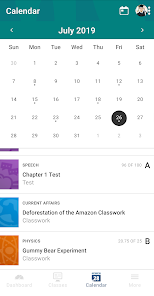
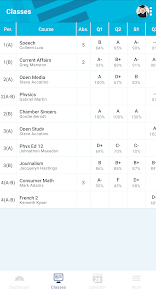
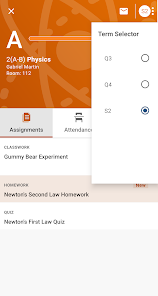
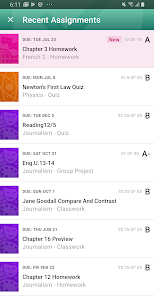
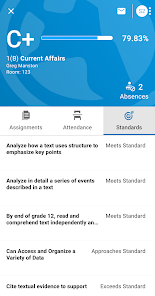
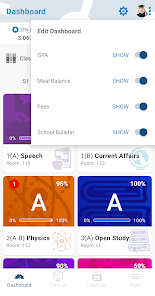
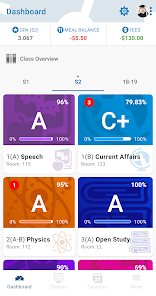
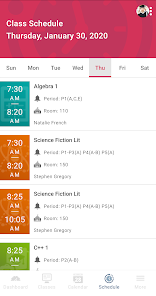
PowerSchool Mobile is a user-friendly app designed to enhance communication between students, parents, and educators. It provides real-time access to grades, attendance, assignments, and school announcements, empowering users to stay informed and engaged in the educational process. With its intuitive interface, PowerSchool Mobile streamlines the management of academic information, making it easier for families to support student success and foster a collaborative learning environment. Download the app today to stay connected with your school community!
Features of "PowerSchool Mobile"
PowerSchool Mobile is a comprehensive app designed to enhance communication between students, parents, and educators. One of its standout features is real-time access to student grades and attendance, allowing parents to stay informed about their child's academic performance. The app also provides notifications for important updates, such as assignment deadlines and school events, ensuring that users never miss critical information.
Another key feature is the ability to view detailed course information, including syllabi and teacher contact details, which helps parents and students stay organized. The app supports multiple languages, making it accessible to a diverse user base. Additionally, PowerSchool Mobile offers a user-friendly interface that simplifies navigation, making it easy for users to find the information they need quickly. Overall, the app serves as a vital tool for fostering engagement and collaboration within the educational community.
How to Use "PowerSchool Mobile"?
Using PowerSchool Mobile is straightforward and user-friendly. First, download the app from the App Store or Google Play Store, depending on your device. Once installed, open the app and enter your school's unique code, which can typically be obtained from your school’s administration or website. After entering the code, you will be prompted to log in using your existing PowerSchool account credentials.
Once logged in, you can easily navigate through various sections, such as grades, attendance, and assignments. The dashboard provides a quick overview of your child's academic status, while the notifications feature keeps you updated on any changes or important announcements. To maximize the app's benefits, regularly check for updates and engage with the information provided. This proactive approach will help you stay informed and involved in your child's education.
Pros & Cons of the App
PowerSchool Mobile offers several advantages that make it a valuable tool for parents and students. One of the primary benefits is its real-time access to academic information, which allows parents to monitor their child's progress closely. The app's user-friendly interface and multilingual support enhance accessibility, making it easier for diverse families to engage with their child's education. Additionally, the notification feature ensures that users are promptly informed about important updates, fostering better communication between home and school.
However, there are some drawbacks to consider. Some users have reported occasional glitches or slow loading times, which can hinder the overall experience. Additionally, the app's reliance on internet connectivity means that users may face challenges in areas with poor service. Lastly, while the app provides a wealth of information, it may overwhelm some users who are not tech-savvy. Balancing these pros and cons is essential for users to make the most of PowerSchool Mobile.
 Google Play
  App Store
 FAQ
Can I create playlists on Spotify?
Yes, users can create, share, and collaborate on playlists with friends.
Can I download music on Spotify?
Yes, premium users can download songs and playlists for offline listening.
Can I listen to Spotify offline?
Yes, premium users can listen to downloaded music offline without an internet connection.
Can I use Spotify on multiple devices?
Yes, you can use Spotify on multiple devices, but only one device can stream at a time.
Does Spotify have podcasts?
Yes, Spotify hosts a wide range of podcasts across various genres.
Similar Apps













You May Like

ClassDojo
Education
4.8

Blackboard
Education
3.3

Mathway: Scan & Solve Problems
Education
4.4

Duolingo: Language Lessons
Education
4.6

Schoology
Education
1.8
Photomath
Education
4.3

Lingokids - Play and Learn
Education
4.3

ABCmouse Classic
Education
3.7

Babbel - Learn Languages
Education
4.6

CE5 Contact
Education
4.0

Cancel Tyranny
Education
4.4

Civilization Revolution 2
Education
3.6