

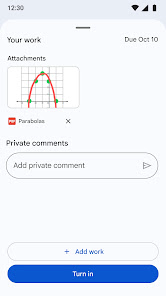
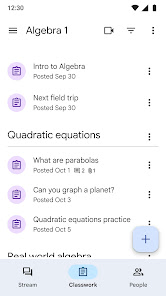
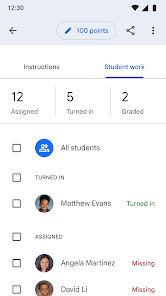
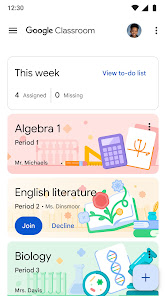
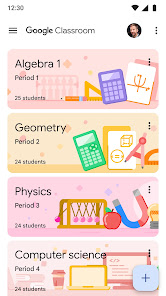
Google Classroom has become an indispensable tool for educators and students alike, streamlining the learning process and enhancing collaboration. Here are some of the standout features that make it a top choice in the realm of educational apps:
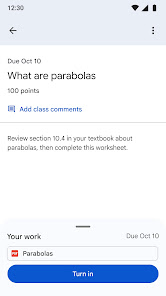
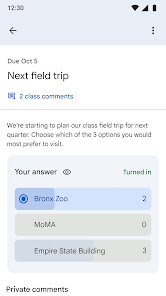
As a high school teacher, I use Google Classroom daily to facilitate learning and engage students. On a typical day, I start by posting the agenda for our lesson, which students can access from their devices. This is especially useful in a hybrid learning environment where some students attend in-person while others join remotely. Additionally, I utilize the platform for quizzes—creating them directly in Classroom allows students to take assessments in a structured manner, and I can review their progress in real time. Beyond the classroom, I also use it for parent-teacher communication; I share updates and resources, making it easier for parents to stay involved in their child's education.
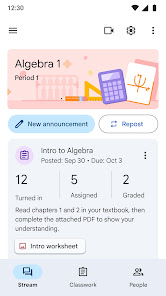
The user interface of Google Classroom is intuitive and user-friendly. Navigating through classes, assignments, and materials feels seamless, which is a breath of fresh air compared to other educational platforms I’ve used. The layout is clean, with clearly defined sections for assignments, announcements, and materials. I appreciate how notifications keep me informed about submissions and comments, ensuring I never miss important updates. Performance-wise, the app runs smoothly, whether I’m using it on a computer or a mobile device. I’ve had very few issues with lag or crashes, which is crucial when I’m in the middle of a lesson. Overall, Google Classroom has made my teaching experience more organized and efficient, and I genuinely enjoy using it.
Google Classroom is completely free to use for both educators and students, which is a significant advantage. While it does require a Google account, the app itself doesn’t have any hidden fees or premium versions, making it accessible to everyone. This is particularly beneficial for schools with limited budgets, as it allows for a powerful educational tool without any financial burden.
Google Classroom receives regular updates that enhance its functionality and security. I’ve noticed improvements in the grading tools and new features that make it easier to manage classes. Support is readily available through Google's Help Center, which provides comprehensive guides and troubleshooting tips. Additionally, the community forum is a great resource for connecting with other educators and sharing best practices. Overall, I feel confident that any issues I encounter can be resolved quickly with the available support.
When it comes to security and privacy, Google Classroom takes several measures to ensure that users' personal data is protected. The app is available on both the App Store and Google Play, which adds a layer of credibility. However, users do need to create a Google account, which requires some personal information. Fortunately, Google has a robust privacy policy in place, detailing how data is collected and used. Importantly, Google Classroom doesn’t show ads, and there are no invasive tracking behaviors, which is a relief for parents and educators concerned about student privacy. Overall, I feel safe using Google Classroom, knowing that my information and my students’ data are treated with respect.

 Streamlines assignment distribution and submission process Facilitates real-time feedback and communication Enhances collaboration among students and teachers Integrates seamlessly with other Google tools Accessible from any device with internet connection
 Limited features for advanced assignments and assessments User interface can be confusing for new users Reliance on internet access can hinder participation Integration with third-party tools is often problematic
 Google Classroom collects certain personal information, such as your name and email address, to facilitate its services. However, Google adheres to strict privacy policies to protect user data and ensure it is used responsibly.
Google Classroom is completely free to use for both educators and students, with no trial period necessary.
While Google Classroom is primarily designed to work online, some features may be available offline through the mobile app. However, a stable internet connection is recommended for the best experience and full functionality.
You can contact Google Classroom support through the Help Center, accessible within the app, or by visiting the Google support website. You can also send feedback directly through the app's feedback option.
Since Google Classroom is free, there is no subscription to manage or cancel. However, if you are using Google Workspace for Education, you will need to manage your subscription through your Google Workspace admin console.
You can reach Google support through the Google Workspace Help Center or by visiting the Google Classroom Help page for assistance.
Google Classroom is activated automatically for eligible Google Workspace accounts. Just log in to start using it.
Google Classroom does not have a specific customer number; support is primarily available online through the Help Center.
Visit classroom.google.com and sign in with your Google account credentials associated with your school or organization.






 Google Play
  App Store