


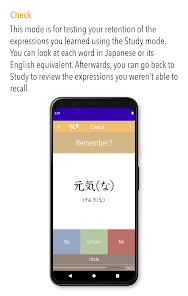
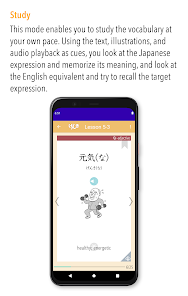
"GENKI Vocab for 3rd Ed." is a comprehensive vocabulary app designed to enhance the learning experience for students of the Japanese language. One of its standout features is its alignment with the GENKI textbook series, ensuring that users can easily find vocabulary that corresponds to their lessons. The app includes a vast database of words and phrases, complete with audio pronunciations, which helps learners improve their listening and speaking skills. Additionally, it offers flashcard functionality, allowing users to create personalized study sets tailored to their needs.
Another notable feature is the built-in quizzes and practice tests that reinforce learning and track progress. The app also provides example sentences for each vocabulary word, giving context and aiding comprehension. Furthermore, the user-friendly interface makes navigation simple, and the app is compatible with various devices, allowing for flexible study sessions. Overall, "GENKI Vocab for 3rd Ed." is an invaluable tool for anyone looking to expand their Japanese vocabulary effectively.
To make the most of "GENKI Vocab for 3rd Ed.," start by familiarizing yourself with its layout and features. Begin by selecting the vocabulary sets that correspond to your current lessons in the GENKI textbook. This targeted approach ensures that you are learning relevant words and phrases. Utilize the flashcard feature to create custom sets, focusing on words that you find challenging or need to review more frequently.
Incorporate the audio pronunciation feature into your study routine to improve your listening skills and pronunciation. Regularly engage with the quizzes and practice tests to assess your understanding and retention of the vocabulary. Additionally, take advantage of the example sentences provided to see how words are used in context, which can enhance your overall comprehension. Consistency is key, so aim to dedicate a few minutes each day to practice, and you will see significant improvements in your vocabulary over time.
Like any educational tool, "GENKI Vocab for 3rd Ed." has its advantages and disadvantages. One of the primary pros is its alignment with the GENKI textbook series, making it an excellent companion for students using these resources. The app's extensive vocabulary database, along with audio pronunciations and example sentences, provides a well-rounded learning experience. Additionally, the flashcard and quiz features promote active engagement, which can enhance retention and understanding.
However, there are some cons to consider. Some users may find the app's interface less intuitive than desired, which could hinder navigation for beginners. Additionally, while the app is comprehensive, it may not cover every nuance of the language, leaving some advanced learners wanting more. Lastly, the reliance on digital devices may not suit everyone’s learning style, as some students prefer traditional study methods. Balancing the app's use with other resources can help mitigate these drawbacks.

 Comprehensive vocabulary lists enhance learning for various proficiency levels. Engaging exercises promote active retention and practical usage. Contextual examples help learners understand words in real-life situations. User-friendly layout makes studying efficient and enjoyable. Integrated review sections ensure regular reinforcement of learned vocabulary.
 Limited context for vocabulary usage may hinder practical application in real-life situations The workbook format can feel repetitive and less engaging for learners Some learners may find the lack of cultural insights limiting for deeper understanding
 Yes, users are encouraged to submit suggestions or feedback through the app's support section or via email to help improve the app's functionality and content.
The app adheres to privacy standards and does not collect personal data unless explicitly provided by the user for account-related purposes.
Yes, GENKI Vocab for 3rd Ed. allows users to download content for offline use, enabling them to study without an internet connection.
Users can cancel their subscription through their account settings within the app or by visiting the app store where they purchased the subscription.
The subscription to GENKI Vocab for 3rd Ed. typically costs around $9.99 per month, with options for annual subscriptions that may provide additional savings.
Unfortunately, customer numbers cannot be changed. For any concerns, please reach out to customer service for further assistance.
Yes, you can update your email address in your account settings after logging in. If you need help, contact customer service.
You can reach customer service via the support email provided on our website or through the contact form in your account dashboard.
You can contact customer service via the support section on our website or through the email provided during your account setup.
After purchasing, check your email for an activation link. Click the link to activate your account and log in.











 Google Play
  App Store