
 Home
Home  Apps
Apps  Games
Games  Windows
  Topics
  Terms of Service
  Cookies & Privacy Policy
  Disclaimer
Koala Sampler


Information
- Category: Music & Audio
- Price: $4.99
- Age Rating: Everyone
- Rating: 4.8
- Developer: elf audio
- Version: 1.4147
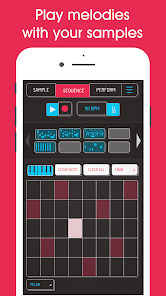
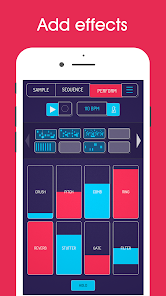
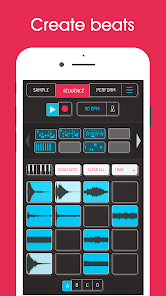
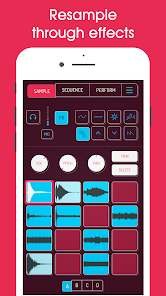
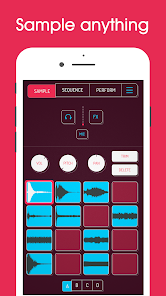
Introducing the Koala Sampler app, your ultimate tool for creating and sharing music on the go! With an intuitive interface, a wide range of sound samples, and powerful editing features, you can easily mix, loop, and layer sounds to craft unique tracks. Whether you're a seasoned musician or a beginner, Koala Sampler empowers your creativity, allowing you to capture inspiration anytime, anywhere. Dive into the world of music-making and unleash your inner artist!
Features of "Koala Sampler"
Koala Sampler is a versatile mobile application designed for music producers and sound designers. One of its standout features is its intuitive interface, which allows users to easily record, edit, and manipulate audio samples. The app supports various audio formats, enabling users to import sounds from their device or external sources seamlessly. Additionally, Koala Sampler offers a range of built-in effects, such as reverb, delay, and pitch shifting, allowing for creative sound design.
Another notable feature is the ability to create and organize sample packs, making it easy for users to manage their sounds. The app also includes a loop function, enabling users to create rhythmic patterns effortlessly. Furthermore, Koala Sampler supports MIDI controllers, providing an enhanced experience for those who prefer tactile interaction. The app's export options allow users to share their creations directly to social media or save them for later use, making it a comprehensive tool for both amateur and professional musicians.
How to Use "Koala Sampler"?
Using Koala Sampler is straightforward, even for those new to music production. To get started, download the app from your device's app store and open it. Upon launching, you will be greeted with a clean interface that invites you to begin recording. To record a sample, simply tap the record button and capture your desired sound. Once recorded, you can trim, loop, and apply effects to enhance your audio.
After editing your samples, you can organize them into packs for easy access. To create a new pack, navigate to the sample library and select the option to add a new pack. You can then drag and drop your samples into this pack. For those using MIDI controllers, connect your device to the app to trigger samples in real-time. Finally, when you're satisfied with your creation, use the export feature to share your work or save it for future projects. This user-friendly approach makes Koala Sampler accessible for all levels of music creators.
Pros & Cons of the App
Koala Sampler comes with several advantages that make it a popular choice among music enthusiasts. One of the primary pros is its user-friendly interface, which allows beginners to navigate the app with ease. The ability to record and edit samples directly on a mobile device is another significant benefit, providing flexibility for users on the go. Additionally, the app's extensive range of effects and MIDI support enhances its functionality, catering to both novice and experienced producers.
However, there are some drawbacks to consider. One con is that while the app is feature-rich, it may lack some advanced capabilities found in desktop software, which could limit professional users. Additionally, the mobile platform may not provide the same level of precision as traditional studio setups. Some users have also reported occasional performance issues, particularly when handling larger sample packs. Overall, while Koala Sampler is an excellent tool for mobile music production, it may not fully replace more robust desktop applications for serious producers.
 Google Play
  App Store
 FAQ
Can I create playlists on Spotify?
Yes, users can create, share, and collaborate on playlists with friends.
Can I download music on Spotify?
Yes, premium users can download songs and playlists for offline listening.
Can I listen to Spotify offline?
Yes, premium users can listen to downloaded music offline without an internet connection.
Can I use Spotify on multiple devices?
Yes, you can use Spotify on multiple devices, but only one device can stream at a time.
Does Spotify have podcasts?
Yes, Spotify hosts a wide range of podcasts across various genres.
Similar Apps













You May Like

SiriusXM: Music, Sports & News
Music & Audio
4.6

Pandora - Music & Podcasts
Music & Audio
3.9

BandLab
Music & Audio
4.6
Audiomack: Music Downloader
Music & Audio
4.8

Amazing Slow Downer
Music & Audio
3.7

Amazon Music: Songs & Podcasts
Music & Audio
3.4

Apple Music
Music & Audio
4.6
FL STUDIO MOBILE
Music & Audio
4.0
MediaMonkey Pro
Music & Audio
4.4

MobileSheets
Music & Audio
4.4
Music Downloader -Mp3 music
Music & Audio
4.7

Music Downloader MP3 Download
Music & Audio
4.2