


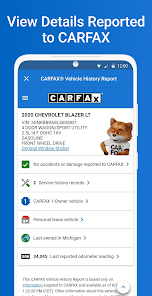
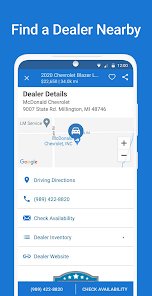
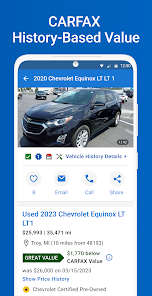
The "CARFAX - New & Used Cars" app offers a comprehensive suite of features designed to enhance the car buying experience. One of its standout features is the ability to access detailed vehicle history reports, which provide crucial information about a car's past, including accidents, service records, and title status. This transparency helps buyers make informed decisions and avoid potential pitfalls.
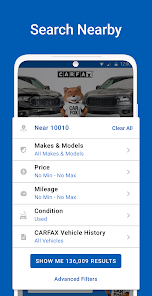
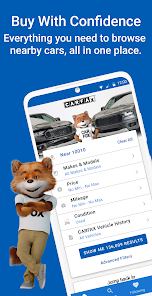
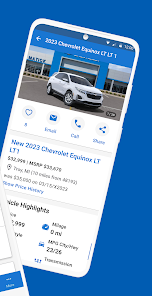
Additionally, the app allows users to search for both new and used cars based on various criteria such as make, model, price range, and location. Users can also set alerts for specific vehicles, ensuring they are notified when a car that meets their criteria becomes available. The app includes a user-friendly interface that simplifies navigation, making it easy to compare different vehicles and their features.
Another notable feature is the integration of dealer reviews and ratings, which helps users gauge the reputation of dealerships. Furthermore, the app provides tools for calculating financing options and estimating monthly payments, making it easier for users to budget for their purchase. Overall, the "CARFAX - New & Used Cars" app is a valuable resource for anyone in the market for a vehicle.
Using the "CARFAX - New & Used Cars" app is straightforward and user-friendly. To get started, users need to download the app from their device's app store and create an account. Once logged in, users can begin their search for vehicles by entering specific criteria such as make, model, year, and price range. The app will generate a list of available cars that match the user's preferences.
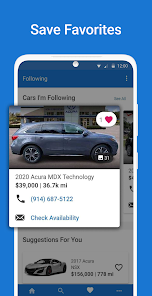
After selecting a vehicle, users can access the detailed CARFAX report, which provides essential information about the car's history. This report includes data on previous ownership, accident history, and service records, allowing users to assess the vehicle's condition. Users can also save their favorite listings and set alerts for price changes or new listings that match their criteria.
For those interested in financing, the app offers tools to calculate potential monthly payments based on loan terms and interest rates. Additionally, users can read reviews of dealerships to ensure they are making a purchase from a reputable source. Overall, the app streamlines the car buying process, making it easier for users to find the right vehicle.
The "CARFAX - New & Used Cars" app comes with several advantages that enhance the car buying experience. One of the primary pros is the access to detailed vehicle history reports, which provide transparency and help users avoid purchasing cars with hidden issues. The app's user-friendly interface makes it easy to navigate and search for vehicles, catering to both seasoned buyers and first-time car shoppers.
Another significant advantage is the ability to set alerts for specific vehicles, ensuring users stay informed about new listings or price changes. The integration of dealer reviews adds an extra layer of trust, allowing users to choose reputable dealerships. However, there are some cons to consider. The app may not have listings for every vehicle available in the market, particularly from private sellers. Additionally, while the app is free to use, some features may require a subscription or payment for detailed reports.
Overall, while the "CARFAX - New & Used Cars" app has its limitations, its benefits significantly outweigh the drawbacks, making it a valuable tool for anyone looking to buy a car.

 Access comprehensive vehicle history reports for informed buying decisions. Find trusted dealerships with verified customer reviews and ratings. Utilize advanced search filters to match your specific preferences and budget. Benefit from price analysis tools to ensure fair market value. Receive alerts for new listings that fit your criteria, saving time.
 Limited vehicle listings compared to larger marketplaces can restrict options. Pricing information may not always reflect market trends or hidden fees. User reviews and ratings can be inconsistent or biased, affecting trust.
  Google Play
  App Store
 Yes, users can submit suggestions or feedback directly through the app, usually found in the settings or support section, allowing the team to consider user input for future updates.
Yes, CARFAX - Shop New & Used Cars may collect personal data to enhance user experience, provide personalized content, and improve app functionality. Users should review the privacy policy for detailed information.
The app requires an internet connection to access live listings and vehicle history reports, so offline use is limited. However, some features may be available without an internet connection after initial loading.
Users can typically cancel their subscription through the app store where they purchased it, or by following the instructions provided in the app settings.
Subscription costs may vary based on the features selected; users should check the app for the latest pricing details and any available subscription plans.
Unfortunately, you cannot change your customer number. If you need assistance, please contact customer service for support.
To activate your account, follow the link in the confirmation email you received after registration and set your password.
You can reach CARFAX customer service by calling their support number listed on the website or using the live chat feature for immediate assistance.
You can contact customer service via the support section of the CARFAX website, either through email or by calling their support number.
Your customer number can usually be found in your account settings or on your purchase confirmation page.