
 Home
Home  Apps
Apps  Games
Games  Windows
  Topics
  Terms of Service
  Cookies & Privacy Policy
  Disclaimer
ZUS - Save Car Expenses


Information
- Category: Auto & Vehicles
- Price: free
- Age Rating: Everyone
- Rating: 4.7
- Developer: No NDA Inc
- Version: 8.20.5
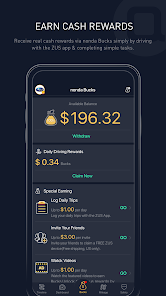
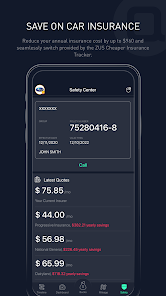
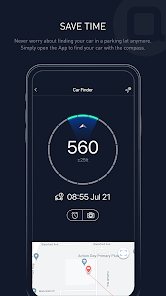
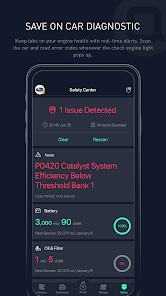
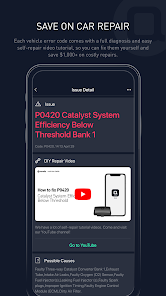
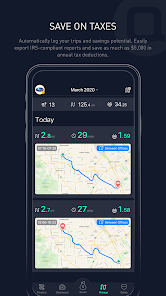
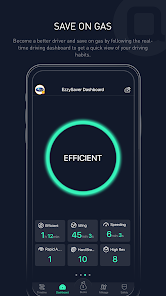
Introducing ZUS - Save Car Expenses, the ultimate app designed to help you manage and reduce your vehicle costs effortlessly. Track fuel consumption, maintenance schedules, and expenses in one convenient place. With personalized insights and reminders, ZUS empowers you to make informed decisions, ensuring your car remains a source of joy, not stress. Start saving money and time today with ZUS, your trusted companion for smarter car ownership!
Features of "ZUS - Save Car Expenses"
"ZUS - Save Car Expenses" is a comprehensive mobile application designed to help car owners manage their vehicle expenses efficiently. One of its standout features is the ability to track various costs associated with car ownership, including fuel, maintenance, insurance, and repairs. Users can input their expenses manually or sync with bank accounts for automatic tracking, making it easier to monitor spending over time.
Another notable feature is the mileage tracker, which allows users to log their trips and calculate the total distance traveled for business or personal use. This is particularly useful for those who need to report mileage for tax deductions or reimbursement purposes. Additionally, the app provides reminders for upcoming maintenance tasks, ensuring that users stay on top of their vehicle's health and avoid costly repairs down the line.
Furthermore, "ZUS" offers insightful analytics and reports, giving users a clear overview of their spending patterns. This data can help car owners make informed decisions about their vehicle usage and identify areas where they can save money. Overall, the app combines functionality with user-friendly design, making it an essential tool for anyone looking to manage their car expenses effectively.
How to Use "ZUS - Save Car Expenses"
Using "ZUS - Save Car Expenses" is straightforward and user-friendly, making it accessible for all car owners. To get started, users need to download the app from their respective app store and create an account. Once registered, they can begin entering their vehicle details, including make, model, and year, which helps personalize the experience.
After setting up their vehicle profile, users can start logging expenses by selecting the type of cost they want to track, such as fuel or maintenance. The app allows for manual entry or the option to sync with bank accounts for automatic updates. Users can categorize expenses, add notes, and even upload receipts for better record-keeping.
To maximize the app's benefits, users should regularly update their mileage and expenses. The app will generate reports and analytics based on the data entered, providing insights into spending habits. Additionally, users can set reminders for maintenance tasks, ensuring they never miss an important service. Overall, "ZUS" is designed to simplify the process of managing car expenses, making it a valuable tool for any vehicle owner.
Pros & Cons of the App
Like any application, "ZUS - Save Car Expenses" has its advantages and disadvantages. One of the primary pros is its comprehensive tracking capabilities, allowing users to monitor various expenses related to their vehicles in one place. The app's user-friendly interface makes it easy for individuals to navigate and input data, which is particularly beneficial for those who may not be tech-savvy. Additionally, the mileage tracking feature is a significant advantage for users who need to keep accurate records for tax purposes or reimbursement.
On the downside, some users may find that the app lacks certain advanced features, such as integration with specific vehicle diagnostic tools or more detailed analytics. Additionally, while the app is generally reliable, occasional bugs or syncing issues can occur, which may frustrate users. Furthermore, the app may require a subscription for access to premium features, which could deter some potential users.
In summary, "ZUS - Save Car Expenses" is a valuable tool for managing car-related expenses, offering a range of features that cater to the needs of vehicle owners. However, users should weigh the pros and cons to determine if it aligns with their specific requirements and preferences.
 Google Play
  App Store
 FAQ
Can I create playlists on Spotify?
Yes, users can create, share, and collaborate on playlists with friends.
Can I download music on Spotify?
Yes, premium users can download songs and playlists for offline listening.
Can I listen to Spotify offline?
Yes, premium users can listen to downloaded music offline without an internet connection.
Can I use Spotify on multiple devices?
Yes, you can use Spotify on multiple devices, but only one device can stream at a time.
Does Spotify have podcasts?
Yes, Spotify hosts a wide range of podcasts across various genres.
Similar Apps
















You May Like

AlfaOBD
Auto & Vehicles
3.8

Car Launcher Pro
Auto & Vehicles
4.4

inCarDoc Pro | OBD2
Auto & Vehicles
4.3

PayByPhone
Auto & Vehicles
4.9

ParkMobile: Park. Pay. Go.
Auto & Vehicles
4.7

Shell: Fuel, Charge & More
Auto & Vehicles
3.5

Toyota
Auto & Vehicles
4.6

CarMax: Used Cars for Sale
Auto & Vehicles
4.6

Autotrader Used Cars for Sale
Auto & Vehicles
4.8

AutoZone Auto Parts & Repair
Auto & Vehicles
4.7

Android Auto
Auto & Vehicles
4.1

FIXD OBD2 Scanner
Auto & Vehicles
4.2