
 Home
Home  Apps
Apps  Games
Games  Windows
  Topics
  Terms of Service
  Cookies & Privacy Policy
  Disclaimer
Car Scanner ELM OBD2


Information
- Category: Auto & Vehicles
- Price: free
- Age Rating: Everyone
- Rating: 4.7
- Developer: CAR SCANNER LLC
- Version: 2.0.59
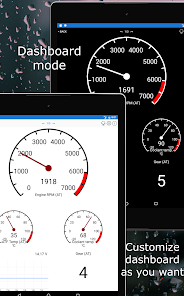
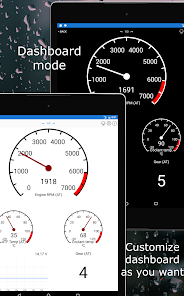
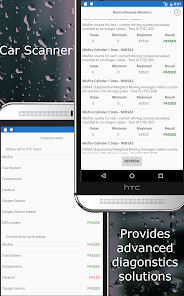
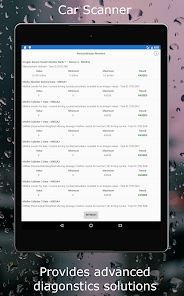
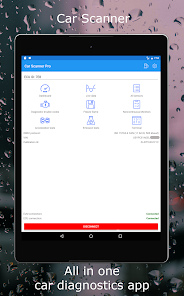
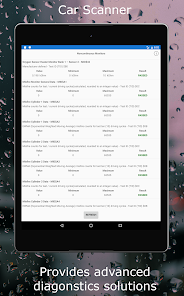
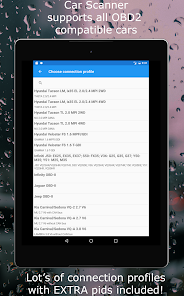
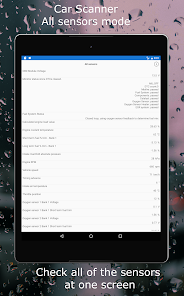
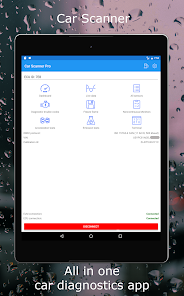
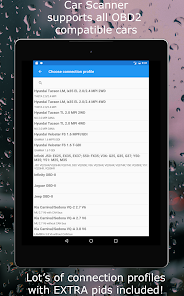
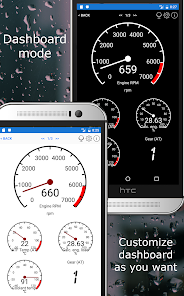
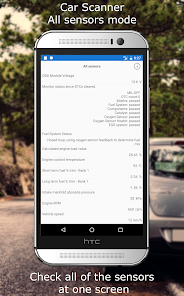
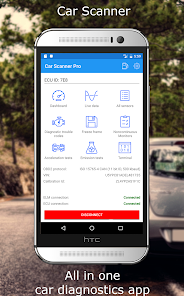
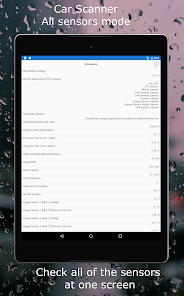
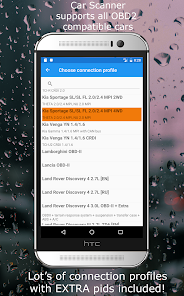
"Car Scanner ELM OBD2" is a powerful diagnostic tool designed for car enthusiasts and professionals alike. This app connects to your vehicle's OBD2 system, providing real-time data, fault code reading, and performance monitoring. With an intuitive interface, it allows users to easily access vital information about their vehicle's health, helping to identify issues and optimize performance. Whether you're troubleshooting or simply curious about your car's performance, Car Scanner is your go-to solution for comprehensive vehicle diagnostics.
Features & Highlights
Car Scanner ELM OBD2 is a remarkable tool for car enthusiasts and everyday drivers alike. It taps into the power of your vehicle’s OBD2 system, turning your smartphone into a comprehensive diagnostic tool. Here are some of the standout features that make this app a must-have:
- Real-Time Data Monitoring - This feature allows you to view live data directly from your vehicle's sensors. For instance, during a long road trip, I used this feature to monitor engine temperature and fuel efficiency, ensuring everything was running smoothly.
- Diagnostic Trouble Codes (DTC) Reading - Car Scanner can read and clear DTCs, which is invaluable when your check engine light comes on. Last week, I encountered a warning light on my dashboard. Using the app, I quickly identified the issue as a minor sensor fault, saving me a trip to the mechanic.
- Customizable Dashboards - Users can tailor the interface to display the data that matters most to them. I set up my dashboard to show RPM, speed, and coolant temperature, which made monitoring performance during my driving tests much easier.
- Advanced Graphing Capabilities - This feature allows you to visualize data over time, which is perfect for diagnosing intermittent issues. I used this to graph my vehicle's fuel trims over several trips, helping me spot a gradual decline in performance.
- Vehicle Database Access - The app provides extensive vehicle information, including specifications and service history. While researching repairs for my car, I found detailed schematics that guided me through the process.
Real Experience Using Car Scanner ELM OBD2
Application Scenarios
My journey with the Car Scanner ELM OBD2 app began during a routine check of my vehicle before a long drive. I wanted to ensure everything was in top shape, and this app quickly became my go-to tool. I remember checking the engine status, fuel efficiency, and even the battery voltage before hitting the road. On another occasion, while driving home from work, I noticed my car was idling roughly. Pulling out the app, I connected my ELM327 Bluetooth adapter and diagnosed the problem in real-time. It turned out to be a minor issue with the air intake sensor, something I could fix myself without needing a mechanic's assistance.
User Experience
The user interface of Car Scanner ELM OBD2 is both intuitive and visually appealing. Navigating through various features was seamless, and I appreciated how easy it was to customize my dashboard. The app’s workflow is straightforward; connecting to the vehicle via Bluetooth was quick, and I was able to start monitoring data within minutes. Performance-wise, the app was responsive, with minimal lag while retrieving real-time data. Overall, my feelings after using the app have been overwhelmingly positive. It feels empowering to have such detailed information about my vehicle right at my fingertips, enabling me to make informed decisions about maintenance and repairs.
Pricing
Car Scanner ELM OBD2 offers a free version, which is quite functional for basic diagnostics and monitoring. However, for those serious about vehicle maintenance, the Pro version is worth the investment. The Pro version unlocks advanced features, such as enhanced data graphs and extended diagnostic capabilities. The pricing is reasonable, especially considering the potential savings on mechanic visits and repairs.
Updates & Support
The developers of Car Scanner ELM OBD2 are proactive with updates, frequently adding new features and improving existing ones. I’ve noticed enhancements in performance and user interface with recent updates, making the app even more user-friendly. Support options are robust, with a comprehensive FAQ section and responsive customer service. I had a minor question regarding a feature, and I was pleasantly surprised by how quickly I received a helpful response.
Security & Privacy Review
When it comes to security and privacy, Car Scanner ELM OBD2 takes several measures to protect its users. The app is officially available on both the App Store and Google Play, ensuring it has met certain security standards before being distributed. Upon downloading, I found that the app required minimal personal data for registration, which is a relief for privacy-conscious users like myself. There are no intrusive ads, and I didn’t encounter any tracking behavior that would compromise my data. Overall, I feel secure using this app, knowing my privacy is respected while still enjoying the powerful features it provides.
Pros 
-
 Experience real-time diagnostics
 - User-friendly interface design
- Supports multiple vehicle brands
- Access to detailed error codes
- Live data monitoring capabilities
- Customizable dashboards available
Cons 
-
 Limited vehicle compatibility
 - Some features require purchase
- User interface can be cluttered
- Occasional connectivity issues
 Google Play
  App Store
 FAQ
Can I submit suggestions or feedback to Car Scanner ELM OBD2?
Yes, users can submit feedback and suggestions through the app's support section or directly via their website.
Does Car Scanner ELM OBD2 collect my personal data?
The app may collect anonymized data for improving services, but it does not collect personally identifiable information without consent.
Does Car Scanner ELM OBD2 support offline use?
Some features require an internet connection, but basic functionalities can be used offline after initial setup.
How do I cancel my Car Scanner ELM OBD2 subscription?
You can cancel your subscription through your app store settings or account management options, depending on your platform.
How much does a subscription to Car Scanner ELM OBD2 cost?
The subscription cost varies, but it typically offers monthly and yearly plans, ensuring flexibility for users.
How to use Car Scanner ELM OBD2
Can I reset my password for the Car Scanner ELM OBD2 app?
Yes, you can reset your password by selecting the "Forgot Password?" link on the login screen.
How can I contact customer service for the Car Scanner ELM OBD2 app?
You can reach customer service through the app's settings or visit their official website for support options.
How do I activate the premium features of the Car Scanner ELM OBD2 app?
Navigate to the premium section in the app and follow the prompts to complete your purchase and activate the features.
How do I log in to the Car Scanner ELM OBD2 app?
Open the app and select the login option, then enter your registered email and password to access your account.
How do I update my account information in the Car Scanner ELM OBD2 app?
Go to the settings menu within the app, select your account, and edit your information as needed.
Similar Apps















You May Like

AlfaOBD
Auto & Vehicles
3.8
Car Launcher Pro
Auto & Vehicles
4.4
inCarDoc Pro | OBD2
Auto & Vehicles
4.3

PayByPhone
Auto & Vehicles
4.9

ParkMobile: Park. Pay. Go.
Auto & Vehicles
4.7

Shell: Fuel, Charge & More
Auto & Vehicles
3.5

Toyota
Auto & Vehicles
4.6

CarMax: Used Cars for Sale
Auto & Vehicles
4.6

Autotrader Used Cars for Sale
Auto & Vehicles
4.8

AutoZone Auto Parts & Repair
Auto & Vehicles
4.7

Android Auto
Auto & Vehicles
4.1

FIXD OBD2 Scanner
Auto & Vehicles
4.2