















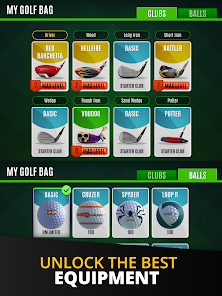


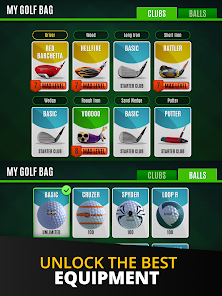

"Ultimate Golf!" is a dynamic mobile golf game that offers a variety of features designed to enhance the gaming experience. One of its standout features is the realistic graphics that bring the golf courses to life, providing players with an immersive environment. The game includes a wide range of real-world golf courses, allowing players to experience different terrains and challenges. Additionally, players can customize their golf clubs and balls, tailoring their equipment to suit their playing style.
Another notable feature is the multiplayer mode, where players can compete against friends or other players worldwide in real-time matches. This adds a competitive edge to the game, making it more engaging. The game also offers various tournaments and events, providing players with opportunities to earn rewards and improve their skills. Furthermore, "Ultimate Golf!" includes a progression system that allows players to level up and unlock new content as they play, keeping the gameplay fresh and exciting.
Using "Ultimate Golf!" is straightforward and user-friendly, making it accessible for players of all skill levels. To get started, download the app from your device's app store and create an account. Once you’re in, you can choose to play a quick match or enter a tournament. The game features a tutorial that guides new players through the basics of gameplay, including how to swing, aim, and putt.
As you play, you can customize your golfer and equipment by accessing the settings menu. This allows you to select different clubs and balls that can enhance your performance on the course. To compete with others, simply join multiplayer matches or invite friends to play. Regularly participating in events and tournaments will help you earn rewards and improve your skills. Remember to check for updates, as the game frequently adds new content and features to keep the experience engaging.
"Ultimate Golf!" comes with several advantages that make it a popular choice among golf enthusiasts. One of the main pros is its stunning graphics and realistic gameplay, which provide an immersive experience. The multiplayer feature allows for competitive play, making it fun to challenge friends or players from around the world. Additionally, the game offers a variety of courses and customization options, keeping the gameplay fresh and engaging. Regular updates and events also contribute to a dynamic gaming environment.
However, there are some cons to consider. Some players may find the in-app purchases necessary to progress, which can be frustrating for those who prefer a free-to-play experience. Additionally, the game may require a stable internet connection for optimal performance, which could be a drawback for players in areas with poor connectivity. Lastly, while the game is designed to be accessible, some users may find the learning curve steep if they are unfamiliar with golf mechanics. Balancing these pros and cons can help players decide if "Ultimate Golf!" is the right fit for them.

 Ultimate Golf! offers realistic graphics that enhance your gaming experience. Enjoy a wide variety of courses from around the world. Compete with friends in real-time multiplayer tournaments for added excitement. Customize your golfer with unique gear and skills for a personalized touch. Regular updates keep gameplay fresh with new challenges and features.
 Limited course variety may lead to repetitive gameplay experience. In-app purchases can create a pay-to-win environment. Connectivity issues can disrupt gameplay and affect performance.
 Yes, players can submit suggestions or feedback through the app's support section or by contacting the developers directly via their official website.
Yes, Ultimate Golf! may collect personal data as outlined in its privacy policy, which includes information necessary for account creation and in-game interactions.
Ultimate Golf! requires an internet connection to access its full functionality, including multiplayer modes and live events, and does not support offline play.
You can cancel your Ultimate Golf! subscription through your device's app store settings or the account management section within the app.
The subscription cost for Ultimate Golf! may vary based on the plan chosen, with options for monthly or yearly subscriptions. Check the app for the most current pricing.
Customer numbers are unique and cannot be changed. If you have concerns, please reach out to customer service for further assistance.
Yes, providing your customer number when contacting support helps us assist you faster and more efficiently.
You can contact customer service through the in-app support feature or visit our website for more options.
To activate your account, follow the instructions in the activation email sent to you. If you didn't receive it, check your spam folder or contact customer service.
To update your preferences, log in to your account, go to settings, and adjust your communication options under customer service preferences.












 Google Play
  App Store