
 Home
Home  Apps
Apps  Games
Games  Windows
  Topics
  Terms of Service
  Cookies & Privacy Policy
  Disclaimer
myAudi


Information
- Category: Auto & Vehicles
- Price: free
- Age Rating: Everyone
- Rating: 3.9
- Developer: Audi
- Version: 5.1.1
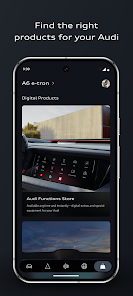
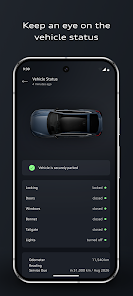
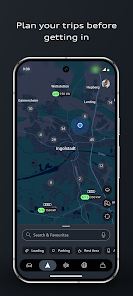
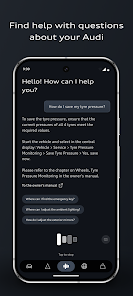

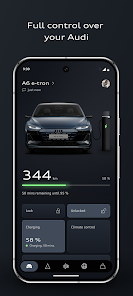
The myAudi app enhances your Audi ownership experience by seamlessly connecting you to your vehicle. Access essential features such as remote locking, vehicle status updates, and navigation assistance right from your smartphone. With personalized services and real-time information, the app ensures you stay in control and informed about your Audi. Whether you're planning a trip or managing maintenance, myAudi is your essential companion for a smarter, more connected driving experience.
Features & Highlights
The myAudi app is a remarkable companion for Audi owners, designed to enhance the driving experience and streamline vehicle management. Here are some standout features that truly set it apart:
- Remote Vehicle Access: With myAudi, you can control various functions of your vehicle from anywhere. Imagine sitting at your desk and being able to remotely start your engine to warm up your car on a chilly morning.
- Service Reminders: The app keeps track of your vehicle’s maintenance schedule. For instance, it will notify you when it's time for an oil change or tire rotation, helping you stay on top of your car’s health without having to remember dates.
- Navigation Integration: You can send destinations directly to your car’s navigation system. Picture yourself planning a weekend getaway and sending the address of your destination from your phone to your car, saving you time and hassle.
- Charging Management: For electric Audi owners, the myAudi app provides real-time data about charging stations and the status of your vehicle’s charge. If you're out and about and need to recharge, the app can guide you to the nearest charging point.
- Personalization Features: The app allows you to customize your vehicle settings, such as ambient lighting and seat adjustments. Think about getting into your car to find it perfectly adjusted to your preferences, ready for a comfortable ride.
Real Experience Using myAudi
Application Scenarios
As an Audi owner, I find myself reaching for the myAudi app almost daily. One particular scenario that stands out is my morning routine. Every weekday, I use the app to start my car remotely while I’m still sipping coffee at home. This feature is a game changer during the winter months when I dread stepping into a cold vehicle. I simply tap the app, and within minutes, my car is warm and ready to go. Another instance is when I plan a road trip with friends. I use the navigation integration to send the destination directly to my car, making the journey smoother and more enjoyable. The service reminders also play a crucial role; I never have to worry about missing maintenance checks, as the app sends notifications straight to my phone.
User Experience
The user interface of the myAudi app is intuitive and user-friendly. Upon opening the app, I’m greeted with a clean layout that makes navigating through features straightforward. The dashboard provides a quick overview of my vehicle’s status, including fuel levels, tire pressure, and any alerts that need attention. I particularly appreciate the seamless workflow; for instance, accessing the remote start feature takes only a couple of taps. The performance of the app has been consistently smooth, with minimal loading times and no crashing issues. Overall, using myAudi feels like having a personal assistant dedicated to my vehicle, enhancing my ownership experience and ensuring I stay connected with my car.
Pricing
The myAudi app is free to download and use, which is a significant advantage for Audi owners. There are no hidden fees, and all core features are accessible without a subscription. This makes it easy for users to enjoy the app's functionalities without worrying about ongoing costs. It’s a relief to have such comprehensive tools at my fingertips without stretching my budget.
Updates & Support
myAudi is regularly updated to enhance functionality and introduce new features based on user feedback. I appreciate how Audi actively listens to its users and implements changes that improve the app. Customer support is readily available through the app, and I’ve found their response times to be quick and helpful. Whether I have questions about specific features or need assistance troubleshooting, the support team is just a message away.
Security & Privacy Review
As a user concerned about security and privacy, I’ve done my homework on the myAudi app, and I’m pleased with what I found. The app is available through official sources, such as the App Store and Google Play, ensuring that users can download it safely. During the registration process, I was required to provide some personal information, which is standard for most apps. However, it’s reassuring to know that my data is protected by encryption protocols. In terms of ads and tracking, I haven’t encountered any intrusive advertisements or excessive tracking behaviors, which is a common concern among American users. The app focuses on enhancing the user experience rather than bombarding users with ads, allowing me to feel secure while using it. Overall, myAudi respects my privacy while providing an invaluable service to enhance my driving experience.
Pros 
-
 Unlock your Audi's potential
 - Seamless remote access anytime
- Real-time vehicle diagnostics
- Personalized driving insights
- Convenient service scheduling
Cons 
-
 Limited compatibility issues
 - Occasional app crashes reported
- Navigation can be confusing
- Slow loading times observed
 Google Play
  App Store
 FAQ
Can I submit suggestions or feedback to myAudi?
Yes, you can submit suggestions and feedback directly through the app or via the official website.
Does myAudi collect my personal data?
Yes, myAudi collects personal data to enhance user experience and provide tailored services, adhering to privacy regulations.
Does myAudi support offline use?
myAudi primarily requires an internet connection for most features, but some data may be accessible offline.
How do I cancel my myAudi subscription?
You can cancel your subscription through the app settings or your app store account settings.
How much does a subscription to myAudi cost?
Subscription costs may vary based on features selected, typically starting at a nominal monthly fee.
How to use myAudi
How can I contact Customer Service for the myAudi app?
You can contact Customer Service through the app's support section or visit the Audi website for phone and email options.
How do I activate features in the myAudi app?
To activate features, log in to your account and follow the prompts to connect your vehicle and enable desired services.
How do I find my Customer Number for the myAudi app?
Your Customer Number can be found in your Audi account details or on your vehicle documents.
How do I log in to the myAudi app?
Open the app, enter your email and password, and tap "Log In." If you don't have an account, you can register through the app.
Similar Apps
















You May Like

AlfaOBD
Auto & Vehicles
3.8

Car Launcher Pro
Auto & Vehicles
4.4

inCarDoc Pro | OBD2
Auto & Vehicles
4.3

PayByPhone
Auto & Vehicles
4.9

ParkMobile: Park. Pay. Go.
Auto & Vehicles
4.7

Shell: Fuel, Charge & More
Auto & Vehicles
3.5

Toyota
Auto & Vehicles
4.6

CarMax: Used Cars for Sale
Auto & Vehicles
4.6

Autotrader Used Cars for Sale
Auto & Vehicles
4.8

AutoZone Auto Parts & Repair
Auto & Vehicles
4.7

Android Auto
Auto & Vehicles
4.1

FIXD OBD2 Scanner
Auto & Vehicles
4.2