
 Home
Home  Apps
Apps  Games
Games  Windows
  Topics
  Terms of Service
  Cookies & Privacy Policy
  Disclaimer
My Best Colors


Information
- Category: Beauty
- Price: free
- Age Rating: Everyone
- Rating: 4.2
- Developer: colorwise.me
- Version: 10.8.0
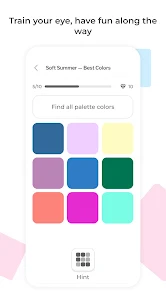
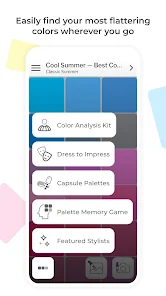
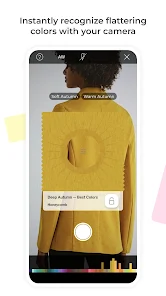
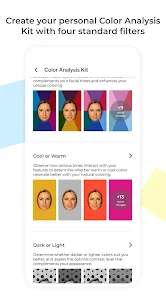
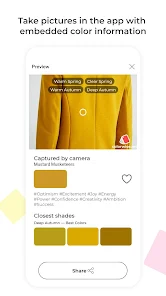
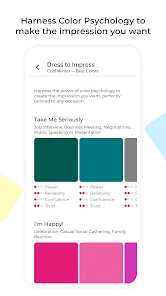
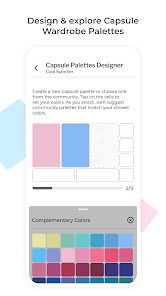
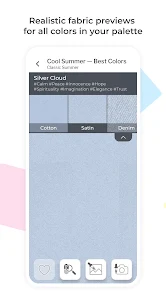
Welcome to "My Best Colors," the ultimate app designed to help you discover and embrace your unique color palette! Whether you're looking to enhance your wardrobe, revamp your home decor, or simply express your personal style, our intuitive tools and expert guidance will empower you to find the shades that complement your individuality. Dive into a vibrant world of color and unlock your true potential with "My Best Colors" today!
Features of "My Best Colors"
"My Best Colors" is a unique application designed to help users discover their most flattering color palettes based on their personal characteristics. One of its standout features is the color analysis tool, which evaluates skin tone, hair color, and eye color to recommend shades that enhance an individual's natural beauty. The app also includes a virtual wardrobe feature, allowing users to upload images of their clothing and see how different colors complement their outfits. Additionally, it offers a community forum where users can share their experiences and seek advice from others on color choices.
Another notable feature is the personalized shopping assistant, which suggests clothing and accessories in the recommended colors, making it easier for users to shop for items that suit them. The app also provides seasonal color updates, ensuring that users stay in tune with the latest trends. Furthermore, "My Best Colors" includes tutorials and tips on how to effectively incorporate these colors into everyday wear, making it a comprehensive tool for anyone looking to enhance their style.
How to Use "My Best Colors"?
Using "My Best Colors" is a straightforward process that begins with downloading the app from your preferred app store. Once installed, users are prompted to create a profile, where they input details about their skin tone, hair color, and eye color. This information is crucial for the app's color analysis feature, which generates a personalized color palette tailored to the user's unique characteristics.
After receiving the color recommendations, users can explore the virtual wardrobe feature by uploading photos of their clothing items. The app will then suggest which colors work best with their existing wardrobe. Additionally, users can browse the shopping assistant for clothing and accessories that align with their recommended colors. To maximize the app's benefits, users are encouraged to engage with the community forum, where they can share insights and seek advice from fellow users. Overall, "My Best Colors" is designed to be user-friendly, making it accessible for anyone looking to enhance their fashion choices.
Pros & Cons of the App
Like any application, "My Best Colors" comes with its own set of advantages and disadvantages. One of the primary pros is its personalized approach to color analysis, which helps users identify shades that enhance their appearance. The virtual wardrobe feature is another significant advantage, as it allows users to visualize how different colors can be integrated into their existing clothing. Additionally, the community forum fosters a sense of belonging and support among users, making it easier to share tips and experiences.
On the downside, some users may find the app's recommendations to be overly restrictive, limiting their exploration of colors outside the suggested palette. Furthermore, the effectiveness of the color analysis can vary based on the accuracy of the information provided by the user. There may also be occasional technical glitches that can hinder the user experience. Overall, while "My Best Colors" offers valuable tools for enhancing personal style, users should remain open to experimenting with colors beyond the app's suggestions.
 Google Play
  App Store
 FAQ
Can I create playlists on Spotify?
Yes, users can create, share, and collaborate on playlists with friends.
Can I download music on Spotify?
Yes, premium users can download songs and playlists for offline listening.
Can I listen to Spotify offline?
Yes, premium users can listen to downloaded music offline without an internet connection.
Can I use Spotify on multiple devices?
Yes, you can use Spotify on multiple devices, but only one device can stream at a time.
Does Spotify have podcasts?
Yes, Spotify hosts a wide range of podcasts across various genres.
Similar Apps













You May Like

Ulta Beauty: Makeup & Skincare
Beauty
4.6

Booksy for Customers
Beauty
4.9

Sephora: Buy Makeup & Skincare
Beauty
4.2

IPSY: Personalized Beauty
Beauty
4.7

StyleSeat: Book Hair & Beauty
Beauty
4.8

SALLY BEAUTY
Beauty
4.6

Scentbird Monthly Perfume Box
Beauty
4.9
Artistry Virtual Beauty
Beauty
4.3
Beatrix: AI Beauty Camera
Beauty
4.3

e.l.f. Cosmetics and Skincare
Beauty
4.7
PERFUMIST Perfumes Advisor
Beauty
3.4

Skin Bliss: Skincare Routines
Beauty
4.2