
 Home
Home  Apps
Apps  Games
Games  Windows
  Topics
  Terms of Service
  Cookies & Privacy Policy
  Disclaimer
Makeup camera


Information
- Category: Beauty
- Price: free
- Age Rating: Everyone
- Rating: 3.6
- Developer: PlayWood
- Version: 1.0.9
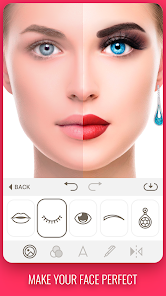
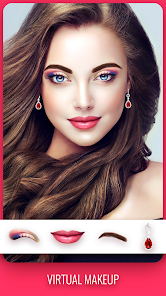
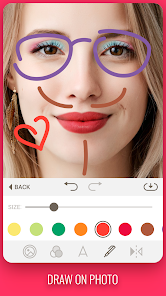
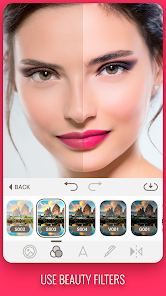
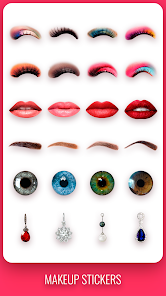
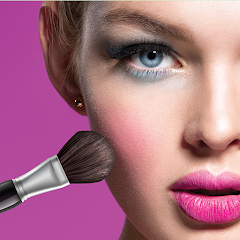
Introducing the Makeup Camera app, your ultimate beauty companion! Transform your selfies with stunning makeup filters and virtual try-ons that let you experiment with various looks in real-time. Whether you're preparing for a special occasion or just want to enhance your everyday style, our intuitive interface makes it easy to apply makeup effects, adjust colors, and share your fabulous results with friends. Unleash your creativity and discover the perfect look with Makeup Camera!
Features of "Makeup Camera"
The "Makeup Camera" app is designed to enhance your beauty experience through advanced technology. One of its standout features is the real-time makeup simulation, allowing users to try on various makeup looks instantly. This feature uses augmented reality to overlay makeup effects on your face, giving you a realistic preview of how different products will appear.
Another notable feature is the extensive library of makeup styles and products. Users can choose from a wide range of lipsticks, eyeshadows, blushes, and more, making it easy to experiment with different looks. Additionally, the app often includes tutorials and tips from professional makeup artists, helping users learn how to apply makeup effectively.
Furthermore, the app typically offers photo editing tools, enabling users to enhance their selfies with filters, brightness adjustments, and skin smoothing options. This combination of features makes the "Makeup Camera" a comprehensive tool for anyone looking to explore makeup without the commitment of purchasing products.
How to Use "Makeup Camera"
Using the "Makeup Camera" app is a straightforward process that can be enjoyed by anyone, regardless of their makeup expertise. First, download and install the app from your device's app store. Once installed, open the app and grant it permission to access your camera for real-time makeup application.
Next, position your face within the frame as instructed by the app. You will see various makeup options displayed on the screen. Simply tap on the desired makeup product, and the app will apply it to your face in real-time. You can adjust the intensity and placement of the makeup to suit your preferences.
Additionally, the app allows you to save your favorite looks and share them on social media. For those looking for inspiration, explore the tutorials and tips provided within the app to enhance your skills. With these simple steps, you can easily navigate the "Makeup Camera" and enjoy a fun and interactive makeup experience.
Pros & Cons of the App
The "Makeup Camera" app comes with several advantages that make it appealing to users. One of the primary benefits is its ability to provide a virtual makeup experience without the need for physical products. This feature allows users to experiment with different looks without the financial commitment of purchasing makeup items. Additionally, the app's user-friendly interface makes it accessible for individuals of all ages and skill levels.
However, there are some drawbacks to consider. The accuracy of the makeup simulation can vary based on lighting conditions and the quality of the device's camera. Some users may find that the virtual makeup does not always translate well in real life. Furthermore, while the app offers a wide range of products, it may not include every brand or shade that users desire, limiting their options.
In summary, while the "Makeup Camera" app provides a fun and innovative way to explore makeup, users should be aware of its limitations. Balancing the pros and cons can help individuals make the most of their experience with the app.
Get Installation Details  Google Play
  App Store
Google Play App Store FAQ
Can I create playlists on Spotify?
Yes, users can create, share, and collaborate on playlists with friends.
Can I download music on Spotify?
Yes, premium users can download songs and playlists for offline listening.
Can I listen to Spotify offline?
Yes, premium users can listen to downloaded music offline without an internet connection.
Can I use Spotify on multiple devices?
Yes, you can use Spotify on multiple devices, but only one device can stream at a time.
Does Spotify have podcasts?
Yes, Spotify hosts a wide range of podcasts across various genres.
Similar Apps













You May Like

Ulta Beauty: Makeup & Skincare
Beauty
4.6

Booksy for Customers
Beauty
4.9

Sephora: Buy Makeup & Skincare
Beauty
4.2

IPSY: Personalized Beauty
Beauty
4.7

StyleSeat: Book Hair & Beauty
Beauty
4.8

SALLY BEAUTY
Beauty
4.6

Scentbird Monthly Perfume Box
Beauty
4.9
Artistry Virtual Beauty
Beauty
4.3
Beatrix: AI Beauty Camera
Beauty
4.3

e.l.f. Cosmetics and Skincare
Beauty
4.7
PERFUMIST Perfumes Advisor
Beauty
3.4

Skin Bliss: Skincare Routines
Beauty
4.2