
 Home
Home  Apps
Apps  Games
Games  Windows
  Topics
  Terms of Service
  Cookies & Privacy Policy
  Disclaimer
Home Workout - No Equipment


Information
- Category: Health & Fitness
- Price: free
- Age Rating: Everyone
- Rating: 4.9
- Developer: Leap Fitness Group
- Version: 1.6.3
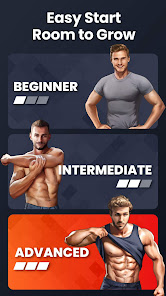
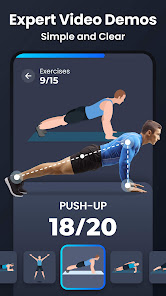
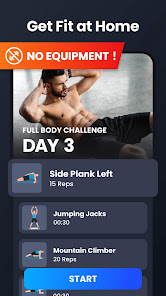
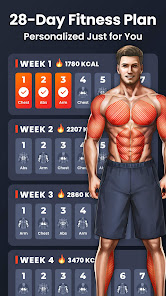
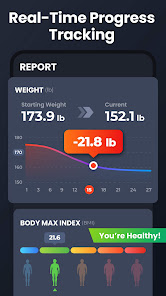
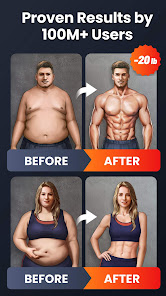

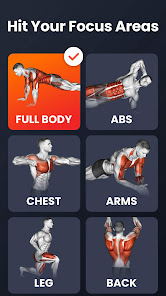
Welcome to the "Home Workout - No Equipment" app! Transform your fitness journey with our easy-to-follow workouts designed for all levels. No gym? No problem! Our app offers a variety of effective exercises that require no equipment, allowing you to stay fit and healthy from the comfort of your home. Whether you're looking to build strength, improve flexibility, or boost your endurance, we've got you covered. Get started today and achieve your fitness goals anytime, anywhere!
Features & Highlights
Home Workout - No Equipment is a fantastic fitness app designed for anyone looking to get in shape without the need for gym equipment. This app truly stands out with its user-friendly interface and a plethora of features that cater to various fitness levels. Here are some of the core features that make it a must-have:
- Customizable Workout Plans: The app allows users to create and personalize their workout plans based on their fitness goals. Whether you want to build muscle, lose weight, or enhance flexibility, you can tailor your routine accordingly. For instance, I set up a 4-week plan focusing on core strength, and it guided me through a balanced mix of exercises each day.
- Video Demonstrations: Each exercise is accompanied by clear video demonstrations, which is incredibly helpful for beginners. I remember struggling with proper form during squats, but with the app’s instructional videos, I quickly learned the right technique, ensuring I was working out safely and effectively.
- No Equipment Needed: As the name suggests, you can perform all workouts without any equipment. This was especially advantageous for me during the pandemic when going to the gym felt unsafe. I could easily do my workouts in my living room, utilizing just my body weight to achieve great results.
- Progress Tracking: The app includes a feature to track your progress over time, which motivates you to keep pushing towards your fitness goals. After a month of consistent workouts, I was thrilled to see my improvement in endurance and strength displayed in easy-to-read graphs.
- Daily Reminders: To keep users accountable, the app sends daily reminders to work out. This feature has been a game-changer for me; on days when my motivation waned, a gentle nudge from the app helped me stick to my routine.
Real Experience Using Home Workout - No Equipment
Application Scenarios
I've found myself utilizing the Home Workout app at various times throughout my day. For example, during my lunch break at work, I often take 15 minutes to do a quick HIIT session using the app. The flexibility it offers has allowed me to squeeze in workouts whenever I can, whether it’s a morning routine before breakfast or a late-night session after a long day. On weekends, I even invite friends over for a group workout session using the app as our guide; it’s fun to share the experience and motivate each other while also enjoying a good laugh trying to keep up with the exercises!
User Experience
The user interface of Home Workout - No Equipment is sleek and intuitive. Navigating through the app feels seamless; I can easily select my workout type, view my progress, and access my personalized plans. Each feature is just a few taps away, which makes the overall experience pleasant and stress-free. The video demonstrations load quickly and play smoothly, ensuring that I can follow along without interruptions. After using the app consistently for several weeks, I've found it to be responsive and reliable; I could easily track my workouts and see my progress, which has significantly boosted my motivation to keep going!
Pricing
Home Workout - No Equipment offers a free version that includes a wide variety of workouts, which is fantastic for anyone just starting their fitness journey. However, there is also a premium membership option that unlocks additional features, such as exclusive workout plans and advanced tracking tools. I’ve opted for the premium subscription, and I believe it’s worth every penny considering the comprehensive resources and enhanced experience it provides.
Updates & Support
The developers of Home Workout are proactive in providing updates, frequently adding new workouts and features to keep the app fresh and engaging. I’ve noticed that they listen to user feedback, often incorporating suggestions for improvement. Customer support is responsive, with options for in-app messaging or email assistance. My inquiries about certain features were addressed promptly, making me feel valued as a user.
Security & Privacy Review
When it comes to security and privacy, Home Workout - No Equipment takes commendable measures to protect its users. The app is available on both the App Store and Google Play, ensuring it meets the respective platform’s security standards. During registration, the app requires minimal personal data, focusing primarily on your fitness goals rather than intrusive personal details, which I appreciate.
In terms of ads and tracking behavior, I noticed a few ads in the free version, but they are not overly intrusive. The premium version eliminates ads altogether, allowing for a more uninterrupted workout experience. Overall, I feel secure using this app, knowing that my data is handled responsibly while enjoying the freedom to work out anytime, anywhere.
Pros 
-
 Transform your living space
 - Achieve fitness goals easily
- No equipment needed, ever
- Tailored workouts for all levels
- Track progress and stay motivated
Cons 
-
 Limited exercise variety
 - No personalized plans available
- Lack of real-time guidance
- May not suit all fitness levels
 Google Play
  App Store
 FAQ
Can I submit suggestions or feedback to Home Workout - No Equipment?
Yes, users can submit suggestions or feedback through the app's support or contact features for improvements.
Does Home Workout - No Equipment collect my personal data?
The app may collect minimal personal data for functionality and personalization, but it prioritizes user privacy. Please check the privacy policy for details.
Does Home Workout - No Equipment support offline use?
Yes, the app allows users to access workouts offline, so you can exercise without an internet connection.
How do I cancel my Home Workout - No Equipment subscription?
You can cancel your subscription through your device's app store settings, following the instructions provided there.
How much does a subscription to Home Workout - No Equipment cost?
The subscription costs vary by region and may include monthly or yearly plans. Check the app for specific pricing.
How to use Home Workout - No Equipment
Do I need to activate the Home Workout app after downloading?
No activation is necessary; simply download the app and start your workouts immediately.
How can I contact customer service for the Home Workout app?
You can reach customer service through the app's help section or by emailing support
How do I find my customer number in the Home Workout app?
Your customer number can be found in the app settings under "Account Information."
How do I log in to the Home Workout app?
To log in, enter your email and password on the login screen, then tap "Log In."
Similar Apps














You May Like

AllTrails: Hike, Bike & Run
Health & Fitness
4.6
Blood Pressure App Pro
Health & Fitness
3.9
Blood Pressure Monitor & Info
Health & Fitness
4.5

Calm - Sleep, Meditate, Relax
Health & Fitness
4.5

Calorie Counter by Lose It!
Health & Fitness
4.6

Daily Yoga ®: Yoga for Fitness
Health & Fitness
4.1

Feelsy: ASMR Stress Relief
Health & Fitness
4.1

Home Fitness Coach: FitCoach
Health & Fitness
4.3
FitNotes Supporter
Health & Fitness
4.9

Fitbit
Health & Fitness
4.1

Flo Period & Pregnancy Tracker
Health & Fitness
4.7

Geocaching®
Health & Fitness
4.6