
 Home
Home  Apps
Apps  Games
Games  Windows
  Topics
  Terms of Service
  Cookies & Privacy Policy
  Disclaimer
Game Booster VIP Lag Fix & GFX


Information
- Category: Libraries & Demo
- Price: 0.99
- Age Rating: Everyone
- Rating: 4.2
- Developer: TOLAN
- Version: 122
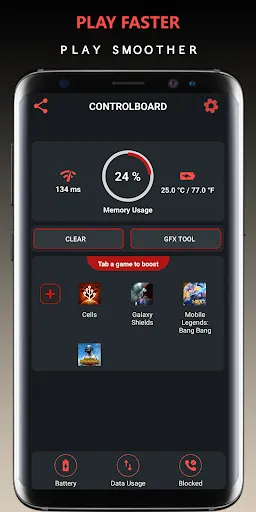
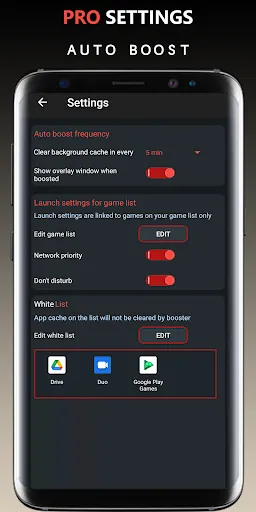
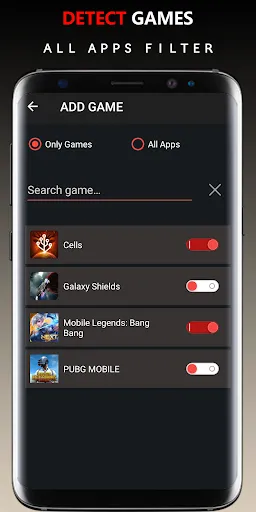
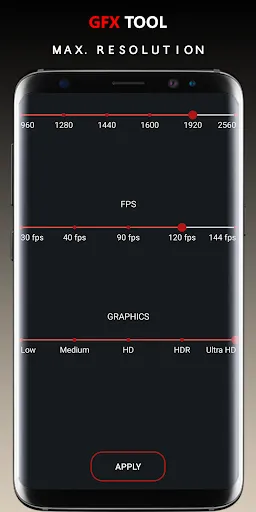
"Game Booster VIP Lag Fix & GFX" is designed to enhance your gaming experience by optimizing device performance and reducing lag. With advanced features, it fine-tunes system resources, ensuring smooth gameplay and improved graphics. Whether you're a casual gamer or a competitive player, this app helps you achieve the best performance possible, allowing you to focus on winning without interruptions. Elevate your gaming with seamless controls and stunning visuals!
Features of "Game Booster VIP Lag Fix & GFX"
"Game Booster VIP Lag Fix & GFX" is designed to enhance gaming performance on mobile devices. One of its standout features is the ability to optimize system resources, which helps in reducing lag and improving frame rates during gameplay. The app achieves this by freeing up RAM and closing background applications that may consume valuable resources.
Another notable feature is the GFX tool, which allows users to customize graphics settings for various games. This includes adjusting resolution, frame rates, and visual effects, enabling gamers to tailor their gaming experience according to their device's capabilities. Additionally, the app provides a one-tap boost option, making it user-friendly for those who may not be tech-savvy.
Furthermore, "Game Booster VIP" includes a game launcher that organizes games in one place, making it easier for users to access their favorite titles. The app also offers a monitoring feature that tracks performance metrics, helping users understand how their device is handling different games. Overall, these features combine to create a smoother and more enjoyable gaming experience.
How to Use "Game Booster VIP Lag Fix & GFX"
Using "Game Booster VIP Lag Fix & GFX" is straightforward and user-friendly. First, download and install the app from a trusted source, such as the Google Play Store. Once installed, open the app, and you will be greeted with a clean interface that displays your installed games. To begin optimizing your gaming experience, simply select the game you wish to boost.
After selecting a game, you can choose to apply the one-tap boost feature, which automatically optimizes your device's resources for that specific game. Alternatively, you can manually adjust the graphics settings using the GFX tool, allowing you to customize the resolution and frame rates according to your preferences. Once you have made your selections, launch the game directly from the app for an enhanced gaming experience.
Additionally, you can monitor performance metrics while gaming, which helps you understand how well your device is performing. If you encounter any issues, the app provides troubleshooting tips to help you resolve them. Overall, the app is designed to be intuitive, making it accessible for gamers of all skill levels.
Pros & Cons of the App
"Game Booster VIP Lag Fix & GFX" comes with several advantages that make it appealing to gamers. One of the primary pros is its ability to significantly reduce lag and improve overall gaming performance, which is crucial for competitive gaming. The GFX tool is another highlight, allowing users to customize graphics settings for a more tailored experience. The app's one-tap boost feature simplifies the optimization process, making it accessible for users who may not be tech-savvy.
However, there are some drawbacks to consider. Some users have reported that the app may not work effectively on all devices, leading to inconsistent performance improvements. Additionally, while the app is free to download, certain features may require a premium subscription, which could deter some users. Furthermore, excessive reliance on such apps may lead to neglecting other important device maintenance practices.
In summary, while "Game Booster VIP Lag Fix & GFX" offers valuable features for enhancing gaming performance, potential users should weigh the pros and cons based on their specific needs and device capabilities. Overall, it can be a useful tool for those looking to optimize their gaming experience.
Get Installation Details  Google Play
  App Store
Google Play App Store FAQ
Can I create playlists on Spotify?
Yes, users can create, share, and collaborate on playlists with friends.
Can I download music on Spotify?
Yes, premium users can download songs and playlists for offline listening.
Can I listen to Spotify offline?
Yes, premium users can listen to downloaded music offline without an internet connection.
Can I use Spotify on multiple devices?
Yes, you can use Spotify on multiple devices, but only one device can stream at a time.
Does Spotify have podcasts?
Yes, Spotify hosts a wide range of podcasts across various genres.
Similar Apps














You May Like

Unistellar
Libraries & Demo
3.6

Wifi Connecter Library
Libraries & Demo
3.9

Cardboard
Libraries & Demo
3.4

Tradutor Portugues Espanhol
Libraries & Demo
4.1
Test DPC
Libraries & Demo
4.1

Addons for Melon
Libraries & Demo
4.2
AirPlay - Cast Screen
Libraries & Demo
3.9
Apple Carplay
Libraries & Demo
0

Apple tv Remote
Libraries & Demo
4.3
Apple Watch for Android
Libraries & Demo
4

Camera Block: Guard & Anti spy
Libraries & Demo
4.5

Camera endoscope / OTG USB
Libraries & Demo
3.8