
 Home
Home  Apps
Apps  Games
Games  Windows
  Topics
  Terms of Service
  Cookies & Privacy Policy
  Disclaimer
Easy Scanner - PDF Maker


Information
- Category: Tools
- Price: free
- Age Rating: Everyone
- Rating: 4.2
- Developer: CALLERSHOW
- Version: 2.0.1
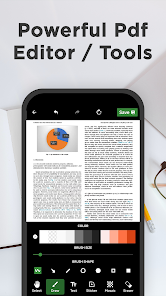
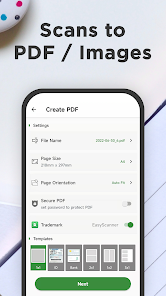
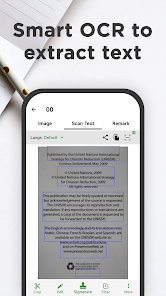
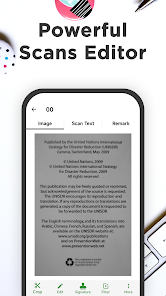
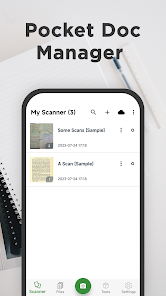
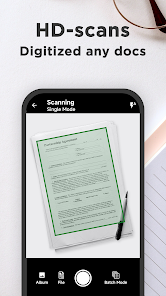
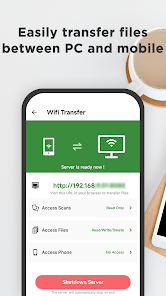
"Easy Scanner - PDF Maker" is your go-to app for transforming documents into high-quality PDFs effortlessly. With a user-friendly interface, it allows you to scan, edit, and share documents on the go. Whether you need to digitize receipts, notes, or contracts, this app ensures clarity and precision. Enjoy features like automatic edge detection, image enhancement, and cloud storage integration, making document management simple and efficient. Turn your smartphone into a powerful scanning tool today!
Features of "Easy Scanner - PDF Maker"
"Easy Scanner - PDF Maker" is a versatile application designed to simplify the process of scanning documents and converting them into PDF format. One of its standout features is the ability to scan documents using your device's camera, allowing for high-quality image capture. The app also includes automatic edge detection, which ensures that the scanned images are cropped accurately, enhancing the overall appearance of the final document.
Another notable feature is the option to enhance scanned images with filters and adjustments, such as brightness and contrast, making it easier to read text. Users can also organize their scanned documents into folders for better management. The app supports multiple file formats, enabling users to save their scans as PDFs or JPEGs. Additionally, it offers cloud storage integration, allowing for easy sharing and backup of documents across various platforms.
Lastly, "Easy Scanner - PDF Maker" provides a user-friendly interface, making it accessible for individuals of all tech levels. With its comprehensive features, the app is ideal for students, professionals, and anyone needing a reliable scanning solution.
How to Use "Easy Scanner - PDF Maker"
Using "Easy Scanner - PDF Maker" is a straightforward process that can be completed in just a few steps. First, download and install the app from your device's app store. Once installed, open the app and grant it permission to access your camera and storage. To begin scanning, tap the camera icon, which will activate your device's camera.
Position the document you wish to scan within the camera frame. The app will automatically detect the edges of the document, ensuring a clean scan. You can manually adjust the cropping if necessary. After capturing the image, you will have the option to enhance it using various filters and adjustments. Once satisfied with the scan, save it in your desired format, either as a PDF or JPEG.
Finally, you can organize your scanned documents into folders for easy access. The app also allows you to share your scans via email or cloud storage services, making it convenient to distribute your documents. With these simple steps, you can efficiently create high-quality scans using "Easy Scanner - PDF Maker."
Pros & Cons of the App
"Easy Scanner - PDF Maker" comes with several advantages that make it a popular choice among users. One of the primary pros is its user-friendly interface, which allows even those with minimal tech experience to navigate the app easily. The automatic edge detection feature is another significant benefit, as it ensures that scans are clean and professional-looking without requiring manual adjustments. Additionally, the app's ability to enhance images with filters and adjustments adds value, making documents more legible.
However, there are some drawbacks to consider. Some users have reported occasional issues with the app crashing or lagging, particularly when handling larger files. Additionally, while the basic features are free, certain advanced functionalities may require in-app purchases, which could be a downside for users seeking a completely free solution. Lastly, the app's reliance on camera quality means that users with older devices may not achieve optimal scanning results.
In summary, "Easy Scanner - PDF Maker" offers a range of useful features and a user-friendly experience, but potential users should weigh the pros and cons before deciding if it meets their scanning needs.
Get Installation Details  Google Play
  App Store
Google Play App Store FAQ
Can I create playlists on Spotify?
Yes, users can create, share, and collaborate on playlists with friends.
Can I download music on Spotify?
Yes, premium users can download songs and playlists for offline listening.
Can I listen to Spotify offline?
Yes, premium users can listen to downloaded music offline without an internet connection.
Can I use Spotify on multiple devices?
Yes, you can use Spotify on multiple devices, but only one device can stream at a time.
Does Spotify have podcasts?
Yes, Spotify hosts a wide range of podcasts across various genres.
Similar Apps











You May Like

Calculator
Tools
4.4

SHAREit: Transfer, Share Files
Tools
4.3

Auto Clicker - Automatic tap
Tools
4.6

Beats
Tools
3.8

Starlink
Tools
4.9
APRSdroid - APRS Client
Tools
3.9
AVG AntiVirus & Security
Tools
4.6

AirMirror Receiver Pro
Tools
3

Amazon Fire TV
Tools
4.6
Automatic Call Recorder Pro
Tools
3.5

Blink Home Monitor
Tools
4.4
CC Booster
Tools
4.5