


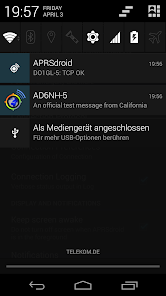
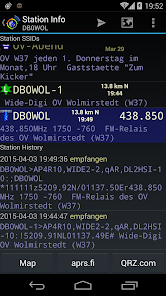
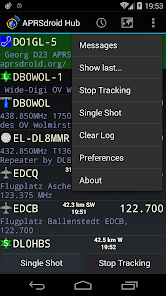
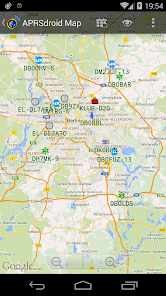
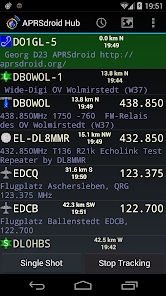
APRSdroid is a versatile APRS (Automatic Packet Reporting System) client designed for Android devices, offering a range of features that enhance user experience. One of its primary features is real-time tracking, allowing users to view the locations of other APRS stations on a map. This is particularly useful for amateur radio operators and outdoor enthusiasts who want to keep track of friends or fellow operators in the field.
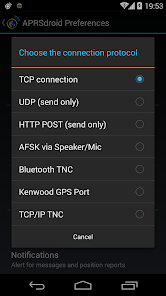
Another notable feature is the ability to send and receive APRS messages, enabling communication between users. The app supports various APRS protocols, ensuring compatibility with a wide range of devices. Additionally, APRSdroid includes weather data integration, allowing users to access real-time weather reports and alerts based on their location. The app also offers customizable settings, enabling users to adjust the display and notification preferences according to their needs.
Furthermore, APRSdroid supports the use of GPS for automatic position reporting, making it easier for users to share their location without manual input. The app also features a user-friendly interface, making it accessible for both novice and experienced users. Overall, APRSdroid combines functionality and ease of use, making it a popular choice among APRS enthusiasts.
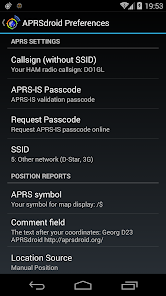
Using APRSdroid is straightforward, even for those new to APRS technology. First, download and install the app from the Google Play Store. Once installed, open the app and configure your settings. You will need to enter your callsign and, if desired, a path for your APRS packets. This initial setup is crucial for ensuring that your device can send and receive data effectively.
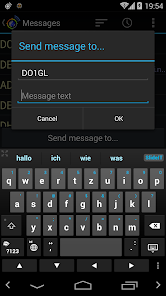
After configuring your settings, enable GPS on your device to allow APRSdroid to automatically report your location. The app will display a map where you can see your position and the locations of other APRS stations nearby. To send a message, navigate to the messaging feature within the app, enter the recipient's callsign, and type your message. This allows for seamless communication with other users.
Additionally, you can customize the app's interface and notification settings to suit your preferences. Regularly check for updates to ensure you have the latest features and improvements. By following these steps, you can effectively utilize APRSdroid to enhance your APRS experience and stay connected with fellow users.
APRSdroid offers several advantages that make it a popular choice among APRS users. One of the main pros is its user-friendly interface, which simplifies navigation and makes it accessible for users of all experience levels. The app's real-time tracking feature is another significant benefit, allowing users to monitor the locations of other APRS stations effortlessly. Additionally, the integration of weather data provides valuable information for outdoor activities, enhancing the app's utility.
However, there are some drawbacks to consider. One con is that the app may consume a considerable amount of battery life, especially when GPS is continuously active. This can be a concern for users who are out in the field for extended periods. Furthermore, while the app is generally reliable, occasional connectivity issues may arise, impacting the ability to send or receive messages. Lastly, some users may find the initial setup process a bit complex, particularly if they are unfamiliar with APRS technology.
In summary, while APRSdroid has its pros and cons, its overall functionality and ease of use make it a valuable tool for APRS enthusiasts. Users should weigh these factors based on their specific needs and preferences when deciding to use the app.

 User-friendly interface simplifies navigation for all skill levels. Real-time tracking enhances situational awareness for users on the go. Supports multiple APRS protocols for versatile communication options. Customizable alerts keep you informed about important events instantly. Offline mode allows access to data without an internet connection.
 Limited functionality compared to dedicated APRS hardware solutions User interface may feel outdated and cluttered Occasional connectivity issues can disrupt real-time tracking
 Yes, users can submit suggestions or feedback through the app's support section or directly via the developer's contact information provided in the app.
APRSdroid - APRS Client is designed to prioritize user privacy and does not collect personal data without consent. However, users should review the privacy policy for detailed information.
APRSdroid - APRS Client requires an internet connection for most features, but some functionalities may be available in offline mode, such as viewing previously downloaded map data.
To cancel your APRSdroid - APRS Client subscription, go to your Google Play account settings, find the subscription section, and follow the prompts to cancel.
The subscription cost for APRSdroid - APRS Client may vary depending on the chosen plan, typically offering monthly and yearly options for users.
Unfortunately, customer numbers cannot be changed. If you need assistance, please reach out to customer service for alternatives.
To activate your account, follow the link sent to your email after registration. If you have issues, contact customer service.
You can reach customer service through the app's support section or via our website's contact form. We’re here to help!
To log in, open the app, enter your username and password, then tap the login button.
You can update your customer information by logging into your account and navigating to the settings section. For help, contact customer service.












 Google Play
  App Store












