
 Home
Home  Apps
Apps  Games
Games  Windows
  Topics
  Terms of Service
  Cookies & Privacy Policy
  Disclaimer
BlueDriver OBD2 Scan Tool


Information
- Category: Auto & Vehicles
- Price: free
- Age Rating: Everyone
- Rating: 3.8
- Developer: Lemur Vehicle Monitors
- Version: 8.5.1
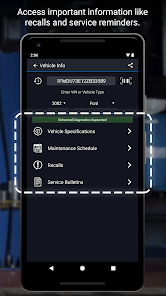
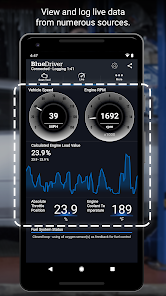
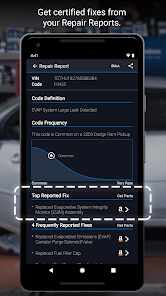
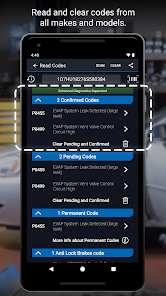

The BlueDriver OBD2 Scan Tool app is a powerful diagnostic tool designed for car enthusiasts and everyday drivers alike. It connects seamlessly with your vehicle's OBD2 system, providing real-time data, diagnostic trouble codes, and repair solutions. With an intuitive interface and comprehensive features, BlueDriver empowers users to understand their vehicle's health, troubleshoot issues, and save on costly repairs. Whether you're a DIY mechanic or just want peace of mind, BlueDriver is your go-to automotive companion.
Features & Highlights
The BlueDriver OBD2 Scan Tool is not just another diagnostic tool; it's a powerful companion for anyone serious about vehicle maintenance and repair. With its user-friendly interface and robust features, it stands out in the crowded market of automotive diagnostic tools.
- Real-Time Data Streaming: The BlueDriver app provides live data from your vehicle's engine and other systems. For instance, I once used it during a long drive when my check engine light flickered. The real-time data allowed me to see specific parameters, helping me diagnose a minor issue before it became a major problem.
- Vehicle-Specific Repair Reports: Unlike many generic OBD2 scanners, BlueDriver offers detailed repair reports tailored to your vehicle's make and model. When I encountered a persistent issue with my car, the app generated a comprehensive report detailing possible causes and the recommended fixes, proving invaluable for my mechanic.
- Enhanced Diagnostic Features: The app supports advanced features such as Smog Check and Mode 6 data, which can be crucial for emissions testing. During my last inspection, BlueDriver's smog check feature indicated that my vehicle was ready for testing, ensuring I wouldn't face any surprises at the emissions station.
- User-Friendly Interface: The app is designed with ease of use in mind. I was impressed with how intuitive it was to navigate through various features, settings, and reports. Even someone not tech-savvy could operate it with minimal guidance.
- Updates and Vehicle Coverage: BlueDriver regularly updates its database, covering an extensive range of vehicles. I appreciated how it stayed current with new models and technologies, which is crucial as automotive technology evolves rapidly.
Real Experience Using BlueDriver OBD2 Scan Tool
Application Scenarios
As someone who enjoys working on cars, I often find myself in scenarios where the BlueDriver OBD2 Scan Tool comes in handy. Just last month, my friend’s car started to sputter while idling. Instead of guessing what the problem might be, I quickly connected the BlueDriver to the OBD2 port and opened the app. Within moments, I had a list of trouble codes, and we could narrow down the issue to a faulty ignition coil. This saved us time, money, and a lot of headache.
Another instance was during a routine maintenance check on my own car. I decided to use BlueDriver to monitor the vehicle's performance. By streaming real-time data, I could assess how the engine was performing under various conditions. This not only enhanced my understanding of my vehicle but also allowed me to identify a minor issue that could have escalated into a significant problem if left unchecked.
User Experience
The user interface of the BlueDriver app is remarkably intuitive. Upon launching the app, I was greeted with a clean dashboard that presented all the necessary features in an organized manner. It took me just a few taps to access the diagnostics, repair reports, and live data features. The workflow was seamless; I could switch between screens without any lag, making my experience smooth and efficient.
Performance-wise, the BlueDriver app is top-notch. It connected quickly to the OBD2 scanner, and the data refresh rate was impressive. I noticed that the app provided live updates without noticeable delays, which was crucial when I was trying to diagnose issues on the fly. Overall, my experience with BlueDriver has been overwhelmingly positive. It feels like I have a professional mechanic's knowledge at my fingertips, and that’s incredibly empowering.
Pricing
BlueDriver OBD2 Scan Tool is reasonably priced, especially considering the wealth of features it offers. The initial cost of the device is around $99.95, which gives you access to the app and its extensive database. This investment is a fraction of what you might pay for a single diagnostic visit to a mechanic, making it an excellent choice for car enthusiasts and everyday drivers alike. Additionally, there are no hidden fees or subscriptions, which adds to its overall value.
Updates & Support
One of the standout aspects of BlueDriver is the regular updates it receives. The developers are proactive in ensuring that the app stays current with the latest automotive technologies and vehicle models, which is crucial in the fast-evolving automotive landscape. Customer support is also commendable; I reached out with a question regarding a specific feature and received a prompt and helpful response. Their commitment to user satisfaction is evident in both the support and the frequent updates.
Security & Privacy Review
For American users, security and privacy are paramount, especially when using apps that connect to vehicle systems. BlueDriver is available on both the App Store and Google Play, which reassures users about its legitimacy and security standards. The app requires some personal data upon registration, but it is minimal and primarily aimed at enhancing user experience.
Importantly, BlueDriver does not bombard you with ads, nor does it engage in invasive tracking behavior, which is a relief in today's digital landscape. The app's design respects user privacy while still providing necessary features. Overall, I felt secure while using BlueDriver, knowing that my data was handled responsibly.
Pros 
-
 Unlock vehicle diagnostics
 - Real-time data streaming
- Comprehensive trouble codes
- User-friendly interface
- Enhanced DIY repair guidance
Cons 
-
 Limited vehicle compatibility
 - Occasional connectivity issues
- Subscription may be required
- User interface can be complex
 Google Play
  App Store
 FAQ
Can I submit suggestions or feedback to BlueDriver OBD2 Scan Tool?
Yes, users can submit feedback through the app or the BlueDriver website to help improve the service.
Does BlueDriver OBD2 Scan Tool collect my personal data?
BlueDriver does not collect personal data; it primarily uses vehicle data for diagnostics and reporting.
Does BlueDriver OBD2 Scan Tool support offline use?
BlueDriver requires an internet connection for certain features, but you can access basic diagnostics offline.
How do I cancel my BlueDriver OBD2 Scan Tool subscription?
Since there is no subscription, there is nothing to cancel; users can discontinue app use anytime.
How much does a subscription to BlueDriver OBD2 Scan Tool cost?
BlueDriver does not have a subscription model; users pay once for the OBD2 device and app access.
How to use BlueDriver OBD2 Scan Tool
How can I contact BlueDriver customer service?
You can contact BlueDriver customer service through their official website or by emailing support
How do I log in to the BlueDriver app?
Open the app and enter your credentials; if you don't have an account, you can create one directly in the app.
Is there an activation process for the BlueDriver app?
The BlueDriver app does not require activation; simply download it and connect it to your OBD2 device to start using it.
What is the customer number for BlueDriver support?
BlueDriver does not have a specific customer number; it's best to reach out via their website or email for support.
Similar Apps
















You May Like

AlfaOBD
Auto & Vehicles
3.8
Car Launcher Pro
Auto & Vehicles
4.4
inCarDoc Pro | OBD2
Auto & Vehicles
4.3

PayByPhone
Auto & Vehicles
4.9

ParkMobile: Park. Pay. Go.
Auto & Vehicles
4.7

Shell: Fuel, Charge & More
Auto & Vehicles
3.5

Toyota
Auto & Vehicles
4.6

CarMax: Used Cars for Sale
Auto & Vehicles
4.6

Autotrader Used Cars for Sale
Auto & Vehicles
4.8

AutoZone Auto Parts & Repair
Auto & Vehicles
4.7
Android Auto
Auto & Vehicles
4.1

FIXD OBD2 Scanner
Auto & Vehicles
4.2