
 Home
Home  Apps
Apps  Games
Games  Windows
  Topics
  Terms of Service
  Cookies & Privacy Policy
  Disclaimer
OnStar Guardian: Safety App


Information
- Category: Lifestyle
- Price: free
- Age Rating: Everyone
- Rating: 4.3
- Developer: OnStar, LLC
- Version: 3.6.7
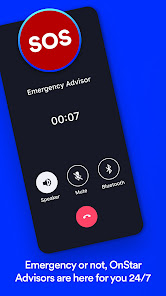
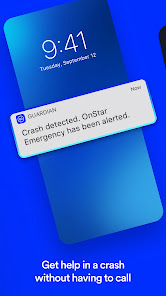
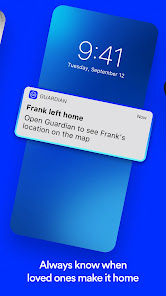
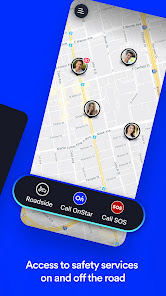
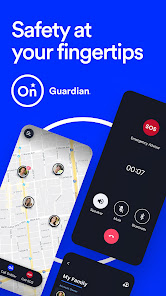
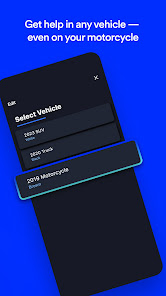
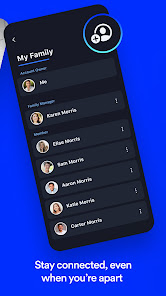
OnStar Guardian is a safety app designed to provide peace of mind and security for you and your loved ones. With features like location sharing, emergency assistance, and crash detection, it empowers users to stay connected and safe in any situation. Whether you're on the road or at home, OnStar Guardian offers a reliable safety net, ensuring help is just a tap away. Experience enhanced protection and confidence with this innovative mobile solution.
Features & Highlights
OnStar Guardian: Safety is an app that redefines personal security in the digital age. With its rich feature set, it empowers users to stay safe while providing peace of mind to their loved ones. Here are some core highlights:
- Emergency Assistance: The app allows you to connect with a dedicated OnStar advisor at the touch of a button. Imagine you're driving alone on a dark, unfamiliar road and suddenly your car breaks down. With the Emergency Assistance feature, you can get immediate help, ensuring you’re never truly alone in a crisis.
- Location Sharing: OnStar Guardian enables you to share your real-time location with trusted contacts. Picture this: you’re out for a jog in an isolated park. You can share your location with a friend or family member, giving them peace of mind and an added layer of security during your workout.
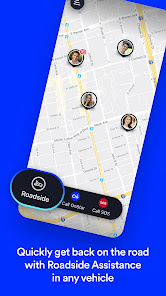
- Roadside Assistance: With just a few taps, you can request roadside assistance when your vehicle has trouble. Let’s say you accidentally lock your keys in the car while at the grocery store. The app connects you to OnStar’s roadside service quickly, saving you time and hassle.
- Crash Response: In the unfortunate event of a car accident, the app provides immediate crash detection and emergency response. If you’re involved in a collision, OnStar’s system can automatically alert emergency services, ensuring you receive help even if you can’t call for it yourself.
- Safety Score: The app evaluates your driving habits and provides a score to help you improve your driving behavior. For example, if you tend to accelerate too fast or brake suddenly, the app will notify you, encouraging safer driving habits and ultimately leading to fewer accidents.
Real Experience Using OnStar Guardian: Safety
Application Scenarios
As someone who frequently travels for work and enjoys outdoor activities on weekends, I find OnStar Guardian to be an essential part of my daily routine. One particular evening, I had to drive to an unfamiliar area for a business meeting. Knowing that I'd be traveling late into the night, I used the location-sharing feature to let my partner know where I was headed. This simple act of sharing my location provided a sense of security for both of us.
Another scenario occurred during a weekend hike. My friends and I decided to explore a new trail, and I used the app to share my location with them. Halfway through our hike, one of my friends tripped and sprained their ankle. I quickly accessed the Emergency Assistance feature and was able to get help on the way while also keeping our friends informed about our situation.
User Experience
The OnStar Guardian app has a clean, intuitive interface that makes navigation seamless. The main dashboard displays all the vital functions prominently, which is great when you need to access features quickly. I appreciate how the app walks you through each function with helpful tips and explanations. The responsiveness of the app is impressive; I’ve never experienced lag or crashes, even during high-demand situations like emergency calls. Overall, using OnStar Guardian feels reassuring, as I know I have a reliable safety net at my fingertips.
Pricing
OnStar Guardian offers various pricing plans, catering to different needs and budgets. The subscription starts at a reasonable monthly fee, which I found to be a great value considering the extensive features offered. They also provide a free trial, allowing potential users to explore the app’s functionalities before committing. This flexibility makes it accessible for everyone, whether you’re a frequent traveler or someone looking for added safety at home.
Updates & Support
The OnStar Guardian app receives regular updates, which keep the features fresh and responsive to user needs. I’ve noticed improvements in user experience and new functionalities being added over time. When I had a question about a feature, the customer support team was quick to respond via chat, and I found their assistance to be both knowledgeable and friendly. It’s reassuring to know that the team behind the app is dedicated to providing excellent support to its users.
Security & Privacy Review
As a user, security and privacy are paramount when it comes to apps like OnStar Guardian. The app is available on both the App Store and Google Play, ensuring it meets strict security standards required by these platforms. During registration, I was required to provide some personal information, such as my name, email, and phone number. This information is crucial for the app to function effectively, especially for features like location sharing and emergency assistance.
One thing I appreciated was the transparency around data usage; OnStar clearly outlines how they handle personal data and the measures in place to protect it. Unlike many apps, I didn’t notice any intrusive ads or excessive tracking behaviors, which can be quite annoying in other applications. Overall, I feel confident using OnStar Guardian, knowing that my security and privacy are taken seriously.
Pros 
-
 OnStar Guardian offers peace of mind
 - Real-time location sharing feature
- Emergency assistance at your fingertips
- Crash detection for swift help
- Safety alerts for driving habits
Cons 
-
 Limited compatibility with cars
 - Requires active subscription fees
- Dependence on mobile signal
- May not cover all emergencies
 Google Play
  App Store
 FAQ
Can I submit suggestions or feedback to OnStar Guardian?
Yes, users can submit suggestions or feedback through the app or by reaching out to OnStar's support team.
Does OnStar Guardian collect my personal data?
Yes, the app collects personal data to provide services, but it follows strict privacy policies to protect your information.
Does OnStar Guardian support offline use?
No, OnStar Guardian requires an internet connection to function properly and access its features.
How do I cancel my OnStar Guardian subscription?
You can cancel your subscription through the app settings or by contacting OnStar customer support directly.
How much does a subscription to OnStar Guardian cost?
Subscription costs vary; typically, it's around $14.99 per month, but check the app for current pricing.
How to use OnStar Guardian: Safety App
How do I activate the OnStar Guardian app?
Download the app, create an account, and follow the prompts to activate it, including verifying your identity.
How do I contact OnStar Guardian customer service?
You can reach OnStar Guardian customer service by calling 1-888-466-7827 or through the app's support section.
How do I log in to the OnStar Guardian app?
Open the app, enter your email and password, and tap 'Log In.' If you forget your password, use the 'Forgot Password?' link.
What is the customer number for OnStar Guardian?
Your OnStar Guardian customer number is found in your account settings within the app.
Similar Apps















You May Like

Ring - Always Home
Lifestyle
4.6

Amazon Alexa
Lifestyle
4.1

Great Clips
Lifestyle
4.2

Nextdoor: Neighborhood Network
Lifestyle
4.6

Design Space: DIY with Cricut
Lifestyle
3.9

Tile: Making Things Findable
Lifestyle
4.8

Tubi - Movies & TV Shows
Lifestyle
4.7

Wyze - Make Your Home Smarter
Lifestyle
4.4

Falling Fruit
Lifestyle
3.2
Google Home
Lifestyle
4.1

Life360: Stay Connected & Safe
Lifestyle
4.4

My Face Shape Meter and frames
Lifestyle
3.9