
 Home
Home  Apps
Apps  Games
Games  Windows
  Topics
  Terms of Service
  Cookies & Privacy Policy
  Disclaimer
Life360: Stay Connected & Safe


Information
- Category: Lifestyle
- Price: free
- Age Rating: Everyone
- Rating: 4.4
- Developer: Life360
- Version: 26.3.0
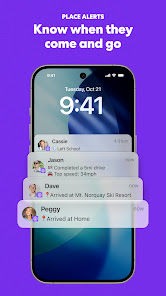
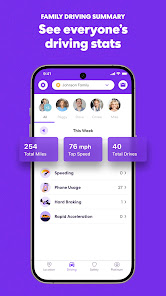
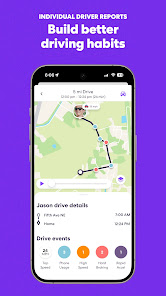
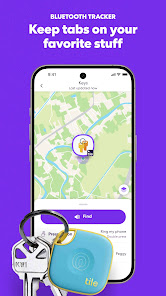
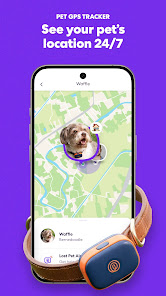
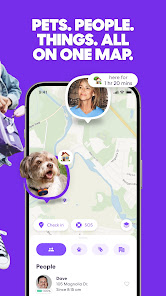
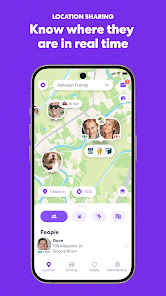

Life360 is a family safety app designed to keep loved ones connected and secure. With real-time location sharing, driving safety features, and emergency alerts, it provides peace of mind for families. Users can create private groups, receive notifications when family members arrive or leave designated places, and access helpful resources in emergencies. Life360 fosters communication and safety, ensuring that everyone stays informed and protected, no matter where they are.
Features of "Life360: Stay Connected & Safe"
"Life360: Stay Connected & Safe" is a comprehensive family safety app designed to enhance communication and security among family members. One of its standout features is real-time location sharing, allowing users to see the precise whereabouts of their loved ones on a map. This feature is particularly useful for parents who want to keep track of their children’s movements. Additionally, the app includes location history, enabling users to review past locations and routes taken.
Another notable feature is the "Place Alerts," which notifies users when family members arrive or leave designated locations, such as home or school. The app also offers a built-in messaging system, allowing for seamless communication without needing to switch to another platform. Furthermore, "Life360" provides emergency services, including a panic button that alerts emergency contacts and local authorities in case of a crisis. The app also includes driving safety features, such as crash detection and driving reports, making it a well-rounded tool for family safety and connectivity.
How to Use "Life360: Stay Connected & Safe"
Using "Life360: Stay Connected & Safe" is straightforward and user-friendly. To get started, download the app from your device's app store and create an account. Once registered, you can invite family members to join your "Circle" by sending them an invitation link. After they accept, you can all share your locations in real-time. To customize your experience, explore the app's settings to adjust privacy options and notification preferences according to your needs.
Once your Circle is set up, you can utilize features like Place Alerts by designating specific locations. This way, you’ll receive notifications when family members arrive or depart from these places. The messaging feature allows you to communicate directly within the app, ensuring that all conversations are centralized. For added safety, familiarize yourself with the emergency features, such as the panic button, which can be activated in urgent situations. Regularly check the driving safety reports to monitor driving habits and ensure the well-being of your loved ones on the road.
Pros & Cons of the App
"Life360: Stay Connected & Safe" offers several advantages that make it a popular choice among families. One of the primary benefits is its real-time location tracking, which provides peace of mind for parents and caregivers. The app's user-friendly interface makes it easy for all family members to navigate, regardless of their tech-savviness. Additionally, the emergency features, including crash detection and the panic button, enhance safety and provide immediate assistance when needed. The ability to set up Place Alerts is another significant advantage, as it keeps family members informed about each other's whereabouts.
However, there are some drawbacks to consider. One of the main concerns is privacy; constant location sharing may make some users uncomfortable. Additionally, while the app is free to use, many of its advanced features require a subscription, which can be a deterrent for some families. Battery consumption can also be an issue, as continuous location tracking may drain device batteries more quickly. Lastly, the app's effectiveness can vary based on network coverage and GPS accuracy, which may lead to occasional discrepancies in location data. Overall, while "Life360" offers valuable features, users should weigh these pros and cons before fully committing to the app.
 Google Play
  App Store
 FAQ
Can I create playlists on Spotify?
Yes, users can create, share, and collaborate on playlists with friends.
Can I download music on Spotify?
Yes, premium users can download songs and playlists for offline listening.
Can I listen to Spotify offline?
Yes, premium users can listen to downloaded music offline without an internet connection.
Can I use Spotify on multiple devices?
Yes, you can use Spotify on multiple devices, but only one device can stream at a time.
Does Spotify have podcasts?
Yes, Spotify hosts a wide range of podcasts across various genres.
Similar Apps















You May Like

Ring - Always Home
Lifestyle
4.6

Amazon Alexa
Lifestyle
4.1

Great Clips
Lifestyle
4.2

Nextdoor: Neighborhood Network
Lifestyle
4.6

Design Space: DIY with Cricut
Lifestyle
3.9

Tile: Making Things Findable
Lifestyle
4.8

Tubi - Movies & TV Shows
Lifestyle
4.7

Wyze - Make Your Home Smarter
Lifestyle
4.4

Falling Fruit
Lifestyle
3.2
Google Home
Lifestyle
4.1

My Face Shape Meter and frames
Lifestyle
3.9

Necrophonic
Lifestyle
3.9