


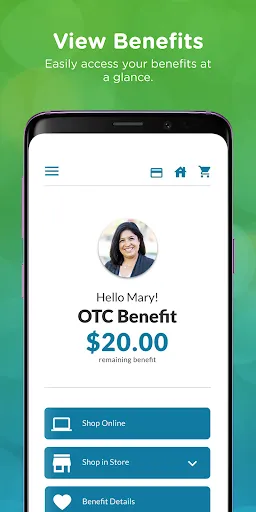
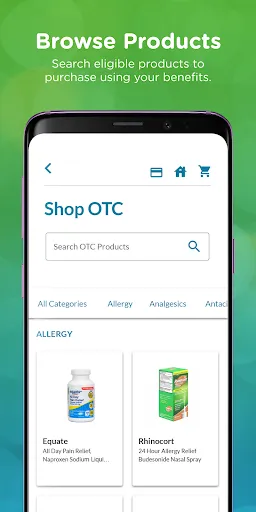
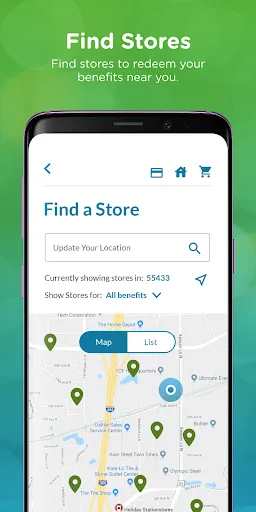
"Healthy Benefits+" is a comprehensive mobile application designed to enhance the health and wellness experience for users. One of its standout features is the ability to manage and track health benefits, allowing users to easily access their eligibility and coverage details. The app also provides a user-friendly interface that simplifies the process of finding nearby participating retailers and pharmacies, making it convenient for users to utilize their benefits effectively.
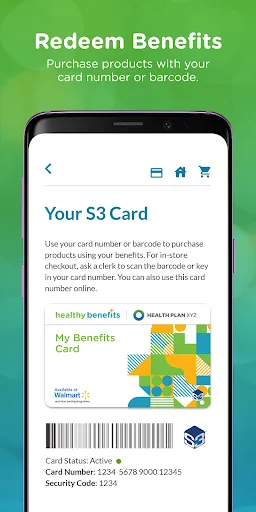
Additionally, "Healthy Benefits+" offers a digital wallet feature, enabling users to store their benefit cards securely. This eliminates the need for physical cards and streamlines the checkout process. The app also includes a rewards program, where users can earn points for healthy purchases, which can be redeemed for various incentives. Furthermore, it provides educational resources and tips on nutrition and wellness, empowering users to make informed health choices. Overall, "Healthy Benefits+" is designed to promote a healthier lifestyle while maximizing the use of available health benefits.
Using "Healthy Benefits+" is straightforward and user-friendly. To get started, users need to download the app from their device's app store and create an account. After registration, users can input their health benefit information, which allows the app to tailor its features to their specific needs. Once set up, users can easily navigate through the app to access their benefits, locate participating retailers, and view their account balance.
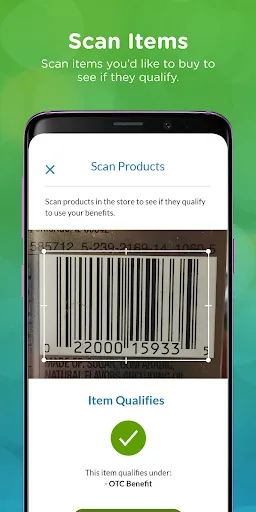
To make the most of the app, users can explore the rewards section, where they can track points earned from eligible purchases. The app also allows users to scan barcodes at checkout, ensuring that they receive the correct discounts and benefits. Additionally, users can take advantage of the educational resources available within the app, which provide valuable insights into maintaining a healthy lifestyle. Regularly checking the app for updates and new offers can further enhance the user experience, making "Healthy Benefits+" a valuable tool for managing health and wellness.
Like any application, "Healthy Benefits+" comes with its own set of advantages and disadvantages. One of the primary pros is its convenience; users can manage their health benefits from their smartphones, eliminating the need for physical cards and paperwork. The app's user-friendly interface makes it easy to navigate, and the rewards program incentivizes healthy purchases, which can lead to cost savings over time. Additionally, the educational resources provided within the app can help users make informed decisions about their health.
On the downside, some users may experience technical issues, such as app crashes or slow loading times, which can hinder the overall experience. Furthermore, the app's effectiveness is dependent on the availability of participating retailers in a user's area, which may limit its usefulness for some individuals. Privacy concerns may also arise, as users are required to input personal health information. Overall, while "Healthy Benefits+" offers numerous benefits, potential users should weigh these pros and cons to determine if it aligns with their health management needs.

 Access a wide range of health and wellness products. Enjoy convenient online shopping and easy navigation. Receive personalized recommendations based on your needs. Track your spending and manage your budget effortlessly. Benefit from exclusive discounts and special offers regularly.
 Limited acceptance at some retailers can restrict shopping options. Monthly limits may not cover all necessary health products. Complicated enrollment processes can deter potential users from joining.
  Google Play
  App Store
 Yes, users can submit suggestions or feedback through the app's support section or by contacting customer service directly.
Healthy Benefits+ may collect personal data to enhance user experience and personalize services, but it prioritizes user privacy and data security.
Yes, Healthy Benefits+ allows users to access certain features and information offline, although some functionalities may require an internet connection.
You can cancel your Healthy Benefits+ subscription through your account settings within the app or by managing your subscription through your app store account.
Subscription costs for Healthy Benefits+ may vary based on features and plans, so it's best to check within the app for the most current pricing.
Unfortunately, customer numbers cannot be changed. If you need help, please contact customer service for support.
Yes, you can contact customer service directly to speak with a representative about your account activation.
You can check the status by logging into your account or contacting customer service for updates on your activation process.
You can reach customer service by calling the number listed on the back of your card or through the customer support section of the Healthy Benefits+ website.
To log in, visit the Healthy Benefits+ website and enter your username and password in the login section.