
 Home
Home  Apps
Apps  Games
Games  Windows
  Topics
  Terms of Service
  Cookies & Privacy Policy
  Disclaimer
Robokiller - Spam Call Blocker


Information
- Category: Communication
- Price: free
- Age Rating: Everyone
- Rating: 3.9
- Developer: Mosaic Srl
- Version: 24.7.7
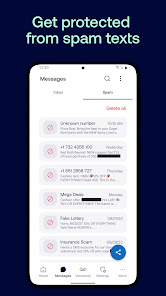
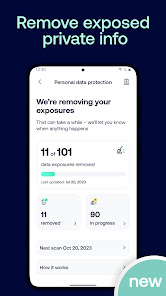
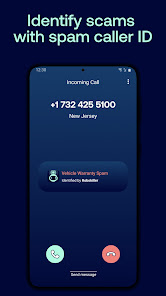
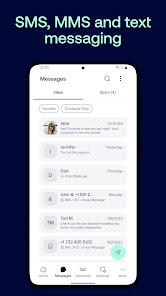
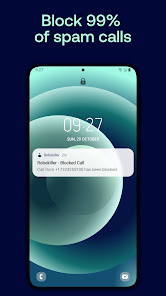
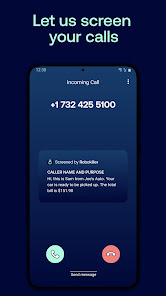

Robokiller is a powerful spam call blocker designed to protect your phone from unwanted robocalls and telemarketers. With advanced technology, it identifies and blocks spam calls in real-time, allowing you to enjoy uninterrupted conversations. The app features a user-friendly interface, customizable settings, and a comprehensive database of known spam numbers. Say goodbye to annoying calls and reclaim your peace of mind with Robokiller, your ultimate defense against unwanted interruptions.
Features of "Robokiller - Spam Call Blocker"
"Robokiller - Spam Call Blocker" is a powerful application designed to help users manage unwanted calls effectively. One of its standout features is the ability to automatically block spam calls using advanced algorithms that identify and filter out known spam numbers. This ensures that users can enjoy a more peaceful phone experience without constant interruptions from telemarketers and robocalls.
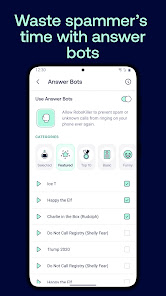
Another notable feature is the "Answer Bots" functionality, which answers spam calls on behalf of the user. This not only saves time but also frustrates spammers by wasting their resources. Additionally, the app provides users with a comprehensive call log, allowing them to review blocked calls and identify patterns in spam activity. Users can also customize their blocking preferences, enabling them to whitelist important contacts or specific numbers they wish to receive calls from.
Robokiller also offers a user-friendly interface, making it easy for individuals of all tech-savviness levels to navigate. The app includes a community-driven spam reporting feature, where users can report new spam numbers, contributing to a constantly updated database. Overall, Robokiller combines functionality and ease of use, making it a top choice for anyone looking to reduce unwanted calls.
How to Use "Robokiller - Spam Call Blocker"
Using "Robokiller - Spam Call Blocker" is a straightforward process that begins with downloading the app from the App Store or Google Play Store. Once installed, users need to create an account, which typically involves providing a phone number and verifying it through a confirmation code sent via SMS. After setting up the account, the app will request permission to access call logs and contacts, which is essential for its spam-blocking capabilities.
Once permissions are granted, Robokiller will automatically start analyzing incoming calls. Users can customize their settings by accessing the app's preferences, where they can choose to block specific types of calls or create a whitelist of contacts. The app also allows users to view a history of blocked calls and listen to recorded spam calls answered by the Answer Bots feature. Regular updates ensure that the app remains effective against new spam tactics, making it a reliable tool for managing unwanted calls.
For optimal performance, users should periodically check the app for updates and review their blocking settings to ensure they align with their preferences. Overall, Robokiller is designed to be user-friendly, making it accessible for anyone looking to take control of their phone experience.
Pros & Cons of the App
Like any application, "Robokiller - Spam Call Blocker" comes with its own set of advantages and disadvantages. One of the primary pros is its effectiveness in significantly reducing unwanted calls. The app's advanced algorithms and community-driven reporting system help keep its spam database current, ensuring that users are protected from the latest spam tactics. Additionally, the Answer Bots feature is a unique selling point, as it not only saves users time but also deters spammers by wasting their resources.
Another advantage is the user-friendly interface, which makes it easy for individuals to navigate and customize their settings. The app also offers a free trial period, allowing users to test its features before committing to a subscription. However, there are some cons to consider. Some users may find the subscription fee a bit steep, especially if they are not receiving a high volume of spam calls. Additionally, while the app is effective, it may occasionally block legitimate calls, requiring users to check their call logs regularly.
Lastly, the app's performance can vary based on the user's location and carrier, as some networks may not fully support its features. Overall, while Robokiller offers robust spam protection, potential users should weigh these pros and cons to determine if it meets their needs.
Get Installation Details  Google Play
  App Store
Google Play App Store FAQ
Can I create playlists on Spotify?
Yes, users can create, share, and collaborate on playlists with friends.
Can I download music on Spotify?
Yes, premium users can download songs and playlists for offline listening.
Can I listen to Spotify offline?
Yes, premium users can listen to downloaded music offline without an internet connection.
Can I use Spotify on multiple devices?
Yes, you can use Spotify on multiple devices, but only one device can stream at a time.
Does Spotify have podcasts?
Yes, Spotify hosts a wide range of podcasts across various genres.
Similar Apps











You May Like

Skype
Communication
4.3

UC Browser-Safe, Fast, Private
Communication
4.4
TextNow: Call + Text Unlimited
Communication
4.6

GroupMe
Communication
4.6
LINE: Calls & Messages
Communication
3.6

Firefox: el navegador privado
Communication
4.6

Brave Private Web Browser, VPN
Communication
4.7

Burner: Second Phone Number
Communication
4.4

Cafe - Live video chat
Communication
4.6

CallApp: Caller ID & Block
Communication
4.4
Coco - Live Video Chat HD
Communication
3.1

Contacts
Communication
4.3